
On this pageTable of contents+
- What Does 404 Mean?
- Types of 404 Error
- When Does a 404 Occur?
- 1. User Input Error
- 2. A Page Was Deleted or Moved
- 3. A Link No Longer Works
- 4. Server Configuration Problems
- 5. A Website Redesign or URL-Structure Change
- 6. An Attack or Server Failure
- How Do You Resolve 404 Errors?
- 1. Use a 301 Redirect
- 2. Design a Custom 404 Page
- 3. Check the Website's Links and URLs
- 4. Update the Sitemap and Submit It to Search Engines
- 5. Check the Server Configuration
- 6. Monitor and Report 404 Errors
- How Ordinary Users Can Respond to a 404 Error
- What Does Soft 404 Mean?
- How Do You Repair a Soft 404?
- How 404 Errors Can Affect SEO
- Recommended Tools for Handling 404 Errors
- GlobalBrandsDigital SEO Services Can Help Address 404 Problems

404 errors are common in website operations, yet they are often overlooked. They can disrupt the user experience and may also affect SEO. If missing URLs are not handled appropriately, a site can lose useful visits and weaken its online presentation. This article explains the causes and effects of 404 errors and the ways to address them, so you can reduce avoidable SEO problems and understand the available repair options.
What Does 404 Mean?
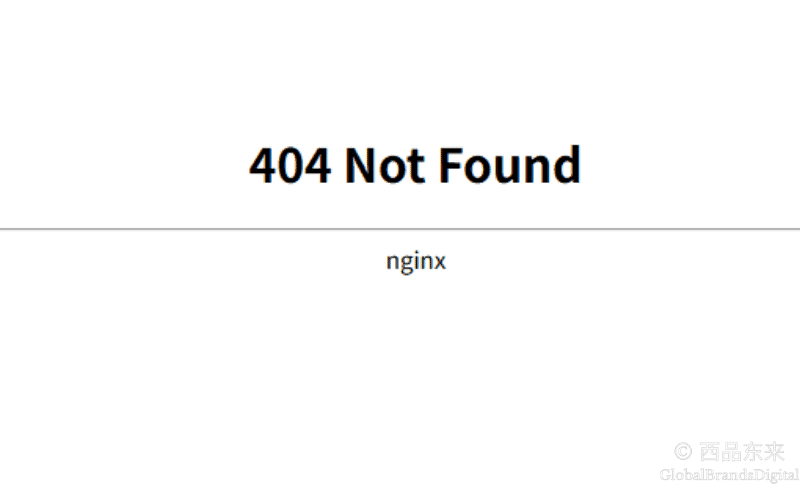
404 Page Not Found is an HTTP status code. It means that the server cannot find a page at the URL you requested. This usually happens in one of the following situations:
- The page was deleted or moved: if a page is removed or moved to a new location without an appropriate redirect, visitors will see a 404 error.
- The link is incorrect: a misspelled or incorrectly entered URL can make the request fail.
- The page never existed: if you try to visit a page that has never existed, the server returns a 404 response.
The important point is that the response follows a request initiated by the client. A 404 belongs to the 4xx class of errors and indicates that the requested resource does not exist at that server location.
Types of 404 Error
404-related errors can be distinguished in several ways:
- Standard 404: this is the most common situation. A page has usually been deleted or moved without a redirect.
- Soft 404: the server returns a 200 success status even though the page is effectively blank or says that nothing was found. The page appears to load successfully at the protocol level, but it does not provide the requested content. This mismatch can affect SEO because a search engine must determine whether the apparently successful page is useful.
- 404 over HTTPS: a 404 can also occur on a website that uses HTTPS. It has the same basic meaning as a 404 over HTTP, although the surrounding fault may involve an HTTPS route or SSL configuration.
When Does a 404 Occur?
Several common issues can produce a 404 response. Understanding them can help you locate the cause more quickly and choose an appropriate repair.
1. User Input Error
One of the most common causes is an incorrectly entered URL. A spelling mistake, a missing letter, an extra symbol or the wrong capitalization can lead to a missing page. For example, adding an extra letter or symbol to www.example.com/page1 can make the request return a 404.
2. A Page Was Deleted or Moved
When a page is deleted, or its URL is changed and the page is moved to a new location, visitors will see a 404 if no redirect is set. This can happen when a redesign removes pages or moves them into different folders.
3. A Link No Longer Works
A broken link on or to the website can also produce a 404. This is especially visible when another website links to one of your pages and that page is later deleted or moved. Users who click the old external link then reach a 404. Regularly checking and updating links is therefore important.
4. Server Configuration Problems
An incorrect server configuration can sometimes produce a 404. Examples include a wrong file path or a configuration that does not recognize a file type, such as an incorrect MIME type. If the server is configured incorrectly, it may return a 404 for a resource that should otherwise be available.
5. A Website Redesign or URL-Structure Change
During a redesign, previously valid page links can stop working. If you change the page structure or URL addresses without updating internal links or adding redirects, visitors who follow the old links will encounter 404 responses.
6. An Attack or Server Failure
Less commonly, an attack or server failure can also lead to 404 responses. A page may have been deleted maliciously, or a server problem may make its files unavailable. In that situation, restoring the missing pages and files is important.
How Do You Resolve 404 Errors?
For a website administrator, resolving a 404 is not only a matter of restoring a missing page. It is part of keeping the site operational, supporting users and protecting useful search visibility. The following approaches cover the source article's repair workflow.
1. Use a 301 Redirect
When a page has permanently moved or an appropriate replacement exists, a 301 redirect is the usual approach. It permanently sends visits from the old URL to the relevant new page and is intended to help search engines consolidate applicable signals. It does not guarantee that every visit or all ranking value will transfer.
Why use a 301 redirect? A 301 tells search engines that the old page has moved permanently to a new location. When the destination is genuinely relevant, this can preserve continuity and reduce avoidable losses from the old URL.
How do you set up a 301 redirect?
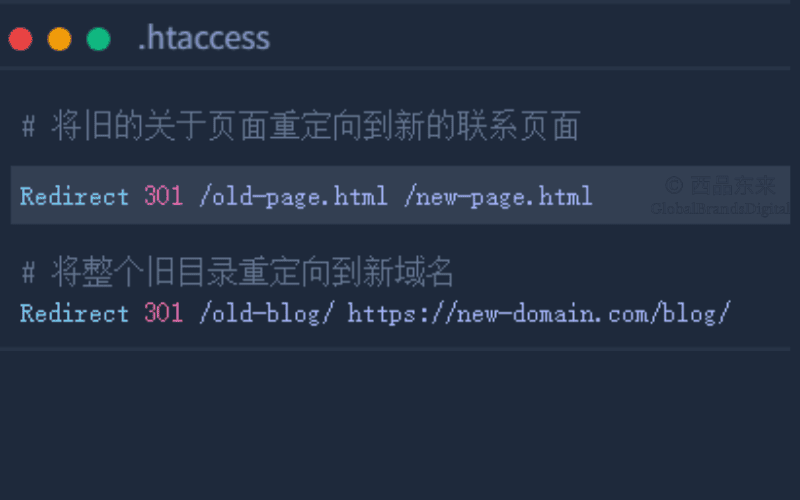
- On an Apache server: you can add a redirect rule by editing the
.htaccessfile. For example:Redirect 301 /old-page /new-page.
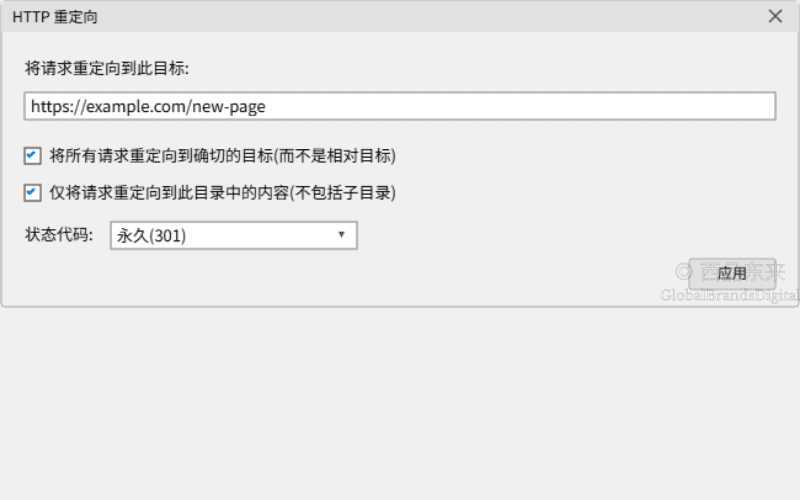
- On an IIS server: you can set a redirect rule through IIS Manager.
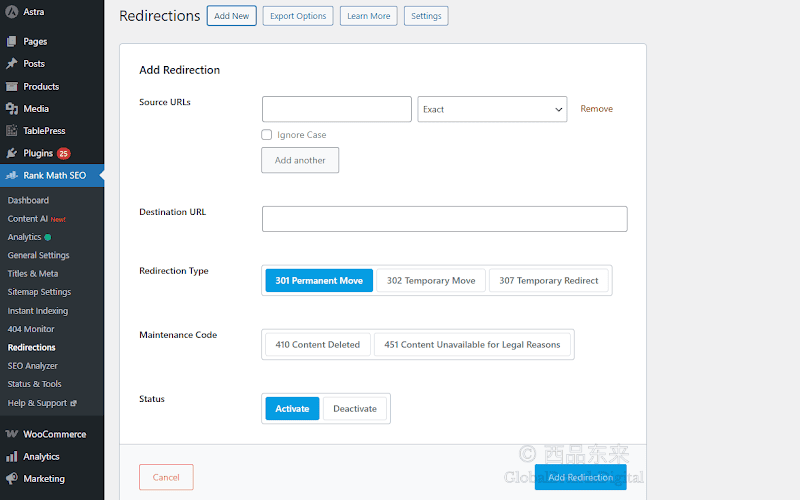
- On a CMS such as WordPress: a redirect plugin can help you set a 301 without editing the server configuration directly.
Note: point every redirect to the correct destination. Avoid redirect loops and irrelevant destinations, which can harm the user experience and create additional SEO problems.
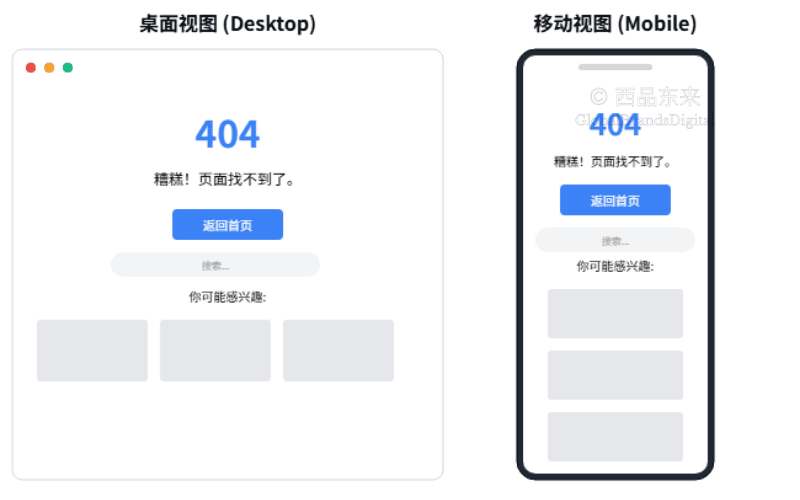
2. Design a Custom 404 Page
A 404 page is the page visitors encounter when the requested resource cannot be found. When it is handled well, it can explain the error and help users continue to other content instead of simply leaving.
Design recommendations for a custom 404 page:
- Give a clear error message: tell the visitor that the page could not be found, using a friendly tone rather than a purely mechanical response.
- Guide the visitor to the homepage: provide a button that returns to the main page.
- Provide site search: let visitors search for other content they may want.
- Recommend popular or related content: direct visitors to relevant pages or popular articles so they can continue browsing.
- Use the brand's design: make the 404 page consistent with the brand so the experience still feels connected to the website.
How to optimize the 404 page: use a responsive design that works on different devices and does not become difficult to use on a phone. Where it suits the brand, a light touch of humor can make the experience less frustrating.
3. Check the Website's Links and URLs
Broken links on a website are one of the main causes of 404 errors. Regularly checking that pages and URLs remain valid is an important way to prevent avoidable failures.
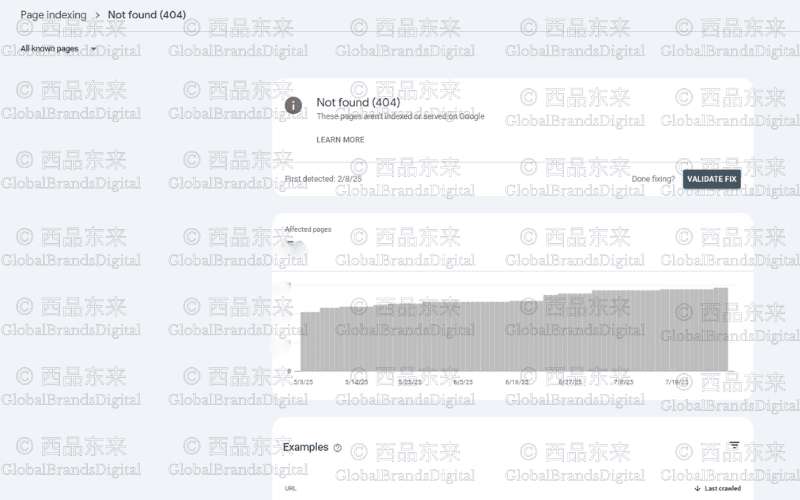
Check dead and broken links regularly: use tools such as Google Search Console or Screaming Frog to scan the site and find links that point to 404 pages.
- Google Search Console: the source recommends reviewing the report that lists 404 URLs and repairing the links that lead to them. Interface names can change over time.
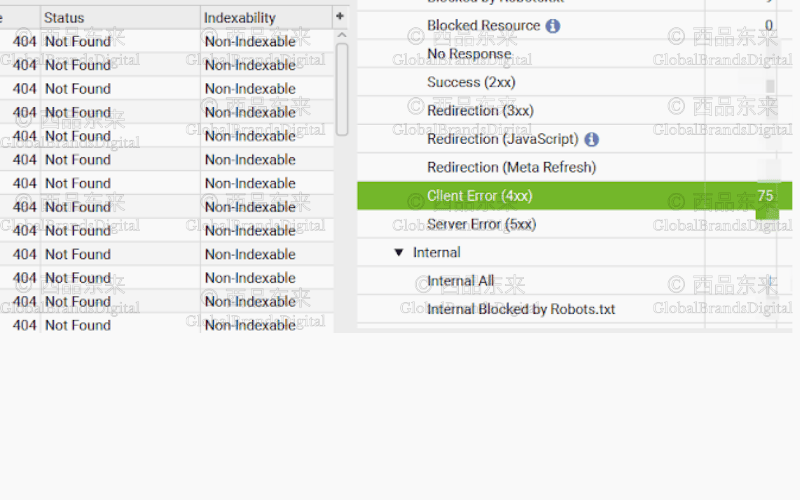
- Screaming Frog: it can crawl the website and identify invalid internal and external links.
Check the URL structure: when a URL structure changes, internal links may not be updated at the same time. Regularly reviewing and updating those links helps keep the website working.
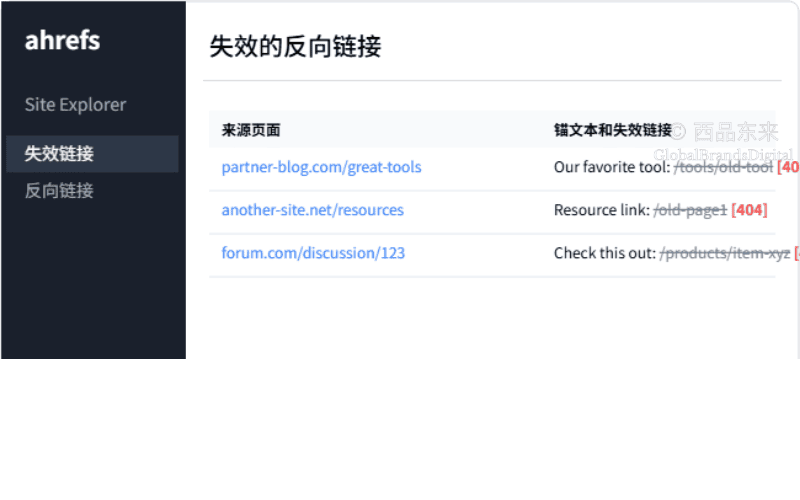
Repair broken backlinks where possible: use a backlink tool such as Ahrefs or Majestic to check whether links from other websites still point to valid pages on your site. If an external link is broken, you can ask that site's administrator to update it, although the decision remains with the third party.
4. Update the Sitemap and Submit It to Search Engines
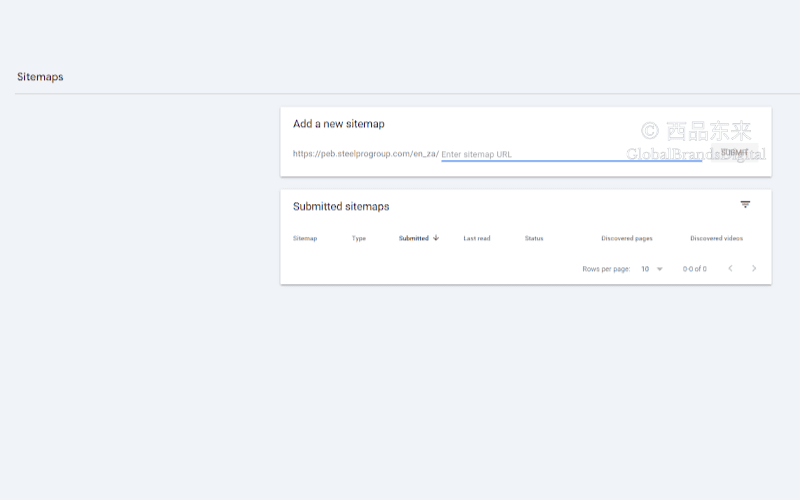
A sitemap helps search engines understand a website's structure and page inventory. When URLs change, update the sitemap and submit the current version to the relevant search engines.
- Update the sitemap: include the current pages. If a page has been deleted or moved, do not leave the obsolete URL in the sitemap.
- Submit the sitemap: submit the updated sitemap through Google Search Console or Bing Webmaster Tools so the search engines can discover the current URLs. Submission does not guarantee immediate crawling or indexing.
- Automate the update: if you use WordPress or another CMS, a suitable plugin may update and submit the sitemap automatically, reducing manual work.
5. Check the Server Configuration
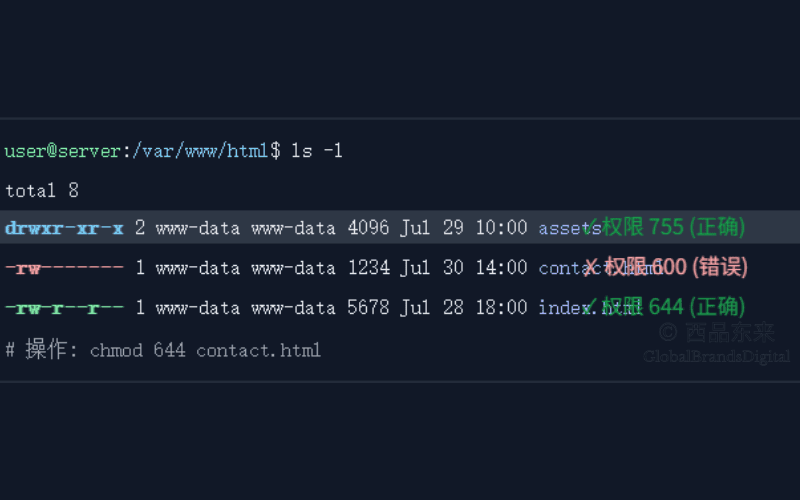
An incorrect server configuration is another common cause of 404 responses, especially on sites that require manual setup. Check the configuration, file paths and permissions.
- Check file permissions: confirm that the server owner can access each file and directory as intended without exposing them unnecessarily. The source gives 755 and 644 as common examples for public resources, but the correct values depend on the environment.
- Check server paths and URL-rewrite rules: confirm that paths are correct and that rewrite rules such as
mod_rewriteare configured as intended. A wrong path or rule can prevent the server from finding a page.
6. Monitor and Report 404 Errors
Continuing to monitor 404 responses is part of maintaining a healthy website. Review reports regularly, investigate recurring errors and repair the paths that should work so that users and search crawlers do not keep encountering the same problem.
- Use Google Analytics: the source recommends monitoring visits to the 404 page and reviewing what those visitors do next. The exact setup and available reporting depend on the current analytics implementation.
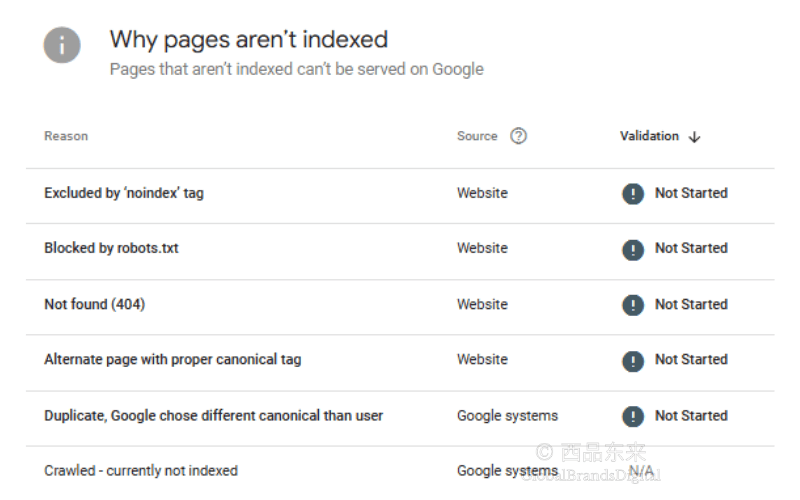
- Use Google Search Console: monitor the reports that identify 404 URLs and address the URLs that search crawlers continue to request. Current report labels may differ from those shown in the source.
- Check regularly: include 404 monitoring in routine website maintenance so recurring problems can be found before they accumulate.
How Ordinary Users Can Respond to a 404 Error
For an ordinary visitor, the problem is often in the client request or the URL itself. Try the following steps in order; they can resolve many common cases quickly.
1. Refresh the page: this is the simplest and most common step. The problem may be a temporary loading failure. Press F5 or Ctrl+R on the keyboard; on a Mac, use Cmd+R.

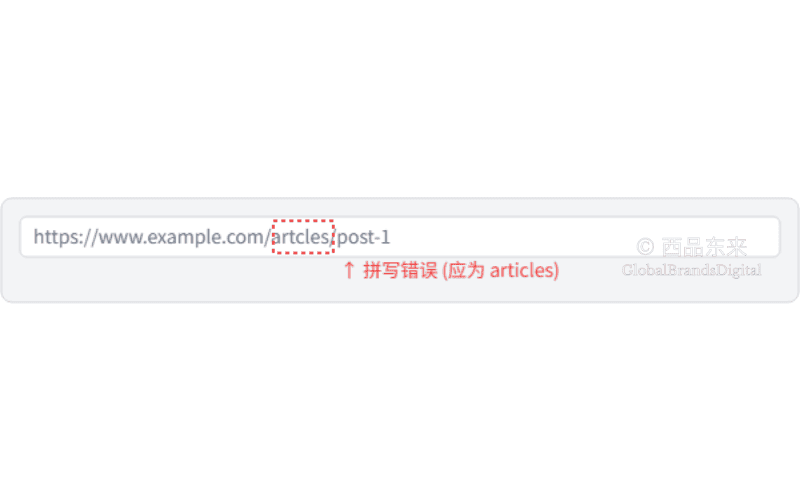
2. Check the URL: an incorrect address is a common cause of a 404. Inspect the browser's address bar carefully for spelling mistakes.
- A misspelled word:
gogle.cominstead ofgoogle.com. - An extra or missing character:
example.com/aboutusinstead ofexample.com/about-us/. - The wrong extension:
.htmlinstead of.htm.
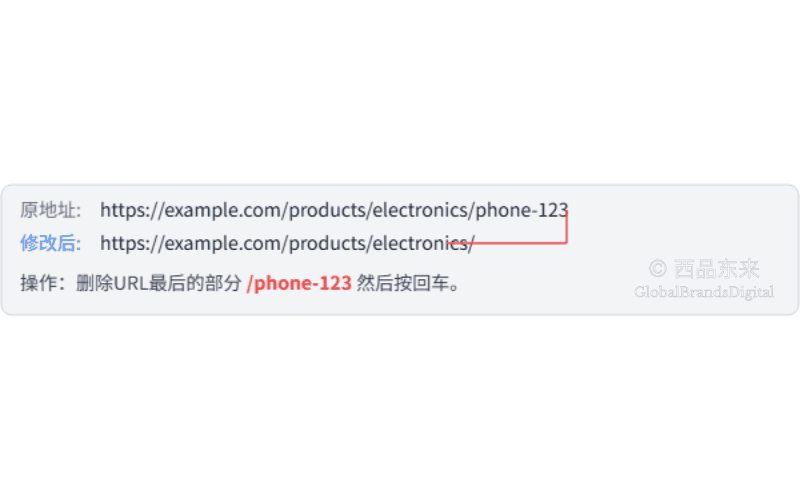
3. Go back to a parent directory.
If www.example.com/category/product/item returns a 404, remove the final part and try the parent directory.
Visit www.example.com/category/product/ or www.example.com/category/. You may find a valid page and then navigate to the content you wanted.
4. Use the website's search function: most websites provide a search box. Search the site for terms related to the page or product you want; this is usually faster than guessing the correct URL.

5. Clear the browser cache and cookies: a browser may have stored an old link to a page that is no longer valid. Clearing the cache can make the browser request the current resource from the server.
- In Chrome: Settings > Privacy and security > Clear browsing data.
- In Edge or Firefox: use the comparable option under the privacy or history settings.

6. Search through a search engine: use Google, Baidu or another search engine and enter site:domain keyword. For example, site:example.com "contact us" may reveal a correct or updated result.
7. Check whether the website is down: an online service such as Down for Everyone or Just Me can help you see whether the whole website is unavailable.
8. Contact the website administrator: if these steps do not resolve the problem, contact the administrator or customer-service team, report the 404 and ask whether a new page address or related information is available.
What Does Soft 404 Mean?
A soft 404 occurs when a URL returns a successful HTTP status, usually 200 OK, even though the page says "not found," says that the file does not exist or contains almost no useful content.
Common causes of soft 404s include:
- A thin page: a database query fails, a discontinued product leaves an empty category page or an automated system generates a nearly empty stub.
- An inappropriate redirect: every missing URL is sent through a temporary 302 redirect, or server rules send every missing URL directly to the homepage. Because the homepage may be unrelated to the resource the visitor requested, Google may classify the result as a soft 404.
- A script or theme error: a JavaScript or template fault prevents the content from loading, so the page shows an error or remains blank even though the server still returns 200 OK.
The mismatch between the status code and the page content can confuse search engines and spend crawl capacity on pages with little value. It may also contribute to a poor assessment of site quality.
How Do You Repair a Soft 404?
The central principle is to make the HTTP status returned by the server consistent with the page's actual content and purpose.
Step 1: Find all soft-404 pages.
In Google Search Console, review the page-indexing report for URLs classified as soft 404. The current navigation labels may differ from those in the source.
Step 2: Handle each page according to its condition.
Review every URL in the list and choose the treatment that matches what actually happened:
- Case 1: The page was permanently deleted.
Let the URL return a 404 Not Found or 410 Gone status. This is the standard response when no relevant replacement exists.
- Case 2: The content moved to a new URL.
Set a permanent 301 redirect so users and search engines requesting the old URL are taken to the relevant new URL.
- Case 3: The page is valid but temporarily has no inventory, such as a sold-out product.
Do not leave the page blank. Add useful information, such as: "This category is sold out; see our other recommendations."
- Case 4: A technical fault made the page blank.
Repair the bug that prevented the page from loading so the intended content is displayed again.
Step 3: Request validation again.
After completing the repairs, return to the relevant Google Search Console report and use the validation action described by the current interface. This tells Google that the issue has been addressed and requests another crawl and assessment; it does not guarantee when the URL will be recrawled.
Note: do not send every unavailable page to the homepage. That creates a poor experience and is a common pattern associated with soft 404s.
How 404 Errors Can Affect SEO
404 responses can affect the user experience and, when important or frequently referenced URLs are mishandled, can also create SEO problems. A legitimate 404 for intentionally removed content is not automatically harmful.
1. Crawling and indexing: large numbers of unnecessary 404 URLs can spend crawler attention on missing resources and make it harder to keep important discovery paths clean. The effect depends on the site's size, linking and crawl patterns.
2. Website authority: many broken journeys can indicate poor maintenance and weaken user trust. The source says search engines may also interpret widespread errors as a quality problem, but no single count determines a site's authority or rankings.
3. Exit behavior and user experience: an unhelpful 404 can frustrate visitors and cause them to leave. A clear custom page and repaired links can reduce that disruption.
4. Internal-link signals: an internal link to a 404 does not lead to a live destination, so it cannot support the intended page relationship. Repair or remove the link, or redirect the URL when a relevant replacement exists.
5. Index coverage: recurring invalid URLs can clutter crawl and indexing reports. Keeping sitemaps and internal links current helps search engines focus on the URLs that should be available.
6. The value of external links: when another site links to one of your missing pages, users reach a dead end and the intended destination cannot benefit normally from that link. Restoring the page, using a relevant redirect or asking the referring site to update its link may recover that path.
Recommended Tools for Handling 404 Errors
Specialist tools can help you detect 404 responses and organize repairs. The source recommends the following options; product features and report names may change.
1. Google Search Console
Google Search Console can show URLs that Google encountered as 404s. Review the relevant indexing reports, trace how the URLs were discovered and repair the links or routes that should work.
2. Screaming Frog SEO Spider
Screaming Frog can crawl a website and list pages or resources that return 404 responses. Its exports can help a team group broken links for repair.
3. Ahrefs
Ahrefs can help identify backlinks that point to missing pages, allowing you to review whether a page should be restored, redirected or updated by the referring website.
4. Sitebulb
Sitebulb is an SEO-audit tool that can crawl a website and report 404 responses so they can be reviewed alongside the site's structure.
5. Broken Link Checker for WordPress
Broken Link Checker is a WordPress plugin that can detect broken links within a site and notify an administrator so the links can be reviewed.
6. Dead Link Checker
Dead Link Checker is an online tool that can scan a website for links that return errors, helping an administrator identify paths that need attention.
GlobalBrandsDigital SEO Services Can Help Address 404 Problems
If your site has recurring 404 responses or other SEO problems, GlobalBrandsDigital offers technical SEO support. The source describes the team as experienced in work such as diagnosing and repairing your website, improving the site structure, repairing broken links, setting relevant 301 redirects and creating a custom 404 page. The exact work depends on the agreed scope, and no traffic or ranking result is guaranteed. Contact us to discuss the current errors and a suitable repair plan.