
On this pageTable of contents+
- What Is GEO Traffic?
- How to Find and Track GEO Traffic
- Use Manual Prompt Tests to Check Mentions and Citations
- Use Specialist Tools to Automate AI-Visibility Tracking
- Use GA4 to Review Clicks From AI Platforms
- Use UTM Parameters for Some Otherwise Unattributed Visits
- Use Search Console to Review the Effect of Google AI Features
- Use Enquiry Forms to Detect Conversions and Indirect Effects
- Check for Existing GEO Traffic in 30 Seconds
- Which GEO Traffic Metrics Should You Monitor?
- Four Patterns for Assessing Whether GEO Is Working
- Three Common GEO Traffic-Tracking Mistakes
- A First-Week GEO Traffic-Tracking Plan
- The Real Difficulty in GEO Traffic Tracking

Many teams work on GEO for several months, open GA4 to assess the result and find no "AI traffic." They assume the configuration is wrong, when the real problem is that they do not know what GEO traffic looks like or where it appears.
This guide explains how to capture observable GEO traffic, estimate what cannot be captured and choose the metrics to review.
What Is GEO Traffic?
GEO traffic consists of website visits and conversions that follow after an AI system mentions, cites or recommends your brand.
The three actions in that definition are different. A mention names the brand in an answer. A citation lists a page as a linked source. A recommendation expressly suggests the brand to the user. Each shows a different degree of prominence.
GEO traffic is not a single number in GA4. Its effects can appear in several places:
- AI answers, where the system may mention the brand, product or point of view even if the user does not click.
- The Sources area beneath an AI answer, where a page may be listed as a cited link.
- GA4, when a user clicks through from a service such as ChatGPT or Perplexity and referral information is available.
- Search Console, where Google search impressions and clicks can include AI features within the reporting Google provides.
- Enquiry forms and CRM records, where someone converts after encountering the brand in an AI answer, including after a delay.
GA4 alone is therefore insufficient; much of the influence never appears there. The following sections explain how to monitor each area.
How to Find and Track GEO Traffic
Where GEO traffic and influence can appear
Use Manual Prompt Tests to Check Mentions and Citations
This may represent a large part of AI visibility, but it never enters an analytics platform when a user sees the brand in an AI answer without clicking. The only way to observe it directly is to run controlled tests in the relevant AI products.
Use the following process:
Prepare ten to thirty questions that customers are likely to ask. Run the same set once a week in the primary AI products relevant to the market, such as ChatGPT, Perplexity, Gemini and Claude, and record:
- Whether the AI system mentions the brand.
- Whether it cites a page with a link.
- Which page it cites.
- The brand's position in the answer.
- Whether the surrounding description is positive, neutral or negative.
- Which competitors are mentioned for the same question.
A spreadsheet is sufficient. Manual testing is practical at the beginning; a ten-prompt run may take about half an hour.
The same prompt can produce different answers at different times. For important prompts, the source recommends two runs on the same day and recording the common result rather than treating one answer as conclusive.
Use Specialist Tools to Automate AI-Visibility Tracking
Manual monitoring becomes difficult when the prompt set exceeds fifty questions, covers more than three platforms and must run every week. That is when a specialist tool may help.
Such tools can run a fixed set of prompts on a schedule across several AI platforms. They can count how often a brand is mentioned or cited, compare competitors and monitor cited pages. Some also combine GA4 data in one dashboard.
The source lists several tools by use case. Product coverage, pricing and third-party awards change, so verify the current plan and methodology before purchase.
OtterlyAI: the source's 2026 snapshot presents it as a lower-cost mature option, starting at $29 for ten prompts, and a practical bridge from manual to semi-automated monitoring.
Profound: the source cites its G2 Winter 2026 AEO Leader position, coverage of more than ten AI engines and pricing from $99 a month. It presents Profound as suited to larger-scale monitoring for mid-sized and enterprise brands.
AthenaHQ: the source highlights its Action Center. It uses observed results to suggest what to write or which page to change, giving the tool a more execution-oriented emphasis.
Scrunch AI: the source highlights Replacement Analysis, which identifies a competitor that replaced the brand in an AI answer. This can be useful in fast-moving categories such as SaaS.
Semrush AI Visibility Toolkit and Ahrefs Brand Radar: teams already using either platform may be able to add its AI module. The source notes that Semrush can begin competitor-domain analysis without a pre-entered prompt set and surface prompts on which that competitor is cited.
In short, the source suggests OtterlyAI for a cost-conscious starting point, Profound for monitoring at scale, AthenaHQ for action recommendations, Scrunch AI for replacement analysis, or the AI module in an existing Semrush or Ahrefs workflow. Verify current capabilities and prices before choosing.
Beginners do not need to buy a tool immediately. Run two or three manual cycles first, then decide.
Use GA4 to Review Clicks From AI Platforms
GA4 does not provide one default category for every AI visit, so first understand how these sessions may be classified.
Desktop clicks from ChatGPT, Perplexity or Claude may pass a referrer but be grouped into the general Referral channel.
Mobile apps, copied URLs and other transitions can lose the referrer and appear as Direct. A Direct session landing on a blog post or guide rather than a homepage may be a signal worth investigating, but it does not prove that the visit came from AI.
Clicks from Google AI features are included in Google organic search reporting. GA4 does not reliably separate every AI feature, so review Search Console's dedicated generative-AI report alongside it.
Industry observers often describe reported AI traffic as a floor rather than a complete total because some visits lose referral information and appear as Direct. The source cites an informal estimate of roughly 30%, but that is not a universal benchmark. The structural limitation matters more than the percentage: prioritize a consistent trend over an impossible attempt to capture every visit.
To separate identifiable AI referrals, create a custom channel group in GA4:
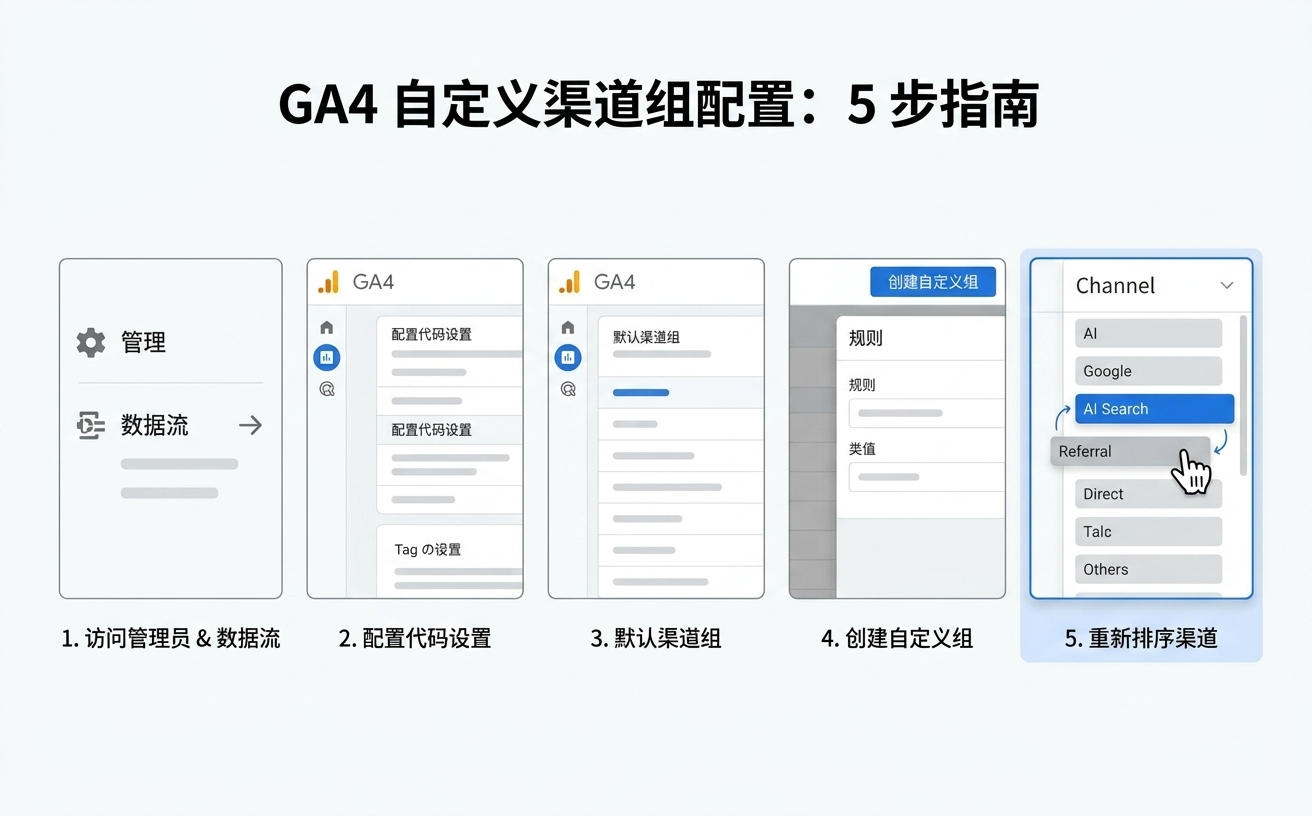
Five Steps to Configure a GA4 Custom Channel Group
- Go to GA4, then Admin, Data Display, Channel Groups and Create new.
- Add a channel named "AI Search."
- Set the condition to Source matches regex and use a reviewed domain list such as:
chatgpt.com|chat.openai.com|perplexity.ai|claude.ai|gemini.google.com|bard.google.com|copilot.microsoft.com|edgeservices.bing.com|deepseek.com|meta.ai|grok.com|you.com|phind.com
- Place AI Search above Referral because channel rules are evaluated in order.
- Save the group and select it in the Acquisition report.
After configuration, test the result against available historical sessions. Custom-channel behaviour can vary with the property and report, so confirm rather than assuming older traffic has been reclassified.
Two common mistakes are using a broad pattern such as ^.*ai, which can match unrelated sources such as mail, gmail or domain, and failing to place the AI rule above Referral.
Use UTM Parameters for Some Otherwise Unattributed Visits
Here, "dark traffic" means visits from an AI platform that appear as Direct because referral information was lost. A custom channel group can classify sessions with a referrer; selected UTM-tagged assets can help identify some additional visits.
Add UTM parameters to embedded links in durable assets that are intentionally distributed externally, such as PDFs, white papers, specification sheets and buyer's guides. If an AI product preserves the tagged URL when citing the asset, the returning visit can be identified.
A naming convention might be:
utm_source=[asset_type]_grounding, such as pdf_grounding or wiki_grounding; utm_medium=ai_referral; utm_campaign=[document_name]
Because ai_referral is a custom medium, add medium = ai_referral to the AI Search custom-channel condition. Avoid using the generic referral medium for these campaign links because it can blur the distinction from the existing Referral channel.
Apply this only to durable assets that are likely to be cited repeatedly. Do not add campaign parameters to every internal blog link; the maintenance burden and attribution side effects can outweigh the benefit.
Use Search Console to Review the Effect of Google AI Features
Clicks involving Google AI Overviews or AI Mode are included within Google organic reporting rather than exposed as a standalone GA4 channel. Search Console now provides a dedicated generative-AI performance report for visibility, so review it alongside GA4.
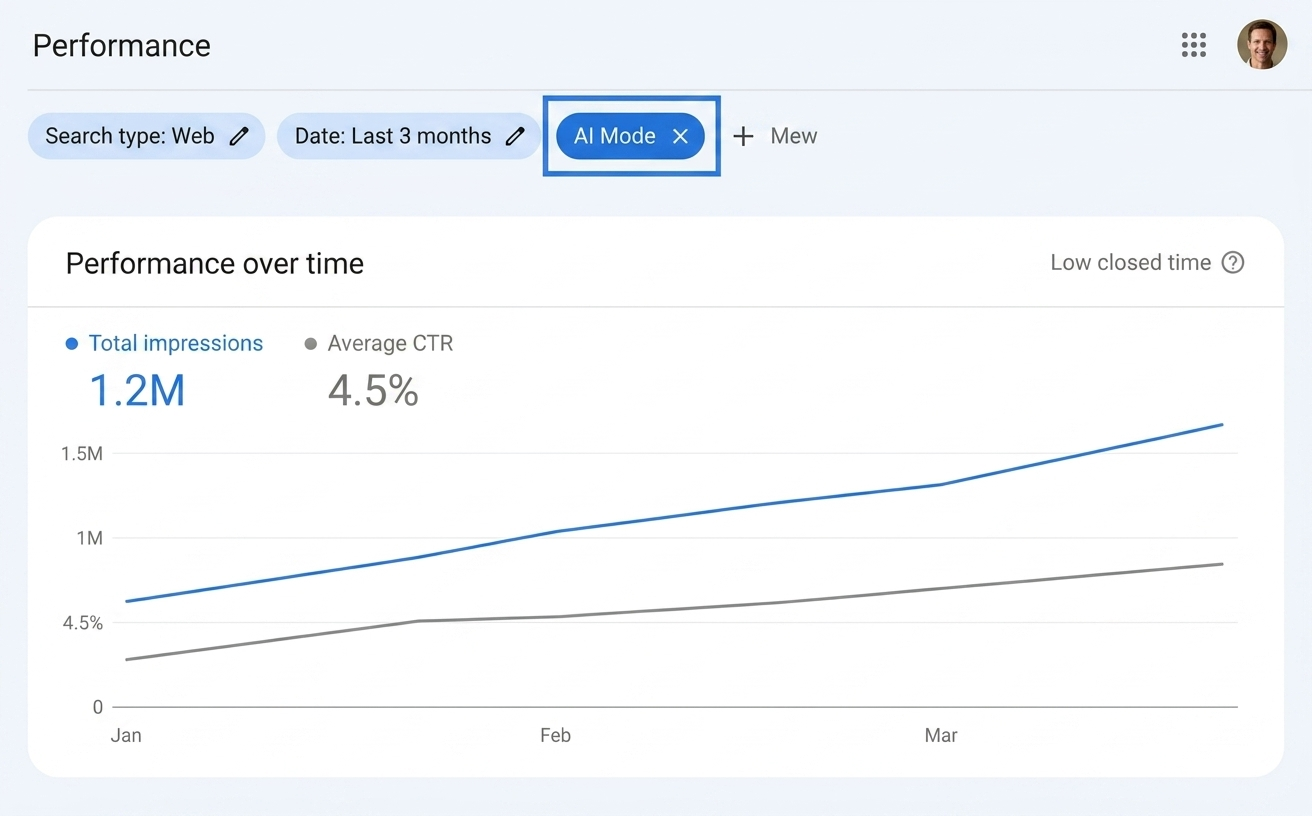
Illustration of Search Console Reporting for Google AI Features
The Chinese source describes an AI Mode search-appearance filter and dates it to June 2025. Google's current documentation instead directs site owners to the Generative AI performance report, which was rolled out worldwide by August 31, 2026. It shows how often pages appeared in generative AI features across Search and Discover. The same counts remain part of the broader totals.
Review four patterns across the dedicated and overall reports:
- Whether priority pages gain impressions in generative AI features.
- Whether overall Web click-through rate changes at the same time. The dedicated report does not attribute individual clicks, so a lower rate is not proof that an AI answer caused the change.
- Which pages, countries and devices account for the dedicated impressions; use general query data only as supporting context because it is not an AI-only query report.
- How the pattern changes over time. Do not treat average position in the general Web report as a direct measure of AI trust.
Many teams fail to establish a baseline for Google AI visibility. The dedicated report can show whether relevant pages already had impressions before formal GEO tracking began.
Use Enquiry Forms to Detect Conversions and Indirect Effects
AI influence can be delayed. Someone may see the brand in ChatGPT, avoid clicking, remember it several days later, search for the brand on Google and submit an enquiry. The influence is real, but GA4 may attribute the session to branded organic search or Direct.
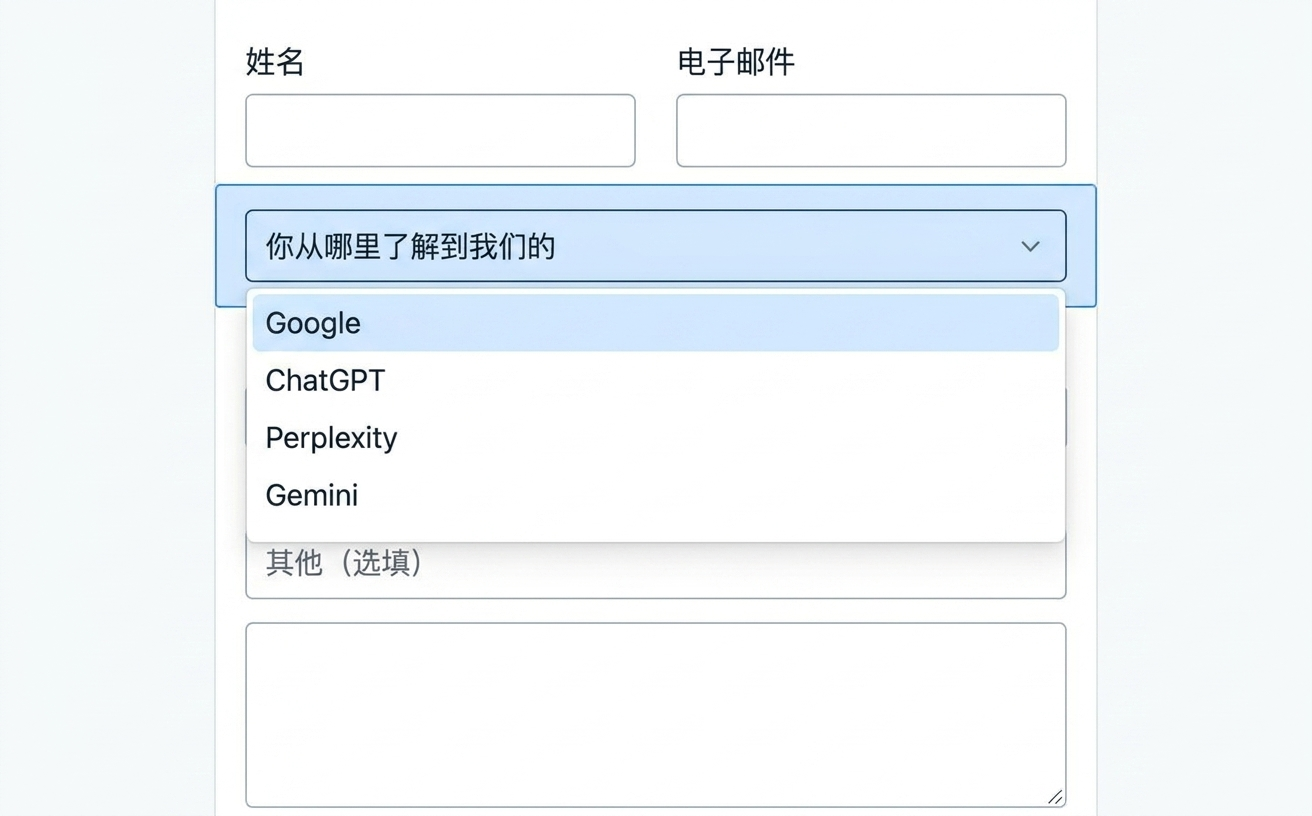
Example Source Field for an Enquiry Form
The most direct way to identify this delayed influence is to ask the customer. Add a field such as "How did you first hear about us?" to the enquiry form. This is a low-cost GEO measurement method for B2B teams.
Suggested options include Google, ChatGPT, Perplexity, Gemini, Bing Copilot, a friend or colleague, LinkedIn and Other.
For more detail, add an optional open-text question such as "What were you looking for when you found us?" The dropdown identifies the platform; the text response may reveal the prompt or decision scenario and improve the design of the prompt set.
Two additional signals can support the assessment:
Change in branded-query demand. Review branded impressions in Search Console. If branded demand rises after GEO work begins and no advertising, media or other campaign explains the change, AI exposure is one possible contributor, not a proven cause.
Direct-traffic trends before and after the GEO program. Compare the total, growth curve and landing-page mix rather than treating every Direct content-page visit as AI traffic. When Direct grows after the start date and other explanations have been considered, it can support a cautious estimate of unattributed influence.
Check for Existing GEO Traffic in 30 Seconds
Before configuring anything, check whether identifiable referrals already exist:
- Open GA4, then Reports, Acquisition and Traffic acquisition.
- Change the dimension to Session source / medium.
- Search in turn for chatgpt, perplexity, claude, gemini, copilot and deepseek.
Any non-zero result confirms identifiable referral traffic from that source. It does not show every citation or every AI-influenced visit, but it establishes that such traffic exists in the property.
Which GEO Traffic Metrics Should You Monitor?
Traffic metrics:
- AI referral sessions, separated by platform.
- Top landing pages for AI referrals.
- AI referral conversion rate compared with ordinary organic traffic.
The source reports a common observation that AI referral traffic can convert at a higher rate than general organic traffic, particularly in B2B. The size of any difference varies widely and should be measured in the site's own data rather than assumed.
Visibility metrics:
- Citation rate: the proportion of the prompt set for which the brand's pages are cited.
- Share of voice: the brand's citations divided by all brand citations in the monitored result set.
- Brand mention count, including mentions without a link.
Conversion metrics:
- Conversions and revenue from identifiable AI referral sessions.
- Customer lifetime value for identifiable AI-referred users, where the data is sufficient.
- Change in the share of enquiry respondents who say they found the brand through AI.
Traffic metrics alone understate GEO. Visibility metrics cover the blind spot where an AI answer mentions the brand without producing a click. Conversion metrics connect the work to business outcomes.
For executive reporting, emphasize conversions from identifiable AI referrals and changes in how people answer the source question. Visits and citations help the team steer its work, but executives will reasonably ask what they mean commercially.
Four Patterns for Assessing Whether GEO Is Working
Pattern 1: AI mentions increase but GA4 traffic does not. The AI system may mention the brand without a link, users may not click the citation, or the answer may satisfy their need. This can be an early visibility signal, not proof of business impact. Next, improve page titles and summaries, provide a clear call to action and strengthen content for commercial questions where a useful link is appropriate.
Pattern 2: AI referral traffic increases but conversions remain low. The landing page may not support the next step, visitors may still be researching, or an educational article may lack a relevant commercial path. Treat this first as a landing-page and intent question. Add a suitable product path, case-study link, enquiry action or useful download where the source content supports it.
Pattern 3: Search Console impressions rise but clicks do not. A search feature may answer the question directly, the title may not earn the click, or the page may not be the primary cited source. Do not treat the pattern alone as proof of success or failure. Improve the title and description, lead with a concise answer and strengthen the page's source value.
Pattern 4: Traffic volume is small but enquiry quality is high. This can be a valuable signal. GEO may initially produce limited traffic but reach users with clearer intent. Validate the pattern in the site's own lead data, then improve the conversion path for those qualified enquiries.
Three Common GEO Traffic-Tracking Mistakes
Reviewing only GA4 and ignoring Search Console. Google AI-feature clicks are included in organic search, so GA4 alone does not provide the complete picture. Use Search Console's dedicated report to see how often pages appeared, and record what the report cannot show.
Assuming every increase in Direct traffic came from AI. Lost referrers are one possible cause, but Direct includes many other journeys. Treat content-page landings and the GEO start date as supporting clues, not attribution proof.
Pursuing complete capture instead of reliable measurement. Some loss is structural. A consistent method for trends and conversions is more useful than an overstated absolute total.
A First-Week GEO Traffic-Tracking Plan
No paid tool is required:
- Day 1: run the quick referral check, configure a reviewed GA4 custom channel group, open Search Console's Generative AI performance report and add a "How did you hear about us?" field to the enquiry form.
- Day 2: inventory durable assets likely to be cited repeatedly, such as buyer's guides, white papers, specification sheets and case-study collections, and add UTM parameters only where appropriate. If none exists, skip this step rather than creating one merely for tracking.
- Days 3-5: place the available data in one sheet, including the GA4 AI Search channel, relevant Search Console data and results from five controlled prompt tests. Use one row per metric.
- Days 6-7: make the first week-over-week comparison and record the limits of the sample.
Minimal monitoring table: ten prompts, the primary AI platforms and one run per week.
| Date | Prompt | Platform | Mentioned? | Cited? | AI traffic | Enquiries | Next action |
| 2/3 | How to choose an X supplier | ChatGPT | No | No | 0 | 0 | Create a buyer's-guide page |
| 2/3 | X pricing factors | Perplexity | Yes | Yes | 3 | 1 | Improve the cost-page call to action |
After one week, teams often discover two things: identifiable AI referrals already existed but were hidden among other referral traffic, and even a small number of AI visits can produce useful conversion signals. Confirm both points in your own data.
The Real Difficulty in GEO Traffic Tracking
The difficult part is not the configuration. It is accepting that some influence will remain invisible, combining several partial views - GA4, Search Console, enquiry fields and specialist tools - and interpreting whether a pattern is an early signal, a landing-page problem or evidence that no measurable impact exists.
In a GEO program, measurement and optimization belong together. Record what changed, whether the AI answers changed and whether visits or enquiries moved with them. Configure the method at the beginning; otherwise, early signals may be impossible to reconstruct months later. If you are already running Google GEO or preparing to begin, GlobalBrandsDigital's GEO service can help connect measurement with the optimization plan.
Whether you already track GEO or are preparing to start, choose the first practical step. Many teams begin with GA4 and add Search Console, enquiry fields and specialist tools over time. Starting with the enquiry-source field is also reasonable because it is inexpensive and can reveal otherwise invisible influence.