
On this pageTable of contents+
- What is Google Ads?
- How the Google Ads system works
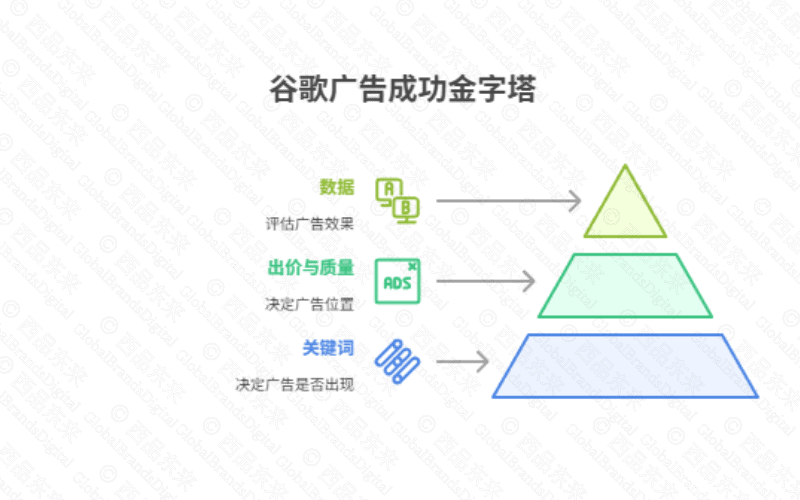
- First: keywords help determine eligible searches
- Second: position reflects bids and quality
- Third: performance decisions depend on trustworthy data
- Additional operating context
- Major Google Ads campaign types
- How a beginner should choose a campaign type
- A practical Google Ads setup guide
- Step 1: create and secure the Google Ads account
- Step 2: enter accurate business information
- Step 3: describe the business precisely
- Step 4: choose a measurable campaign objective
- Step 5: select the campaign type
- Step 6: configure keywords and targeting
- Step 7: write accurate ad copy
- Step 8: set bidding and budget
- Step 10: enter billing information
- Step 11: review and publish the campaign
- Step 12: inspect data and optimize
- Analyze and improve Google Ads performance
- 1. How to analyze campaign data
- 2. How to optimize from the evidence
- Improve ad copy
- Improve the landing page
- Advanced optimization: use ad assets
- Frequently asked questions about Google Ads
- 1. How much does one Google Ads click cost?
- 2. How can Google Ads target an audience?
- 3. What supports success in Google Ads?
- 4. What are the disadvantages of Google Ads?
- 5. What rules apply in Google Ads?
- 6. Can I manage Google Ads myself?
- 7. Should ads run all day?
- 8. What are the best keywords for Google Ads?
- 9. Is Google Ads worth the investment?
- 10. Does Google Ads charge a monthly subscription?
- 11. Do I need a budget to run ads?
- 12. What determines total Google Ads cost?
- 13. How should I set a daily budget?
- 14. Is $20 per day enough?
- 15. Is $100 enough?
- 16. Is $500 per month enough?
- 17. Is $5 per day enough?
- 18. How much should I spend each month?
- 19. How should a startup budget for Google Ads?
- 20. How much can Google Ads earn?
- 21. Do businesses earn two dollars for every one dollar spent?
- 22. What do YouTube ads cost?
- How to combine Google Ads and SEO
- A case framework for combining SEO and Google Ads
- Client context and baseline
- Integrated solution design
- Evidence limits on implementation outcomes

If Google Ads is new to you, the platform can feel complex and it may be hard to know where to begin. This guide starts with the fundamentals and follows the setup one step at a time.
You will learn how paid search works, how to choose a campaign type, how to set up keywords, ads, bidding, budgets and billing, and how to read the resulting data. The goal is to help a beginner build a controlled campaign for website traffic, leads or sales without treating a platform forecast as a guarantee.
The Chinese source includes the complete beginner setup, optimization advice, 22 budget and operating questions, an SEO integration section and a client example. This English edition retains that structure and fourteen instructional screenshots, and it identifies dated interface labels and unsupported numerical claims.
For current product behavior, use Google's official guidance on keyword matching, Ad Rank, budget limits and responsive search ads alongside the dated screenshots below.
What is Google Ads?
Google Ads is an advertising platform for reaching people across search results and other Google inventory. The available campaign types, settings and names evolve, so objectives and measurement should remain more stable than a screenshot-led process.
Define the business outcome, conversion action, audience, market and landing page before opening the campaign builder.
- Google Search: search ads can appear when a person searches for a relevant query.
- YouTube: video campaigns can reach viewers before, during or around video content.
- Other Google inventory: eligible campaigns can also use Gmail, partner sites and apps.
- PPC: with cost-per-click bidding, the advertiser pays for eligible clicks rather than the ad merely being shown; other campaign and bidding options can use different charging models.
- SEO: earns unpaid visibility by improving the site and its content, but usually needs sustained work.
- Google Ads: can create immediate paid visibility for selected audiences, queries and placements.
How the Google Ads system works
Eligibility, auction-time bidding, ad and landing-page quality, targeting and competition influence whether an ad can appear and what it costs. The highest bid does not automatically win every auction.
Treat targeting, message, destination, bid strategy and measurement as one operating system.
First: keywords help determine eligible searches
In Search campaigns, keywords and match behavior help connect ads with queries. Location, language, policy, audience settings and negatives further constrain eligibility. The actual search term may differ from the keyword.
Build tightly related ad groups, choose match types deliberately and review search terms from the first days of delivery.
Second: position reflects bids and quality
Bids express economic intent; ad relevance, expected experience, assets and auction context can also influence placement. Raising bids cannot repair a misleading offer or a poor destination.
Align the ad with the query and landing page, then select a bidding approach that matches reliable conversion data.
- Bid: the amount or economic target the advertiser is willing to use in the auction.
- Quality and context: relevance, expected performance, landing-page experience, assets, competition and other auction-time signals also affect Ad Rank.
Third: performance decisions depend on trustworthy data
Clicks and platform conversions are not enough to judge success. Duplicate tags, imported goals, consent gaps, spam leads and attribution overlap can all distort the reported result.
Validate primary conversions, values, deduplication, attribution assumptions and offline outcome imports before automating toward them.
- Impressions: how often the ad was shown.
- Clicks and click-through rate: how often people clicked and the share of impressions that produced a click.
- Average cost per click: the average media cost recorded for a click.
- Conversions and conversion rate: the configured actions recorded after ad interactions and their rate.
- Business quality: whether those recorded actions became valid leads, orders or another verified outcome.
Additional operating context
Automation can expand reach and optimize bids, but it learns from the objectives and data supplied by the advertiser. Weak conversion definitions can make an automated campaign efficient at producing the wrong outcome.
Use account-level exclusions, brand controls, asset review and conversion governance appropriate to the campaign type.
- Exact match: can match searches with the same meaning or intent as the keyword; it is not limited to a character-for-character duplicate.
- Phrase match: can match searches that include the meaning of the keyword, even when the wording differs.
- Broad match: can reach related searches by using additional signals beyond the literal keyword.
- Broad match modifier: is no longer a separate match type; Google incorporated its behavior into phrase match beginning in 2021.
- CPC: charges are associated with clicks under eligible cost-per-click bidding.
- CPM: eligible video or display buying can use impression-based pricing.
- Conversion-based bidding: some strategies optimize toward conversions or conversion value, but billing and eligibility depend on the campaign and account.
Major Google Ads campaign types
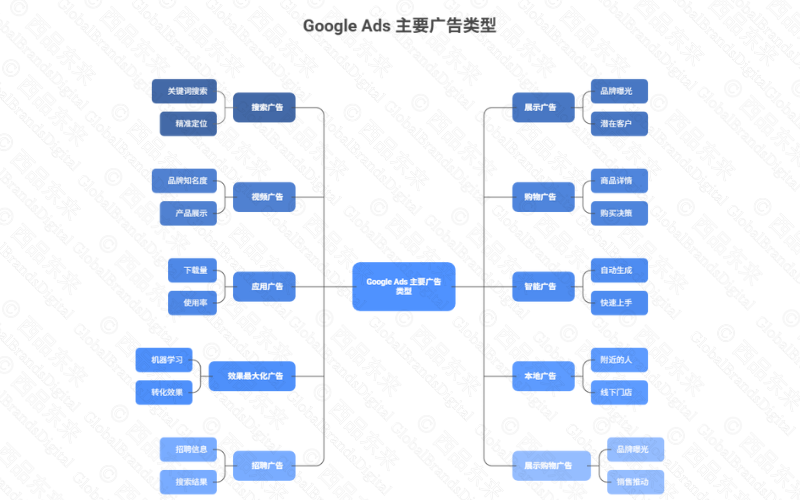
Current Google guidance describes Search, Display, Video, Shopping, Demand Gen, App, Smart and Performance Max options, with availability and migrations changing over time. Each reaches a different mix of intent, surfaces and assets.
Choose the type from the objective and required control, then confirm what the account currently offers before building.
- Search: text ads shown around relevant Google searches.
- Display: visual ads distributed across eligible websites and apps in the Display Network.
- Video: video ads delivered through YouTube and eligible video inventory.
- Shopping: product ads supported by Merchant Center data such as image, price and seller.
- App: automated campaigns that promote an app across eligible Google properties.
- Smart campaigns: a guided, more automated option intended to simplify setup for small businesses.
- Performance Max: a goal-based campaign that can use inventory across Google channels.
- Local promotion: store goals are now supported through current goal-based campaign options rather than a universal standalone Local campaign.
- Recruitment: hiring ads must use an eligible campaign type and comply with employment-ad and personalized-ad policies.
- Demand Gen: Google is migrating remaining Video Action Campaigns to Demand Gen during 2026, so old Display or video labels in screenshots should not be treated as permanent.
- The source's "Shopping Display Ads" label: is dated. Confirm the current Shopping, Performance Max or visual-commerce options in the account instead of looking for that exact campaign name.
How a beginner should choose a campaign type
Search is often easier to interpret when people already express demand. Shopping needs a reliable product feed, and Video or Demand Gen needs suitable creative. Performance Max spans channels but depends heavily on goals and assets.
Start with the smallest type that can answer the hypothesis and that the team can measure and maintain.
- Use Search when people already express clear demand and the offer has a suitable landing page.
- Use Display, Video or Demand Gen when the goal and creative call for broader awareness, consideration or re-engagement.
- Use Shopping when an ecommerce business has accurate, policy-compliant product data and conversion tracking.
- Use App when the measured outcome is an app install or an in-app action.
- Use a more automated option only when the team can supply reliable goals, assets, exclusions and review capacity.
A practical Google Ads setup guide
The exact campaign-builder screens can change, but the durable sequence is consistent: establish ownership, define the business, choose goals and type, configure targeting and assets, set economics, validate tracking and publish cautiously.
Use the source screenshots as dated examples and follow the labels in the current account.
- The company or brand name, offer and target market.
- A valid HTTPS landing page that directly supports the advertised product or service.
- An approved payment method and an authorized owner for billing and account access.
Step 1: create and secure the Google Ads account
The organization should own the account, payments profile, primary email and linked assets. Agency access should use appropriate manager relationships rather than transferring ownership to an individual.
Configure multi-factor authentication, named users, billing contacts and an access-review schedule.
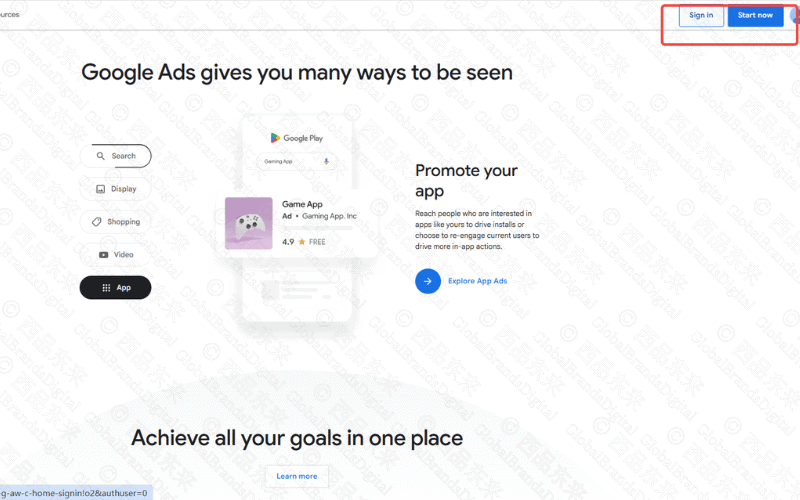
- Open
ads.google.comand sign in with a Google Account controlled by the organization. - Create an appropriate Google Account first if the organization does not yet have one; do not make a personal employee account the permanent owner.
- The source contrasts an older dashboard-first flow with a guided setup sequence. Follow the current account prompts because the order and labels can change.
Step 2: enter accurate business information
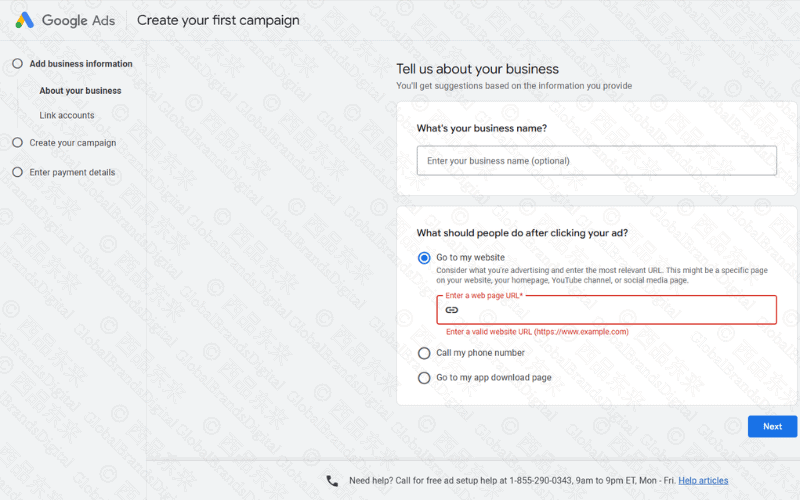
Business name, website and linked profiles can prefill or inform campaign setup. The information must represent the advertiser and final destination accurately.
Use the canonical business identity and verify that the website, phone, location and policy pages are current.
- Add the business or brand name when it helps distinguish this account from other business lines.
- Choose Go to my website when the desired action takes place on a site.
- Choose a phone-call destination only when the business can receive and measure calls.
- Choose an app-download destination only for an eligible app campaign and verified store page.
- Enter the complete HTTPS URL rather than an incomplete domain or broken path.
- Use a relevant product, service or campaign landing page instead of sending every click to the homepage.
- Test the final page on mobile and desktop before continuing.
Step 3: describe the business precisely
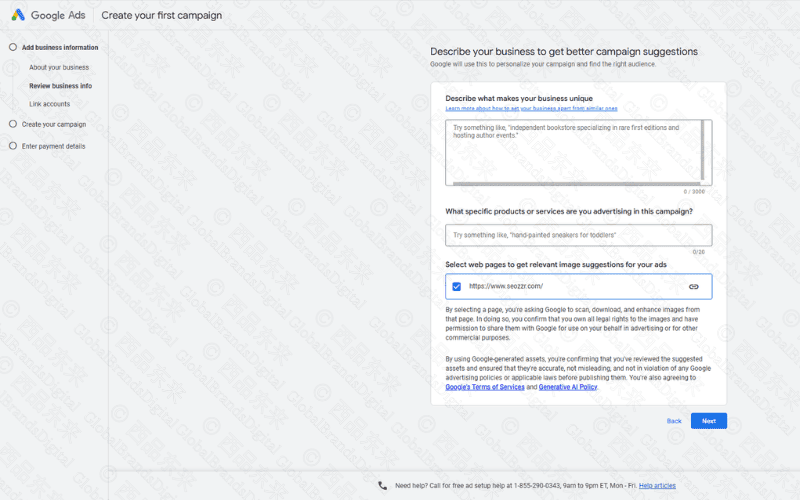
A concise description helps the setup flow suggest goals and assets, but generated suggestions must be reviewed. An exaggerated category or service area can produce irrelevant targeting.
Describe the actual offer, customers and served markets in plain language and remove unsupported claims.
- State one or two specific, supportable reasons the offer is different.
- A footwear description might identify lightweight construction, breathability and the intended running use.
- A service description might identify the actual market, deliverable and team capability.
- Name the exact product or service being promoted rather than the entire catalog.
- Examples include men's lightweight running shoes, SEO consulting or a cross-border payment service.
- Check that the offer is available in every selected location.
- Let Google inspect the website for image and text suggestions only when the site contains approved material.
- Review every automatically extracted image, logo, headline and description before it can serve.
- Remove obsolete promotions, unsupported claims and irrelevant pages from the asset set.
- Upload suitable high-resolution images when the website cannot supply enough usable creative.
- Keep the description brief enough for the central offer and audience to remain obvious.
- Use the approved brand name and product terminology consistently.
- Treat generated suggestions as drafts, not as verified business facts.
Step 4: choose a measurable campaign objective
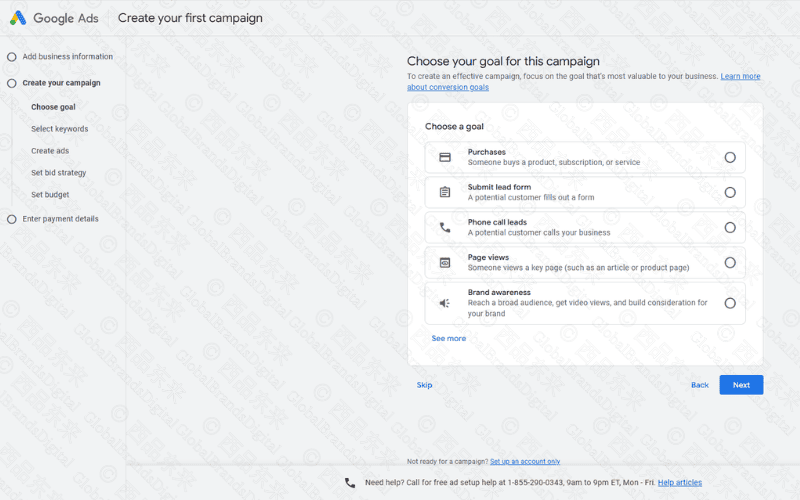
An objective guides campaign recommendations; conversion goals determine the behavior automation may pursue. A lead form submission is not equivalent to a qualified sale.
Select the commercial objective and mark only validated, meaningful actions as primary optimization goals.
- Purchases: use when completed ecommerce transactions are accurately measured.
- The purchase value should come from a verified transaction rather than a page view.
- Example: a footwear store optimizes toward completed, non-duplicated orders.
- Lead forms: use when enquiries are a meaningful step in the sales process.
- Suitable contexts can include B2B services, education, property and other considered purchases.
- Example: a consultation form records a request; the CRM later identifies whether it became a qualified lead.
- Phone calls: use when calls can be received, attributed and evaluated.
- This can suit appointment-led or local services with staffed phone coverage.
- Example: a clinic measures calls that meet its consent and qualification rules.
- Website traffic or page views: use for a genuine visit objective, not as a substitute for an unconfigured sale or lead.
- This may support a new resource or information page when the visit itself is the intended result.
- Example: a service company introduces a guide and measures qualified engagement separately from enquiries.
- Brand awareness: use when reach or recall is the defined objective and suitable creative is available.
- Awareness measurement should not be reported as if it were revenue.
- Example: a new consumer brand establishes market visibility before enough purchase data exists.
- Do not assume that page views or lead forms are universally best for beginners.
- Choose the shortest action that still represents real business value.
- Mark only validated actions as primary bidding goals.
- Keep diagnostic micro-conversions secondary when they should not steer bidding.
- Confirm the selected objective before continuing or document why setup is being deferred.
Step 5: select the campaign type
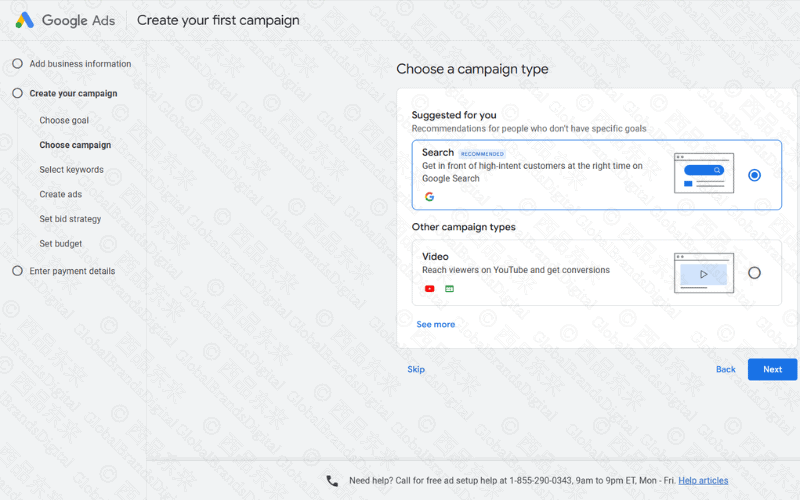
Campaign type determines available inventory, targeting, creative and reporting. The interface may recommend types based on the selected objective, but the advertiser remains responsible for fit.
Compare reach, control, asset requirements and measurement dependencies before accepting the recommendation.
- Search: reaches relevant searches with text-based ads.
- Video: reaches eligible YouTube and video inventory with suitable creative.
- Display or Demand Gen: uses visual inventory for the selected objective and audience.
- Shopping: presents products through an approved feed and linked Merchant Center account.
- Performance Max: uses assets and automation across channels, so goals and measurement must be reliable before launch.
- Use Continue, Next or the current equivalent after checking the selection. Skip a step only when the interface permits it and the missing setting will be completed before launch.
Step 6: configure keywords and targeting
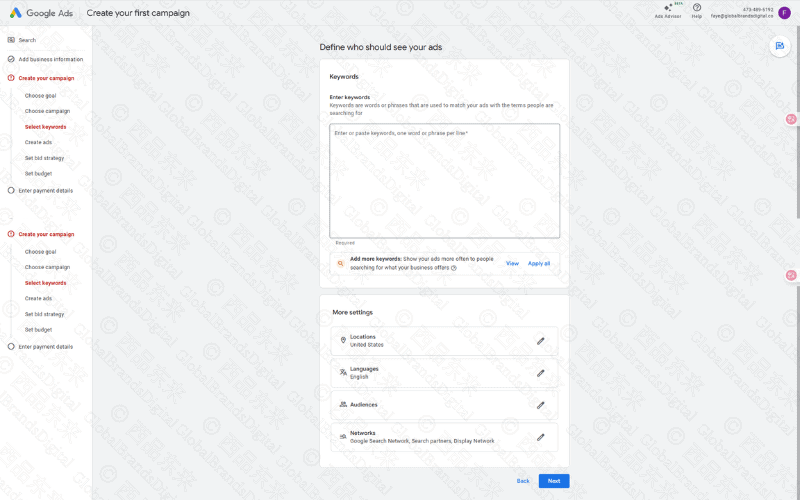
Keyword lists should reflect tightly related intent and landing-page relevance. Match behavior can broaden beyond literal wording, which makes negative keywords and search-term review essential.
Group close themes, add market and language controls, create negatives and avoid mixing informational and commercial intent without a reason.
- Enter search concepts that are directly related to the product, service and landing page.
- Keep one keyword or keyword concept per line in the interface.
- A footwear group could start with men's running shoes, lightweight running shoes and durable running shoes.
- Use the current match-type syntax shown in the account.
- Exact match uses square brackets in keyword entry, but its behavior is based on meaning or intent rather than literal identity alone.
- Phrase match uses quotation marks and can match searches that include the keyword's meaning.
- Broad match uses no punctuation and can reach related searches using additional signals.
- Do not mix unrelated product categories in one ad group.
- There is no universal requirement to keep every group between five and twenty keywords.
- Use as many tightly related keywords as the campaign can maintain and interpret.
- Start with controlled match behavior when the account has little evidence and limited budget.
- Add broad match only when conversion data, bidding, exclusions and search-term review can support it.
- Add negative keywords for clearly irrelevant meanings, products, jobs, research or locations.
- Set locations to where customers are, not merely where the company is based.
- Set language around the language the user and destination can actually use.
- Review the search terms report after launch; the entered keyword is not the same as the user's query.
- Move useful new search terms into the appropriate campaign or SEO research process.
Step 7: write accurate ad copy
Responsive search ads combine submitted headlines and descriptions in different ways. Every asset should remain accurate when shown with another, and the landing page must fulfill the promise.
Cover the offer, differentiator, qualification and next step without unsupported superlatives or artificial urgency.
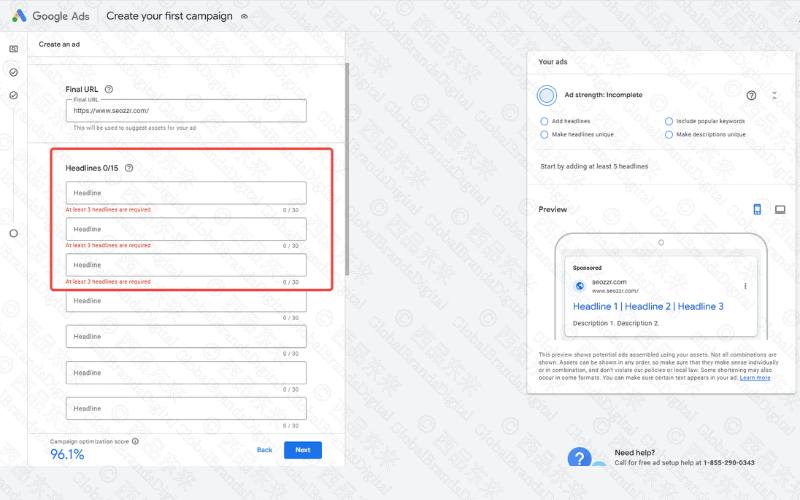
- Final URL: send the click to the most relevant working product or service page.
- Prefer a specific destination such as
https://www.example.com/running-shoesover a generic homepage. - Keep tracking parameters from changing the canonical content or breaking the page.
- Headlines: responsive search ads accept three to fifteen headlines.
- Each headline can contain up to 30 characters in the current format.
- Use distinct, compatible messages so combinations do not become repetitive or contradictory.
- A headline can identify the product, a supportable differentiator, delivery condition or next step.
- Do not publish a discount, free shipping or next-day delivery claim unless it is current and true.
- Avoid vague superlatives such as "the best" when the claim cannot be substantiated.
- Review pinned assets carefully because excessive pinning reduces combination flexibility.
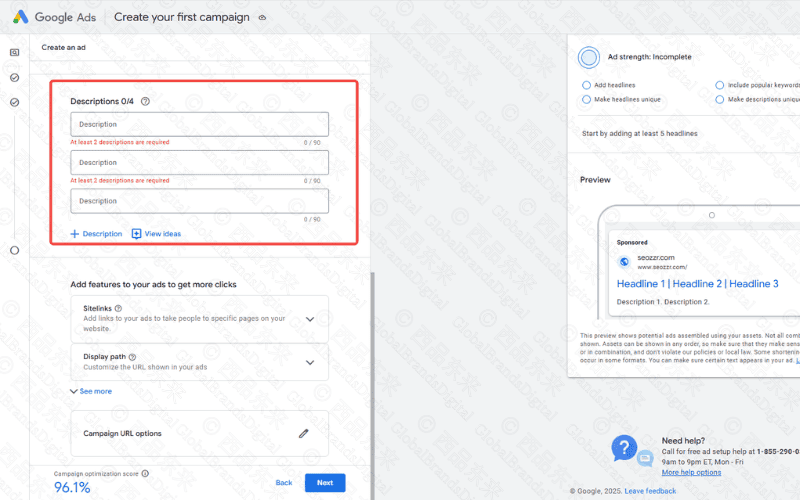
- Descriptions: responsive search ads accept two to four descriptions.
- Each description can contain up to 90 characters in the current format.
- Explain the product and next step in language that remains accurate beside any eligible headline.
- A product description can state intended use and verified features.
- A promotion description must match the landing page and its dates or eligibility.
- Display paths: optional path fields can clarify the destination without changing the actual final URL.
- Use readable path words such as
shoes/runningonly when they accurately describe the page. - Preview: inspect mobile and desktop combinations, but remember that the preview is not every possible serving context.
- Check that no combination repeats the same claim unnecessarily.
- Check capitalization, punctuation, trademarks and market-specific policy requirements.
- Use at least the required number of assets; add more only when each one contributes a useful message.
- For B2B campaigns, a clear next step such as "Book a consultation" can be appropriate when the landing page offers it.
- For ecommerce, prices and offers should come from current business records.
- Keep the brand voice consistent across the ad and destination.
- Run a final policy and factual review before submitting the ad.
Step 8: set bidding and budget
Bidding should optimize toward the chosen outcome. The budget should be large enough to learn without exceeding an acceptable risk. Average daily and eligible total-budget options have different pacing behavior.
Start from unit economics, conversion quality and a defined learning period instead of copying a generic daily amount.
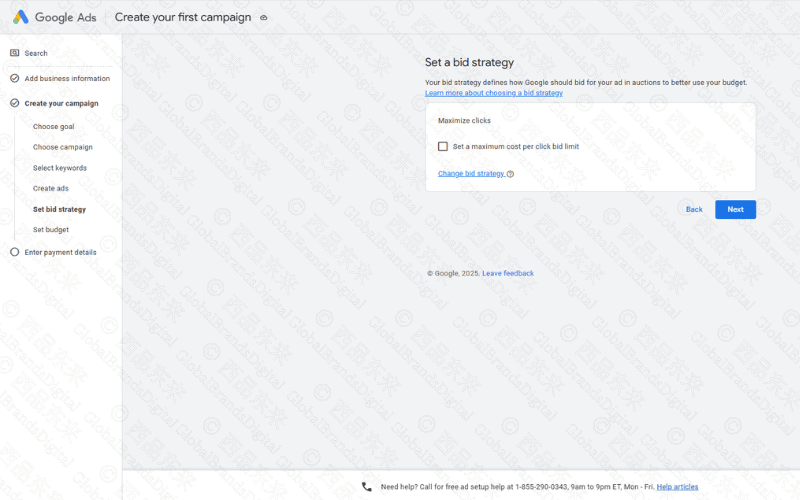
Set the bid strategy
- Maximize Clicks: seeks clicks within the available budget; it does not by itself establish lead or sales quality.
- Manual CPC: allows manual bid control where the option remains available and appropriate.
- Target CPA: uses automated bidding toward a cost-per-acquisition target when the account and campaign are eligible.
- Target ROAS: optimizes toward conversion value and requires trustworthy values and enough useful evidence.
- Google does not prescribe one fixed threshold of thirty conversions for every Smart Bidding decision.
- A new account can begin with a strategy suited to its measurable goal and risk, then review learning and conversion quality.
- If a maximum CPC limit is available, confirm that it will not prevent the campaign from entering the auctions it needs to test.
- Do not copy a $0.50 click cap without checking current auction prices and unit economics.
Set the budget
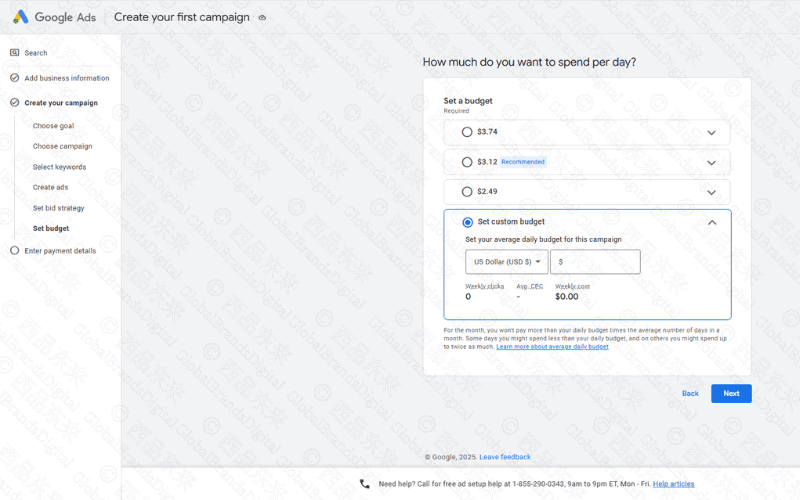
- Enter an average daily budget that the business can afford during the planned learning period.
- Most campaigns can spend up to twice the average daily budget on a particular day and still observe the applicable monthly charging limit.
- For a full month, the common monthly limit is the average daily budget multiplied by 30.4; eligible total-budget campaigns use different rules.
- Use the budget report and billing settings to understand pacing instead of assuming every day will spend the same amount.
- A universal $10–$30 beginner budget is not reliable across markets and auctions.
- Estimate likely clicks and conversions, then decide whether the budget can produce decision-quality evidence.
- Increase budget gradually only after conversion quality and marginal economics remain acceptable.
- Do not repeat a forecast of 80–100 clicks or two to three conversions unless the account forecast and underlying assumptions support it.
- Record a monthly risk ceiling, spending alerts and the person authorized to approve increases.
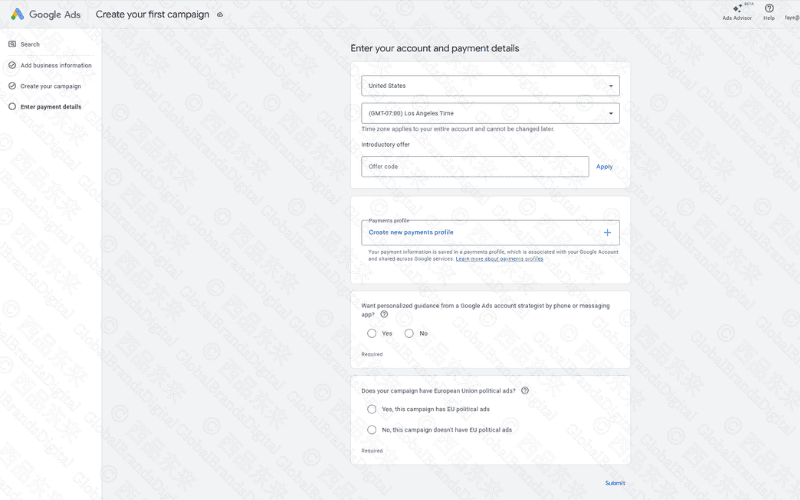
Step 10: enter billing information
Billing details, tax treatment, currency and payments profiles affect administration and may be difficult to change later. They should match the legal advertiser and approved finance process.
Have an authorized finance owner verify the profile, payment method, invoice access and spending notifications.
- Billing country or territory: select the legal billing location shown for the payments profile.
- Confirm the choice carefully because important account-level billing settings can be difficult or impossible to change.
- Time zone: use the reporting and operating time zone approved for the account.
- Review the time-zone choice before activation because later changes may be restricted.
- Currency: choose the currency that matches finance, reporting and approved payment arrangements.
- Do not assume CNY is always best for China-based advertising or USD is always best for cross-border work; use the account's eligible options and finance requirements.
- Promotion code: enter a valid code only when its current terms and eligibility are understood.
- Advertising credits are conditional and should not be treated as guaranteed funds.
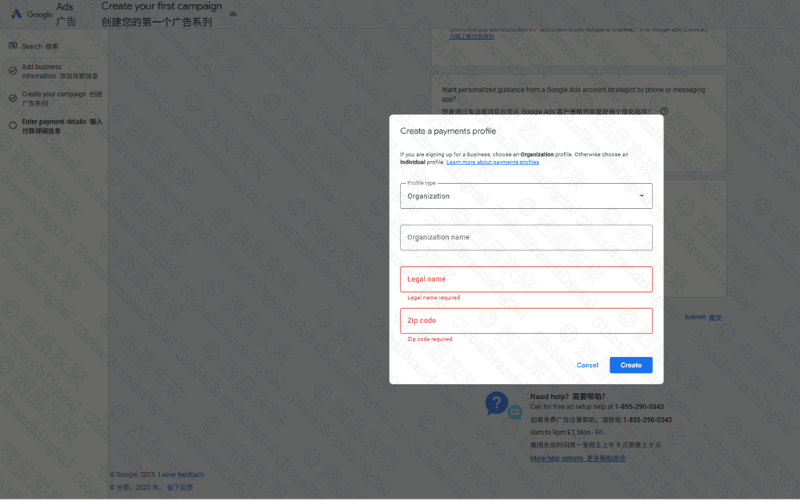
- Payments profile: choose an individual or organization profile that reflects the legal payer.
- Enter the legal name or company name exactly as required for billing.
- Enter the address, postal code and phone details accurately.
- Provide tax information where the selected country or account requires it.
- Payment method: use an eligible, authorized option shown in the account.
- Options can include credit or debit card, bank debit or PayPal depending on country and account.
- Visa or Mastercard support depends on the issuing bank, account and billing market.
- Bank-account automatic payments are not available in every market.
- PayPal is available only in supported locations and account configurations.
- Keep a backup process for failed payments and expiring cards.
- Support contact: choose whether to receive account assistance based on the company's contact policy.
- Do not dismiss all adviser contact as sales; verify the sender and retain control of account changes.
- Political advertising: answer the EU political-advertising question accurately for the advertiser and campaign.
- Do not default to "No" when the campaign could fall within a regulated category.
- Submission: have an authorized finance owner review the complete profile.
- Submit the profile only after names, tax details, currency, country and payment method are correct.
- Confirm who can view invoices, edit payments and receive spending notifications.
- Keep payment access separate from day-to-day campaign editing where practical.
- For an organization, use the approved company identity and billing address.
- For an individual, confirm that personal billing is appropriate under company policy.
- A dual-currency card can be useful in some contexts but is not a universal requirement.
- Test that the chosen payment method is accepted before the planned launch date.
- Document exchange-rate and foreign-transaction costs when they can affect reporting.
- Reconcile Google charges with finance records on a regular schedule.
- Set spending alerts appropriate to the risk ceiling.
- Remove former staff and obsolete payment access promptly.
- Retain invoices and account-change records according to the organization's policy.
- The source example combines China, GMT+8, USD, an organization profile and a Visa card. Treat that combination as a dated example, not a prescription for another legal entity or billing market.
Step 11: review and publish the campaign
A campaign can pass the builder and still have a broken destination, broad location setting, weak exclusion or unverified conversion. Publishing should follow a second-person review.
Check goals, networks, locations, languages, schedule, budget, bids, URLs, assets, policies and tracking, then launch at controlled scope.
- Confirm that the selected objective matches the intended business outcome.
- Confirm that the campaign type is appropriate; do not assume Search is always required.
- Review keywords, match types, negatives and query intent.
- Review every headline, description, image and other asset for accuracy and policy compliance.
- Test the final URL and conversion path on mobile and desktop.
- Confirm locations, location options, languages and schedules.
- Confirm bids, average daily or total budget and the approved spending ceiling.
- Confirm billing and invoice access.
- Confirm primary conversions, values, deduplication and tag diagnostics.
- Use the review screen to resolve warnings rather than clicking through automatically.
- Select Publish or the current equivalent only after the second-person review.
- New or edited ads enter policy review and may show a review status.
- Most reviews are completed within one business day, but some take longer.
- Editing an ad can restart review, so allow enough time before a fixed campaign date.
- A restricted product or unsupported claim can lead to disapproval and may require correction.
- Begin with controlled spend and monitor delivery, search terms, tracking and policy status after launch.
- Do not use an arbitrary three-to-five-day rule when volume, conversion delay or risk requires a different review window.
Step 12: inspect data and optimize
Early data is useful for detecting faults and irrelevant traffic, but small samples can produce unstable rates. Material strategy changes should wait for enough evidence unless spend or safety limits are breached.
Review search terms, placements, assets, devices, locations, times, conversions and lead quality on a fixed cadence.
- Impressions: the number of recorded ad displays.
- Clicks: the number of recorded clicks on eligible ads or assets.
- CTR: clicks divided by impressions for the selected scope.
- Average CPC: cost divided by clicks for cost-per-click traffic.
- Conversions: the actions counted under the account's conversion configuration.
- Investigate low CTR in the context of query, position, format and objective rather than applying a universal two-percent threshold.
- Investigate high CPC against conversion value, competition and query quality rather than lowering bids automatically.
- Investigate low conversion rate across targeting, message, page, tracking and operational follow-up.
Analyze and improve Google Ads performance
Optimization connects media metrics with business quality. A lower cost per lead is not an improvement if the leads are invalid, duplicated or outside the service area.
Create a reporting view that moves from spend and reach to qualified actions, revenue or another verified business outcome.
1. How to analyze campaign data
Begin with delivery and tracking integrity, then segment performance by search term, audience, device, location, time, creative and landing page. Aggregate averages can hide costly pockets.
Compare each segment with volume, lag and business quality before increasing or excluding it.
- CTR: calculate clicks divided by impressions and interpret it by network, query, position and objective.
- A low CTR can indicate weak relevance or copy, but no single two-percent threshold applies to every campaign.
- Review search terms and asset combinations before rewriting every ad.
- Conversion rate: calculate counted conversions divided by eligible interactions for the selected report.
- A low rate can come from poor targeting, a message mismatch, page friction, tracking faults or delayed follow-up.
- Check page speed and usability, but do not claim that one speed target will always improve rankings or conversions.
- CPC: compare actual click cost with the qualified value those clicks produce.
- High CPC can reflect strong competition, weak relevance or simply an expensive but valuable market.
- Use query refinement, relevance and bidding changes only after diagnosing the cause.
- Quality Score: the visible 1–10 score is a diagnostic for expected CTR, ad relevance and landing-page experience.
- Quality Score is not itself an auction-time input and should not replace an Ad Rank or business-outcome analysis.
- Use its components to identify areas to investigate, not as a guaranteed route to lower CPC.
2. How to optimize from the evidence
Each optimization should respond to a diagnosed constraint: irrelevant queries, weak ad relevance, poor destination conversion, insufficient budget, unreliable tracking or low-quality leads.
Write the hypothesis, change one interpretable layer where possible and define the review window and rollback threshold.
- Pause or exclude search terms that are clearly irrelevant; do not delete a relevant keyword only because a small sample has no conversion.
- Increase bids or budget for strong segments only when incremental qualified value supports the change.
- Add negative keywords to prevent known irrelevant meanings and preserve a reviewable negative list.
- For a controlled test, change one interpretable element such as the proposition, headline or destination where practical.
- Use two or more materially different variants when the format and traffic make comparison possible.
- Choose a review period from sample size and conversion delay rather than a universal three-to-seven-day window.
- Retain the better-supported variant and continue testing instead of declaring a permanent winner.
- Build remarketing audiences only with the required consent, notices, eligibility and minimum audience size.
- Use accurate messages and offers for returning visitors; prior interest does not justify pressure or unsupported urgency.
Improve ad copy
Copy should qualify the user as well as attract attention. Clear product, audience, location, price context and next-step language can reduce wasted clicks.
Test materially different propositions, keep every asset accurate and review combinations rather than isolated lines.
- Lead with a supportable product benefit or service outcome that matches the query.
- Use relevant language naturally in the headline or description when it improves clarity.
- Keep the message concise enough to understand in the served format.
- Use a clear call to action that matches the next step on the page.
- Example headline: "Lightweight Running Shoes | Current Offer" only when the product and offer are accurate.
- Example description: state verified comfort, delivery and promotion terms rather than inventing a discount.
- Example CTA: "Shop running shoes" or another action the destination actually supports.
Improve the landing page
The destination should repeat the relevant promise, load reliably, explain the offer and make the action clear. Sending every query to the homepage often creates a context break.
Match intent to a dedicated page, reduce friction, provide trust evidence and test the complete form or checkout.
- Repeat the ad's actual offer, product and eligibility on the destination.
- Measure real loading performance and fix the bottleneck instead of treating three seconds as a universal pass mark.
- Keep the primary information and next action visually clear.
- Use a prominent, descriptive CTA that works with keyboard, touch and assistive technology.
- Write for the target audience's questions and stage of decision-making.
- Add genuine reviews, certifications, policies or other trust evidence only when they can be verified.
- Test responsive layout, forms and checkout across representative mobile and desktop devices.
Advanced optimization: use ad assets
Google now generally refers to extensions as assets. Sitelinks, callouts, structured snippets, images, calls, prices and other eligible assets can add useful information and routes.
Add only assets that remain accurate, lead to working destinations and fit the campaign objective.
- Sitelinks: send users to relevant additional pages such as product categories, service details or contact information.
- Call assets: show an eligible phone route during times when calls can be handled.
- Location assets: connect accurate business-location information where the feature is eligible.
- App assets: provide a verified app-store destination for eligible campaigns.
- In the current interface, open the relevant campaign or asset area rather than relying on the old "Ads & Extensions" label.
- Choose the asset type that adds useful information for this objective.
- Enter accurate links, phone numbers, business details or app information.
- Save the asset and review its association, eligibility and policy status.
- Test every destination and remove expired offers or obsolete details.
Frequently asked questions about Google Ads
Budget and return questions do not have universal answers because auctions, markets, margins, conversion rates and lead quality differ. The answers below replace fixed promises with decision rules.
Use current account forecasts and a controlled test, then scale only after measurement and unit economics are trustworthy.
1. How much does one Google Ads click cost?
Cost per click varies by query, auction competition, location, device, quality and strategy. An industry average cannot quote the price for a specific account.
Use Keyword Planner and a small live test, then compare actual cost with qualified outcome value.
2. How can Google Ads target an audience?
Targeting options vary by campaign type and can include queries, location, language, demographics, audience segments, content, feeds and first-party data. Sensitive categories have additional restrictions.
Use the minimum targeting needed for the objective and review privacy, consent and exclusion requirements.
- Keywords and search intent: connect Search ads with relevant queries and review the actual search terms.
- Location: target countries, regions, cities or eligible radius areas with the correct presence settings.
- Audience and demographics: use available segments only where policy and privacy rules permit.
- Remarketing: re-engage eligible previous visitors or app users with appropriate consent and exclusions.
3. What supports success in Google Ads?
Success requires a credible offer, suitable demand, accurate targeting, useful creative, a strong destination, trustworthy conversions and economic room to learn. Platform configuration cannot rescue a weak offer.
Start with the business constraint, then align campaign mechanics and operational follow-up.
- Define a measurable objective and a conversion that represents meaningful value.
- Select relevant keywords, audiences and locations without relying on uncontrolled broad reach.
- Align accurate ad copy with a useful, fast and trustworthy landing page.
- Review search terms, budgets, bids, creative and qualified outcomes on a continuing basis.
4. What are the disadvantages of Google Ads?
Traffic stops when spend stops, auctions can become expensive, settings are complex and poor tracking can automate waste. Advertising also cannot create product-market fit or organic authority by itself.
Set spend controls, access governance, monitoring and an independent measurement view.
- Competitive auctions can make qualified traffic expensive.
- The platform has a learning curve across setup, policy, tracking, bidding and analysis.
- Campaigns require continuing monitoring; neglected settings can waste spend or degrade relevance.
5. What rules apply in Google Ads?
Ads, destinations, data use, restricted products, trademarks and local laws can all affect eligibility. Policies change and enforcement may include automated and manual review.
Read the policies relevant to the product and market, keep claims supportable and maintain a correction route.
- Ads and destinations must not use deceptive claims, malicious software, illegal content or prohibited discrimination.
- Keywords, targeting and personalization must comply with the policies for the product, audience and market.
- Ads must meet format requirements and lead to a working page that supports the advertised offer.
6. Can I manage Google Ads myself?
A small, simple campaign can be self-managed when the owner has time to learn tracking, targeting, policy and economics. Complexity increases with markets, feeds, automation and offline conversion data.
Begin with a controlled scope and seek qualified help when errors could create material spend or compliance risk.
7. Should ads run all day?
The right schedule depends on query behavior, conversion lag, time zones, support capacity and whether valuable actions can occur without immediate staff response.
Collect enough time-of-day data before restricting delivery and preserve coverage for strategically important periods.
8. What are the best keywords for Google Ads?
The best keywords express an intent the offer and landing page can satisfy profitably. High volume, low CPC or a competitor's list does not establish that fit.
Prioritize relevance and value, then refine using actual search terms and negatives.
- They are directly relevant to the product or service and the intent of the landing page.
- They enter auctions at a cost the business can evaluate against qualified value.
- They include specific long-tail demand when that wording reflects real, convertible needs.
9. Is Google Ads worth the investment?
The channel is worthwhile when incremental qualified value exceeds media and operating cost at an acceptable risk. Platform-reported return should be reconciled with business records.
Run a test with a decision threshold, attribution window and comparison baseline.
10. Does Google Ads charge a monthly subscription?
Google Ads generally bills media usage rather than a universal monthly subscription. Agencies or software may add separate fees. Billing methods depend on account and country.
Review the account payments settings, invoice terms and any third-party contract.
11. Do I need a budget to run ads?
Yes. Ads require an approved payment method and available budget, although credits may apply under specific terms. Management, creative and landing-page work also carry costs.
Budget for media, implementation, measurement and follow-up capacity together.
12. What determines total Google Ads cost?
Total cost depends on budget settings, delivery, auction prices, duration and management or production expenses. Average daily budgets can spend unevenly and still observe applicable billing limits.
Set a monthly or flight-level ceiling and monitor forecast against actual spend.
13. How should I set a daily budget?
A daily budget should reflect affordable risk, expected click cost, conversion uncertainty and the time needed to observe meaningful outcomes. There is no universal minimum.
Work backwards from unit economics and cap the initial test at an amount the business can learn from safely.
14. Is $20 per day enough?
Twenty dollars may collect useful data in a low-cost narrow market and almost none in an expensive auction. The number has meaning only relative to CPC and conversion frequency.
Estimate likely clicks and decide whether that sample can answer the campaign hypothesis.
15. Is $100 enough?
One hundred dollars can validate setup and search-term relevance, but it may be too small to estimate conversion economics. Treat it as a bounded diagnostic when the sample is limited.
Define what the amount can realistically test and avoid claiming failure or success from a few clicks.
16. Is $500 per month enough?
A monthly budget of five hundred dollars can support a narrow campaign in some markets but may be fragmented across too many keywords, locations or campaign types.
Concentrate scope and measure one priority outcome before expanding.
17. Is $5 per day enough?
Five dollars per day may not enter many auctions and can take a long time to collect evidence. It can still test basic delivery in low-cost contexts if expectations are explicit.
Use a narrow query and location set, and set a date for deciding whether the sample is informative.
18. How much should I spend each month?
Monthly spend should follow opportunity, unit economics, operational capacity and confidence in measurement. A percentage-of-revenue rule can ignore margin and growth stage.
Set a learning budget, a profitable scaling rule and a hard risk ceiling.
19. How should a startup budget for Google Ads?
A startup should not use ads to hide uncertainty about the customer or offer. Paid search can test messaging and demand when the learning objective and cash constraint are clear.
Choose one market and outcome, protect runway and stop when the campaign is not producing decision-quality evidence.
20. How much can Google Ads earn?
No responsible forecast can promise earnings without price, margin, demand, conversion and retention evidence. Revenue attributed by the platform is not the same as profit.
Model a range, validate it against transactions and update the model with actual qualified outcomes.
21. Do businesses earn two dollars for every one dollar spent?
The source question reverses a commonly repeated aggregate claim, and neither phrasing should be used as a guarantee. Benchmarks combine unlike businesses and attribution methods.
Use account-level incremental revenue and profit rather than a promotional average.
22. What do YouTube ads cost?
YouTube cost depends on format, bidding, audience, market, creative and objective. Views, impressions and conversions also use different billing and optimization models.
Select the outcome and eligible format, then use account forecasts and a controlled creative test.
How to combine Google Ads and SEO
Paid search can reveal queries, messages and landing-page behavior quickly; SEO builds durable discovery and topic coverage. The datasets should inform one another without treating paid performance as proof of organic ranking potential.
Share validated search terms, objections, conversion quality and page tests across the two programs.
1. Use Google Ads to identify productive search terms
- Test relevant paid-search concepts and compare qualified clicks and conversions rather than raw traffic alone.
- Review the search terms report for real language that can improve keyword research and useful site content.
2. Use Google Ads while SEO is still developing
- Paid campaigns can create immediate, controllable visibility as eligible organic pages build authority and rankings.
- Use location, device and audience controls to test defined markets without assuming those settings transfer directly to SEO.
3. Use controlled tests to improve ads and pages
- Test materially different messages or landing-page treatments and record the affected audience and outcome.
- Use paid conversion evidence as one input to SEO priorities, not as proof that a keyword will rank organically.
4. Coordinate brand visibility
- Paid and organic listings can both contribute to brand discovery, but incremental lift should be measured rather than assumed.
- Keep offers, positioning and factual claims consistent across ads and organic pages.
5. Improve conversion quality
- Connect advertising, analytics and CRM evidence to identify pages that lose qualified users.
- Apply verified landing-page learning to the organic page when it improves the same audience task.
6. Combine a long-term SEO program with short-term paid activity
- Use ads for controlled near-term reach as SEO develops durable unpaid discovery; budget and evaluate each channel separately.
7. Feed validated advertising evidence back into SEO
- Share qualified query, message and conversion evidence with the SEO team and preserve channel-specific attribution.
A case framework for combining SEO and Google Ads
The source presents a client example, but the page does not provide enough independently verifiable data to publish a universal performance claim. The useful contribution is the integration framework.
Document the baseline, interventions, attribution method, time period and evidence before presenting any result publicly.
Client context and baseline
A meaningful case begins with the market, offer, audience, site condition, campaign structure, measurement and constraint. Anonymous claims without this context cannot teach another team what may transfer.
Describe the starting system without exposing confidential customer data or implying permission that has not been granted.
- The source describes an ecommerce company selling running shoes.
- Its Google Ads campaigns received clicks but reportedly converted poorly and did not meet return expectations.
- The source attributes the problem to imprecise message-to-keyword alignment, a weak landing-page experience and little coordination with SEO.
Integrated solution design
The combined workflow can use paid query evidence to refine SEO priorities, improve shared landing pages, add negatives where organic pages answer informational needs and reuse validated messaging responsibly.
Assign each insight to a channel owner and preserve campaign isolation where it is needed for measurement.
1. Improve Google Ads copy and assets
- Test clearer product benefits and supportable calls to action instead of changing every campaign layer at once.
- Add useful sitelinks, call assets or other eligible assets whose details and destinations are current.
2. Improve the landing-page experience
- Compress and size images, remove unnecessary loading work and verify the change with current performance measurements.
- Clarify the offer and purchase action, simplify unnecessary steps and keep promotion details consistent with the ad.
3. Coordinate SEO with the campaign
- Align useful product-page language, metadata and internal links with validated demand without duplicating paid-ad copy mechanically.
- Use genuine reviews and social proof only with permission and enough evidence to support them.
Evidence limits on implementation outcomes
This localized edition does not repeat the source outcome as a verified benchmark because the underlying account data, attribution and client approval are not available in the repository. Missing evidence does not prove failure.
Publish a quantified case only after the owner verifies the period, denominator, costs, attribution and permission.
- The source reports a 40% increase in advertising conversion rate, but the repository contains no account export, period or denominator to verify it.
- The source reports a 25% increase in organic traffic, but the baseline, analytics record and attribution are not available here.
- The source reports a 50% increase in ROI, but spend, revenue, margin and attribution evidence are not available, so this figure is retained only as an unverified source claim.
At this point, you have the basic Google Ads workflow and a way to connect paid evidence with longer-term website improvement. Advertising is only one part of growth; a useful destination and a sustainable organic-search foundation still matter.
GlobalBrandsDigital can review the relationship between paid-search evidence and organic priorities without promising a particular result. Explore our SEO consulting and SEO optimization services, or contact us with the market, offer and measurement problem you need to solve.