On this pageTable of contents+

In Google Search, when a user selects a different tab, the resulting data does not necessarily go to the same report.
For example:
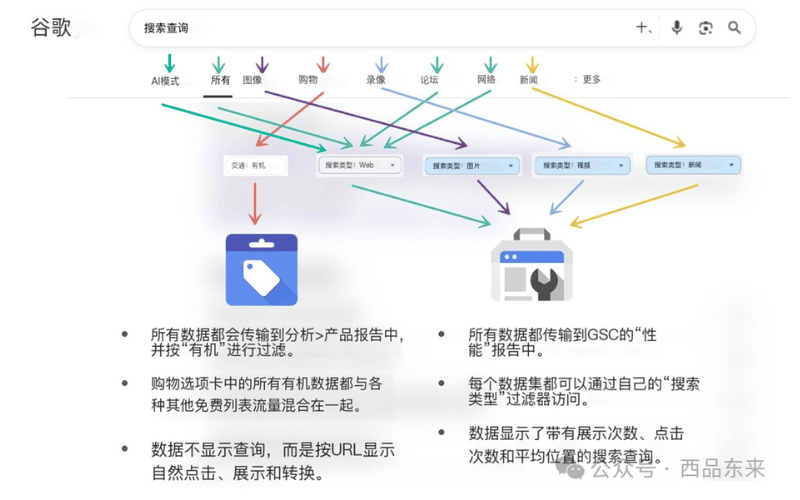
• Clicks from All, Web, AI Mode or Forums are counted under Search Console's Web search type.
• Search Console also reports clicks from Image, Video and News, each under the corresponding search type.
• Google Merchant Center Next reports dedicated Shopping-tab product results. This is an operating map for choosing a report, not a claim that a product page can never also receive Web or Image activity in Search Console.
So if a query is missing from a report, do not immediately assume there is a traffic problem. The activity may belong to another reporting system. Even in the correct Search Console report, some queries remain hidden because of privacy protections or row limits, as Google's query-data documentation explains.
This quick-reference guide will help you clarify:
Where the data from each Search tab goes, what the limits are and how to avoid spending time in the wrong report.
To understand the routing, start with the two main systems in this workflow:
• Google Search Console, or GSC, records most conventional searches, especially the queries that led to the site.
• Google Merchant Center Next, or GMC, handles results from the Shopping tab and focuses more on product pages and measured conversions.
The diagram below shows this tab-to-report map. The icon on the left represents GMC, and the icon on the right represents GSC; use it together with the explanation that follows.
Start with GSC (Google Search Console)
This is the primary report for search-query data.
• Search Console reports clicks from the All, Image, Video and News tabs; it also reports Web and Forums clicks.
• You can inspect queries, impressions, clicks and average position, subject to Search Console's normal data limitations.
• In this map, Forums, Web, All and AI Mode ultimately count under the Web search type.
• The original article recorded AI Mode entering Web totals around June 13, 2025; Google's public documentation log records the change on June 16, 2025.
• When this guide was first published in August 2025, AI Mode data was mixed into Web data and could not be filtered separately. It was like pepper dissolved through soup: detectable, but not easy to lift out on its own. Google now says a Generative AI performance report is rolling out to a subset of properties. That report covers AI Overviews and AI Mode and still draws from the Web search type, so the separate view may not be available in every account.
• Image, Video and News each have a separate search-type filter. Check Google's current Performance report guidance to confirm which filters are available.
Then check GMC (Google Merchant Center Next)
Merchant Center is where this map directs product-page and Shopping performance, but it is not a GSC-style query-by-URL report.
• In this workflow, clicks on products in the Shopping tab do not appear under a separate Search Console search type.
• Merchant Center reports them alongside free-listing results.
• Merchant Center shows when product pages appeared and how often users clicked them. If the account is configured to measure purchases or other conversions, those results may appear too. The report does not give you the same exact query-to-landing-page table as Search Console.
• The product-performance view described in the original article did not expose Shopping queries for keyword-level attribution.
• In the original Merchant Center Analytics view, Products behaved more like a consolidated report of organic traffic to product pages. Google's current product-performance documentation likewise organizes the view around products, brands and categories.
• Merchant Center now also offers separate, aggregated search-topic and search-term trend insights in eligible accounts. Those trends do not turn the product report into an exact query-to-product-URL attribution table, so keyword-level SEO attribution remains limited.
Summary
For SEO analysis, knowing where each Search tab sends its data is not a minor technical detail. It is a basic prerequisite.
Different kinds of sites, including ecommerce stores, content platforms, image libraries and news publishers, can receive very different mixes of traffic from Google's entry points.
If you read the wrong report, you may diagnose the wrong problem and choose the wrong direction.
The next time a query's clicks surge or disappear, first ask yourself:
"Which Search tab did this data come from?"