
On this pageTable of contents+
- What Is Image SEO?
- How Image SEO Differs from Traditional SEO
- Key Elements of Image SEO
- Image Formats and How to Choose
- Optimizing Image Filenames
- Optimizing Image Alt Text
- Image Dimensions and Compression
- Image Placement and Context
- Responsive Images
- Advanced Google Image SEO Techniques
- Use Structured Data
- Using an Image Sitemap
- Using a CDN
- How to Handle Purely Decorative Images
- Recommended Image Optimization Tools (2025)
- From Image SEO to Broader Optimization: How GlobalBrandsDigital Can Help

When optimizing a website, people often focus on page content, keywords and backlinks and leave images to one side. In practice, image optimization can make a site more visible, improve the user experience and ultimately bring in more traffic.
Have you noticed that, when you search Google for a product, the clarity of an image and the accuracy of its description can affect whether you click through to the page? Google Images has become an important way for people to find information and products. Better image SEO can give relevant images more opportunities to appear and earn traffic, although no individual change guarantees a ranking.
This guide looks closely at image format, dimensions, alt text and other practical controls that can help Google discover, crawl, understand and index images. These steps can improve image delivery and contribute to the wider page, but overall results still depend on how useful the page is, how sound the site is and who it competes with.
What Is Image SEO?
Image SEO means optimizing a website's images so search engines can discover, crawl, understand and index them, giving relevant images a better chance to appear in search results and attract traffic.
How Image SEO Differs from Traditional SEO
Traditional SEO often concentrates on a page's written content, including its topics, headings and metadata. Image SEO works on details such as filenames, alt text, format, dimensions and delivery so images can be crawled and understood and may appear in Google Images.
In short, traditional SEO emphasizes the page's written information. Image SEO, by contrast, ensures that its visual assets are accessible, understandable and deliverable. The two work together as parts of the overall page experience.
Key Elements of Image SEO
Image Formats and How to Choose
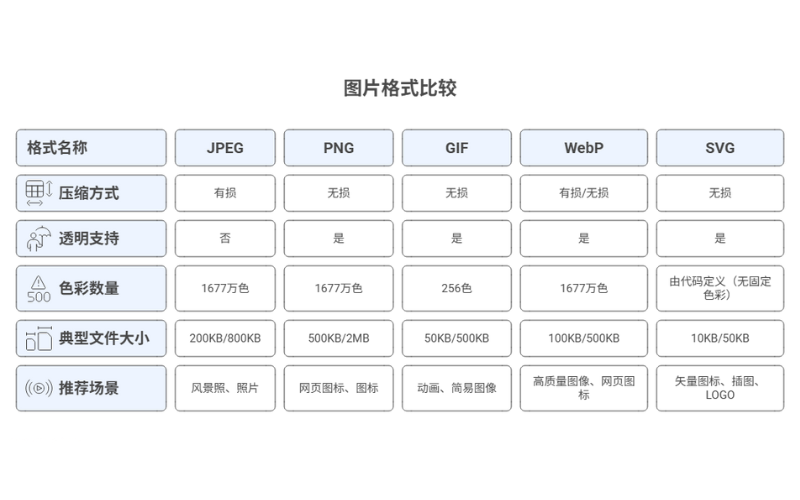
Choosing an appropriate format matters for both image quality and loading performance. Different formats suit different visual content, so the right choice can reduce transfer size and improve the experience. Google Images currently supports BMP, GIF, JPEG, PNG, WebP, SVG and AVIF; test the rendered result rather than choosing from the extension alone.
JPEG
- JPEG is one of the most common web-image formats and is especially suitable for photographs with many colors. Its lossy compression can produce a relatively small file and retain acceptable visual detail, making it useful for many page images.
- Typical uses: photographs, product images and background images.
PNG
- PNG uses lossless compression and retains detail. It is particularly useful when transparency is required, such as for some logos, button graphics and interface assets. PNG files can be comparatively large, so they are not always the best choice when a smaller transfer is the priority.
- Typical uses: icons, buttons, interface elements and images with transparent backgrounds.
GIF
- GIF is commonly used for simple animation. Its palette is limited to 256 colors, so it is a poor fit for richly colored photography.
- Typical uses: short animations and simple animated icons.
Advantages of WebP
- WebP, a format introduced by Google, supports lossy and lossless compression as well as transparency and animation. The source article cites a 25%–34% reduction compared with JPEG and PNG. That is not a universal result: WebP and the newer AVIF format can often reduce bytes, but the result depends on the original asset, encoder settings and acceptable visual quality. Current mainstream browsers support WebP, but check any legacy-browser requirement for the actual audience.
- Typical uses: product images, backgrounds and advertising graphics when reducing transfer size without unacceptable visual loss is important.
SVG
- SVG is a vector format that can scale without the pixelation of a fixed-resolution bitmap. It is often compact for logos, icons and geometric illustrations, is editable, and can expose meaningful text and structure when implemented accessibly. It is not automatically an SEO advantage merely because it is SVG.
Typical uses include site logos, icons and simple illustrations, especially elements that must scale across interface sizes.
Optimizing Image Filenames
An image filename can help users and search systems identify what a file contains. It should provide a clear clue about the subject rather than be treated as a place to force keywords or guarantee rankings.
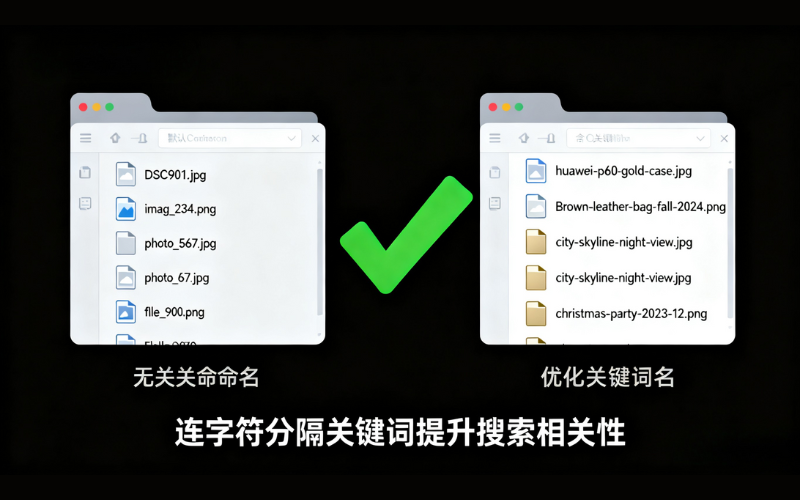
Use descriptive filenames: describe the image clearly and avoid meaningless names such as IMG1234.jpg or picture1.jpg. A name such as golden-retriever-puppy.jpg gives both people and search systems a more useful subject clue.
Relate the filename to the subject: a relevant term can make the filename clearer. On a page selling iPhones, for example, iphone-12-blue.jpg describes the pictured product better than a camera-generated number. Use this for clarity, not as a ranking promise.
- Filename tips:
- Be concise and specific: describe the content accurately without a long, keyword-stuffed name.
- Separate words with hyphens: use hyphens (
-) rather than underscores (_) so the words remain easy for users and Google to interpret. - Avoid special characters: avoid spaces and characters such as
&,%and$; keep the name clean and predictable.
Consider localization and multilingual support: when audiences use different languages, filenames can follow the language and conventions of the asset's intended market. A Chinese-market asset might use an appropriate Chinese name and an English-market asset an English name. This can make assets easier to understand and manage, but it does not guarantee a higher ranking.
Optimizing Image Alt Text
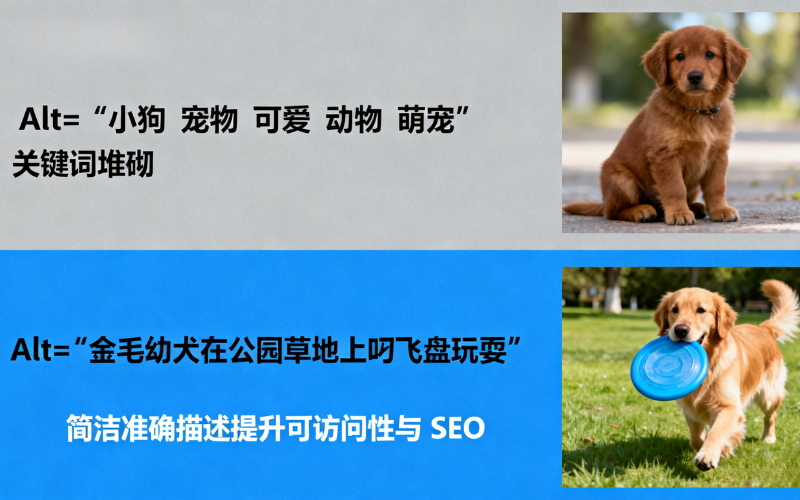
Alt text is an important part of image SEO and accessibility. It supplies a text alternative when an informative image cannot be perceived or loaded, and screen readers can announce it to users with visual impairments. Search systems can also use alt text alongside the visible pixels and surrounding page content; it is not their only way to understand an image.
Tips for Writing Alt Text
Keep these points in mind when writing a text alternative:
- Be concise and accurate: communicate the image's essential content or function without unnecessary detail. For a puppy fetching on grass, "Golden retriever puppy playing fetch in the park" is a clear example.
- Avoid keyword stuffing: alt text should describe the actual image naturally. "Golden retriever puppies playing fetch, golden retriever dogs, playing in the park" is repetitive and less useful.
- Describe relevant people, objects or scenes: when detail matters to the page, "iPhone 12 Pro in hand with a blue case" is more specific than "smartphone in hand."
- Avoid empty labels for informative images: names such as "image1" or "photo" do not communicate content or function. Describe what the image contributes instead.
Image Dimensions and Compression
Optimize Image Dimensions
Pixel dimensions affect both display quality and transfer size. Uploading a 2,000-pixel-wide image for a slot that never needs more than 600 CSS pixels can waste storage and bandwidth. However, a high-density display may need more source pixels than the CSS width, so prepare appropriately sized responsive variants rather than applying one fixed rule.
- Practical application: tools such as Photoshop or GIMP can resize assets for their rendered use. The source suggests an 800-pixel file for a product image displayed at 600 pixels; treat that as an illustration and provide larger responsive candidates when device density or layout requires them.
Compress Images
Large image files can slow pages, especially on mobile connections. Compression can reduce transfer size yet retain enough detail for the asset's purpose.
Common tools: TinyPNG, Squoosh and ImageOptim can reduce image file size, with the final quality depending on the source and settings. The original article says TinyPNG may reduce an upload by 30%–60%; treat that as a dated example, not a guaranteed range.
An appropriate file size: the source recommends keeping each image below 100 KB and contrasts a roughly 150 KB JPEG with more demanding PNG compression. There is no universal 100 KB ceiling. Choose the smallest file that remains clear in its rendered slot and on the intended screens, then test how it affects the page's loading budget. JPEG, PNG, WebP and AVIF each behave differently according to the image and encoder settings.
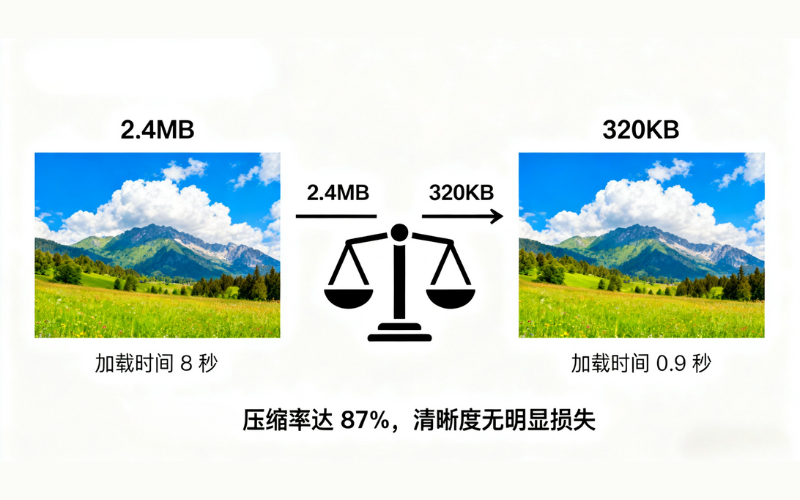
The graphic above illustrates an 87% reduction with no visible loss of clarity. Its numbers are a concept example, not a measured benchmark or a result every image will achieve.
Image Placement and Context
Images should relate to the page and support its topic. A product-page image, for example, should connect clearly with the product description and features. Filling a page with unrelated visuals can make the experience and subject harder to understand.
- Put important images where people need them: give a meaningful image a prominent, useful position rather than burying it. This can draw attention, but placement near the top is not by itself proof to Google that the image is the page's core content.
- Connect images with text: place an image near relevant copy so its context is clear. If a section explains how to train a golden retriever, place a photograph of that activity nearby and explain what it shows.
Responsive Images
Images must adapt to different screens as mobile use grows. Responsive delivery helps them remain clear without wasting bytes.
Use the srcset attribute: srcset lets the browser choose from several candidates for the device and layout. A phone may receive a smaller source, and a larger or denser display can receive a larger one. The source's split snippet is repaired below with a fallback src:
<img
  srcset="image-320w.jpg 320w, image-480w.jpg 480w, image-800w.jpg 800w"
  sizes="(max-width: 320px) 280px, (max-width: 480px) 440px, 800px"
  src="image-800w.jpg"
  alt="Golden retriever puppy playing fetch in the park">
Use the <picture> element: <picture> can offer formats in preference order with a broadly compatible fallback. A browser that supports WebP can choose it; another can use JPEG:
<picture>
  <source srcset="image.webp" type="image/webp">
  <source srcset="image.jpg" type="image/jpeg">
  <img src="image.jpg" alt="Golden retriever puppy playing fetch in the park">
</picture>
Advanced Google Image SEO Techniques
Use Structured Data
Structured data, or Schema markup, embeds machine-readable information in a page so search systems can understand its entities and context. For images, relevant properties can provide semantic details, but markup does not significantly improve presentation or ranking simply because it is present.
ImageObject structured data: an ImageObject can describe an image's URL, dimensions, caption and creator. The original example is repaired into valid JSON-LD below. It is a semantic-description example, not a promise of higher image rankings or rich-result eligibility:
<script type="application/ld+json">
{
  "@context": "https://schema.org",
  "@type": "ImageObject",
  "url": "https://example.com/path/to/image.jpg",
  "width": 800,
  "height": 600,
  "caption": "Golden retriever puppy playing fetch in the park",
  "author": {
    "@type": "Person",
    "name": "John Doe"
  }
}
</script>
Richer product results: on a product page, supported Product structured data can supply details such as price, rating and availability. Eligible information may appear in Google Search, Images or Lens, but Google decides whether to show it; markup does not guarantee visibility or a click-through increase.
For example, a product page can mark up its price, aggregate rating and availability so supported systems can understand those details and may present them with the product image.
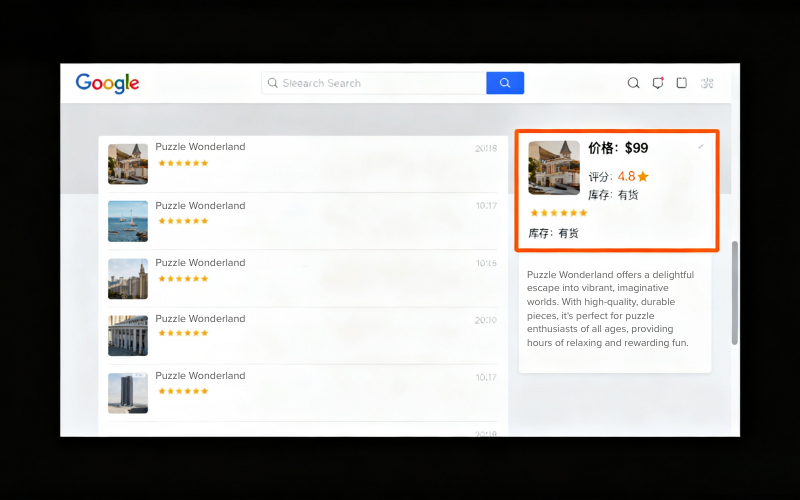
The visual above is conceptual. An actual product result can look different, and eligibility does not guarantee display.
Using an Image Sitemap
An image sitemap can help search engines discover images, especially assets loaded in ways that are harder to find or hosted on a CDN. Submission supports discovery; it does not ensure that every listed image will be crawled, indexed or ranked.
Submit image information in the sitemap: the source example included image:caption, but Google has deprecated that image-sitemap tag. The current form keeps the required image location within the page URL entry:
<url>
  <loc>https://example.com/page1</loc>
  <image:image>
    <image:loc>https://example.com/images/image1.jpg</image:loc>
  </image:image>
</url>
Keep image URLs stable: avoid unnecessary alternate URLs for the same image. Duplicate paths can make crawling and migration management less efficient. If an image URL must change, update references and sitemaps consistently.
- Recommended practice: check whether a CDN, cache or different page templates expose the same image through several URLs. Use a stable preferred URL where practical and list the correct crawlable image location in the sitemap.
Using a CDN
A content delivery network, or CDN, distributes assets across infrastructure that can serve an image from a location or edge closer to the user, reducing latency in many global delivery scenarios.
- Advantages of an image CDN: a well-configured CDN can shorten image delivery time and reduce waiting, especially for an international audience. How much faster it becomes depends on its cache, image processing, origin server and the user's network.
- How to use one: host images with a suitable CDN provider, such as Cloudflare or Amazon CloudFront, and configure stable crawlable URLs, caching and responsive transformations. If the CDN uses a separate host, verify that host in Search Console so image-crawl issues are visible.
How to Handle Purely Decorative Images
Purely decorative images support a visual design without communicating meaningful content. Their accessibility treatment therefore differs from that of informative images.
Use an explicit empty text alternative (alt="") for an image that is genuinely decorative, so assistive technology can ignore it. Do not omit the alt attribute: a missing attribute can cause some screen readers to announce the filename. If an image conveys information or performs a function, give it an appropriate alternative instead.
Recommended Image Optimization Tools (2025)
The source article recommends the following tools. Treat the descriptions as a 2025 snapshot: formats, features, pricing, upload limits and privacy practices can change, so verify current terms before sending sensitive files to any service.
- TinyPNG / TinyJPG: an online tool intended to reduce PNG and JPEG file size with a simple upload workflow. Compare the output visually instead of assuming no quality loss.
- Squoosh: an open-source image tool introduced by Google that previews compression and supports adjustable settings and multiple formats, making it useful to developers and designers.
- ImageOptim: a macOS image optimizer used for JPEG, PNG and GIF workflows, including lossless optimization and batch processing.
- ShortPixel: an image service used to compress files, process batches and convert common web formats.
- Compressor.io: an online compression tool offering lossy and lossless workflows for several common formats.
- Kraken.io: an online optimizer and API intended for compression, bulk workflows and automation across several image formats.
- Picdiet: a browser-based compression tool whose source-era proposition emphasized JavaScript processing, batch use and avoiding an image upload. Verify its current privacy and processing behavior before relying on that claim.
- Ezgif: a web tool focused on GIF and animation tasks such as compression, cropping and resizing.
- Online Image Tool: a general browser-based tool used to compress, crop and convert images.
- RIOT: a Windows image optimization tool associated with JPEG, PNG and GIF workflows and a live output preview.
From Image SEO to Broader Optimization: How GlobalBrandsDigital Can Help
I hope this guide helps you learn the core image SEO techniques and apply them in your day-to-day work.
If you need deeper support or encounter implementation problems, GlobalBrandsDigital provides broader SEO optimization services. Our SEO consultants can review your requirements, and our practical SEO training supports learners at different stages. Advice and training can improve the process, but neither can guarantee a ranking outcome.
The original article also points readers to step-by-step SEO tutorials and invites them to scan a personal WeChat QR code for a China-based consultant. This English repair retains the tutorial intent but omits that China-only private-contact QR asset; readers can use the site's standard contact path instead.
For more guidance, explore the site's SEO optimization knowledge center. That knowledge center does not yet have an English page, so I have left its Chinese address unlinked.