On this pageTable of contents+
- 1. On-Page SEO Foundations
- What Is On-Page SEO?
- Why Is On-Page SEO Important?
- 2. How to Create SEO Content
- 1. Make It Relevant
- 2. Make It Comprehensive
- 3. Make It Distinctive
- 4. Make It Clear
- 3. How to Optimize Your Content
- 1. Include the Main Topic in the Title
- 2. Use a Short, Descriptive URL
- 3. Optimize the Title Tag
- 4. Write a Compelling Meta Description
- 5. Optimize Images
- 6. Add Internal and External Links
- Advanced On-Page Optimization
- 1. Optimize for Featured Snippets
- 2. Add Link-Worthy Elements
- 3. Earn Supported Rich Results with Structured Data
- 4. Improve Topical Relevance
- On-Page SEO Tools
- Yoast SEO
- Ahrefs Webmaster Tools (Free)
- Ahrefs SEO Toolbar (Free)
- MetaTags.io (Free)
- ShortPixel (Free)
- Merkle's Schema Markup Generator (Free)
- Rich Results Test (Free)
- Summary
- References

This is our most detailed on-page SEO guide for 2025. Every passage, internal link and external reference contributes useful context. If you have never worked on on-page SEO, studying the guide carefully should give you a solid working foundation. I hope it helps.
Many people reduce on-page search engine optimization to placing a few keywords in an article. That view is mistaken. Keyword placement still matters, but it is much less important than it once was.
On-page optimization is no longer as simple as it used to be, yet it remains one of the most approachable parts of SEO. It is also one of the few areas you can control directly without deep technical expertise.
If you can make basic website edits and are willing to do some research, you can do it well.
1. On-Page SEO Foundations
Let us begin by making sure we understand what on-page SEO is and why it matters.
What Is On-Page SEO?
On-page SEO, also called on-site SEO, improves web pages so they can perform better in search engines. It includes work on both visible content and the HTML source.
Why Is On-Page SEO Important?
Google examines the content of a page to decide whether it is relevant to a search query. Looking for words and phrases related to the query forms part of that process.
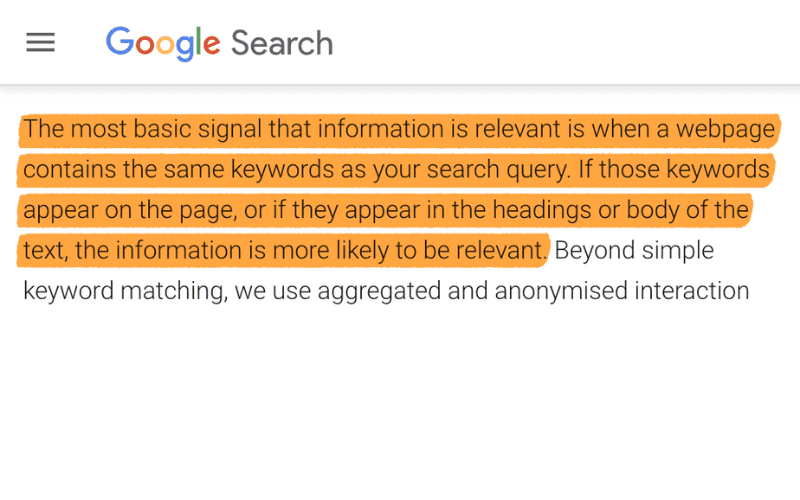
Screenshot from Google's How Search Works
page [1].
On-page SEO involves much more than including keywords in the copy.
Google ultimately tries to return relevant results, so its systems also look for other content connected with the subject. If a page is about dogs but never mentions different breeds, another result may provide a more complete answer.
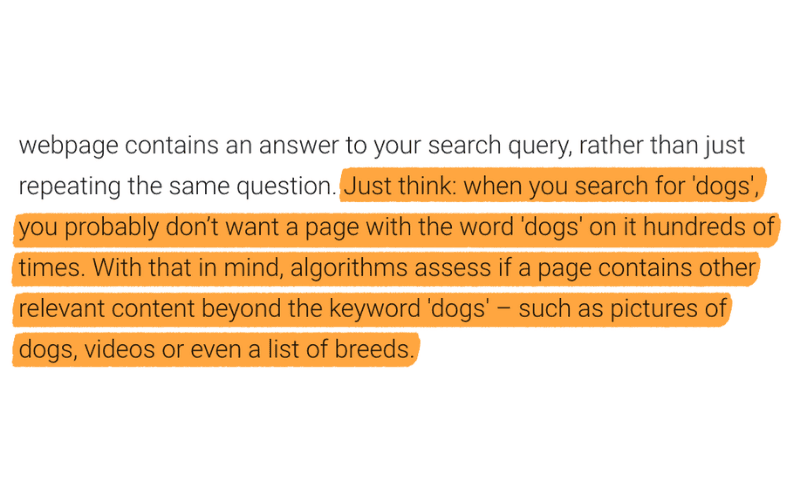
Relevance is a central part of on-page SEO. Unless you understand it, earning strong visibility will be difficult.
2. How to Create SEO Content
Before thinking about technical refinements such as keyword placement, create content that deserves to be considered for the query. Begin with a primary target keyword. If you do not have one, start with a keyword-research guide.
Four qualities require particular attention:
1. Relevance 2. Comprehensiveness 3. Distinctiveness 4. Clarity
1. Make It Relevant
Relevance is arguably the most important part of on-page SEO. It means aligning the content with search intent. If the page does not give searchers what they want, its chance of ranking is limited.
Google has extensive evidence about how people respond to search results, so the current leading results are a useful starting point for examining the three Cs of search intent:
1. Content type 2. Content format 3. Content angle
We introduced this idea briefly in the keyword-research guide [2]. Here we will examine it more closely because aligning content with intent is essential.
1. Content Type
Content types generally fall into five groups: blog posts, product pages, category pages, landing pages and videos. For example, the leading results for black maxi dress
in the source were ecommerce category pages from established stores.
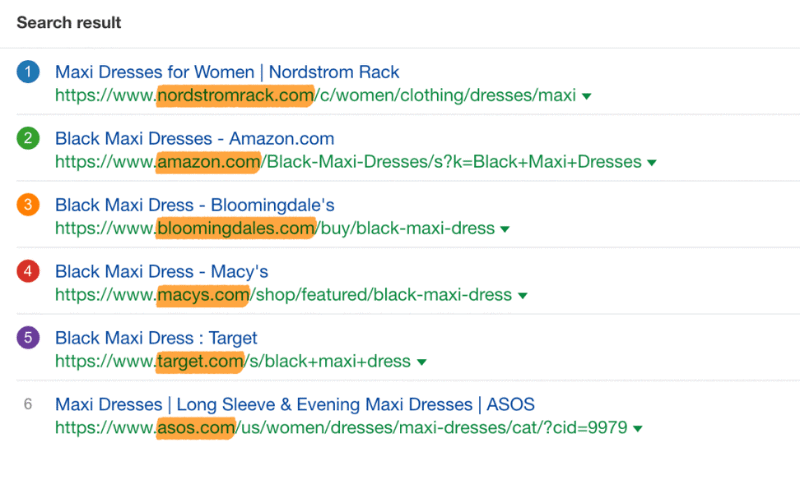
A blog post would be unlikely to satisfy that query. Those searchers appear to be shopping, not studying the subject.
For some queries, however, the pattern is less clear.
The source's results for plants
, for example, mixed ecommerce pages with blog posts.
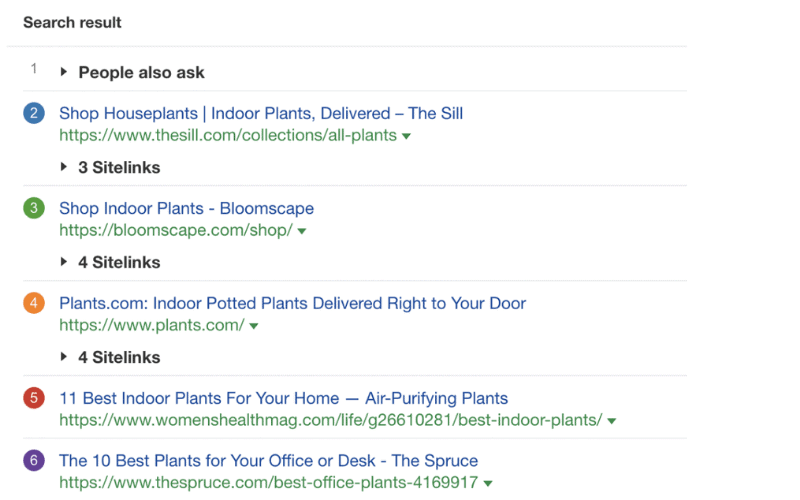
When the result page is mixed, use judgment. In this example the split was roughly even, but the first three results were ecommerce pages. That suggested that shopping intent was stronger, so an ecommerce page was probably the better candidate for the query.
The lesson is that most searchers in that example appeared ready to shop rather than learn, making an ecommerce page the more plausible format.
2. Content Format
Content format applies mainly to blog posts. Common formats include how-to guides, list articles, news reports, opinion pieces and reviews.
For example, almost every result shown in the source for force restart iPad
was a how-to guide, apart from Apple's own pages.
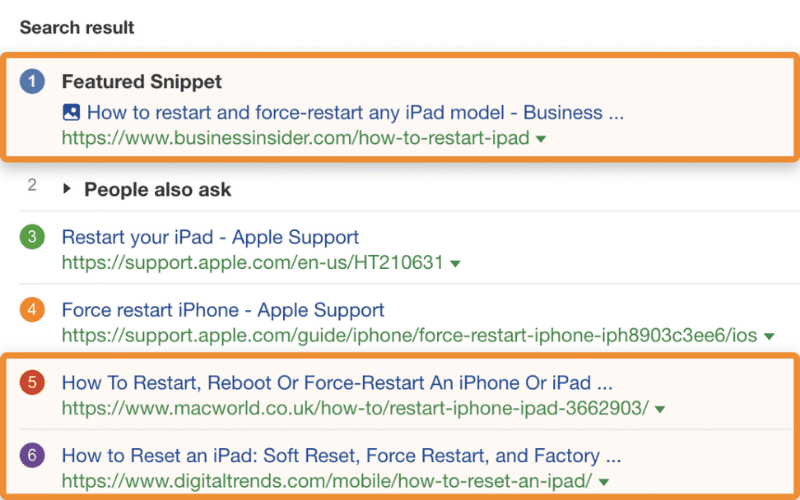
The results for marketing ideas
were list articles.
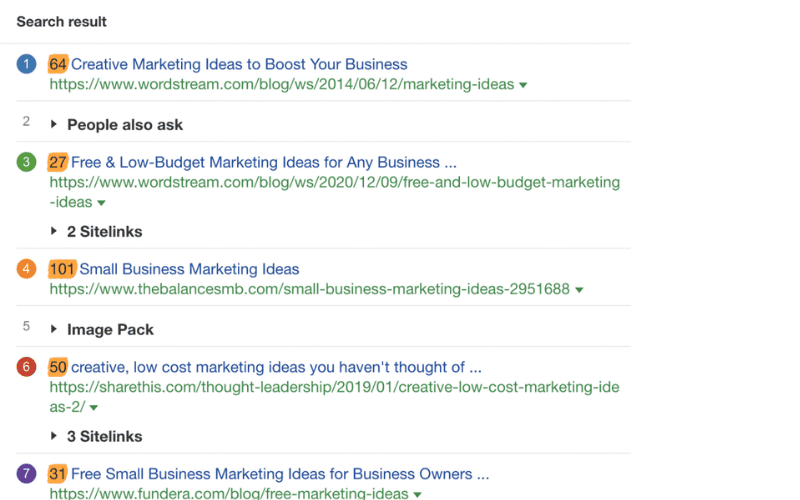
Following the dominant format usually gives a page a better chance of meeting expectations. A list article faces an uphill struggle when searchers consistently prefer a how-to guide.
As with content type, however, the search results do not always produce an unambiguous answer.
The leading pages for how to get more subscribers on YouTube
included a fairly even mixture of how-to and list formats.
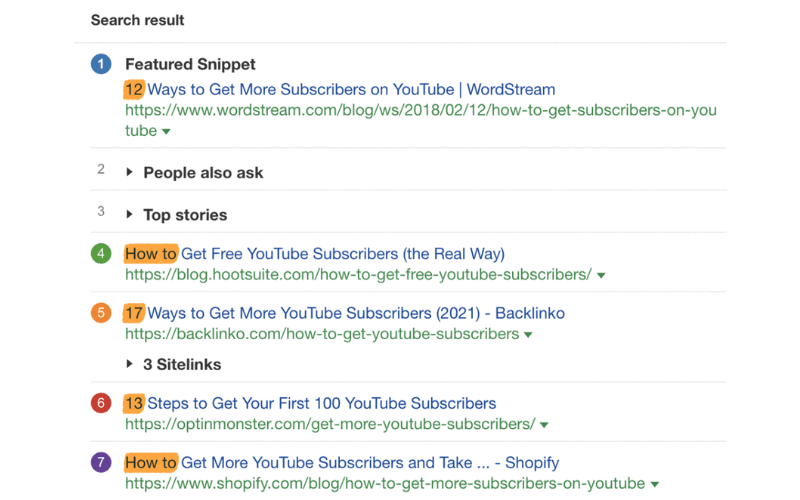
Because how to
appeared in the query, a how-to guide was a reasonable choice, but there was no definitive answer.
Different editors can interpret the same evidence differently. The source author chose a list article about gaining YouTube subscribers because that format better suited the tips being shared.
3. Content Angle
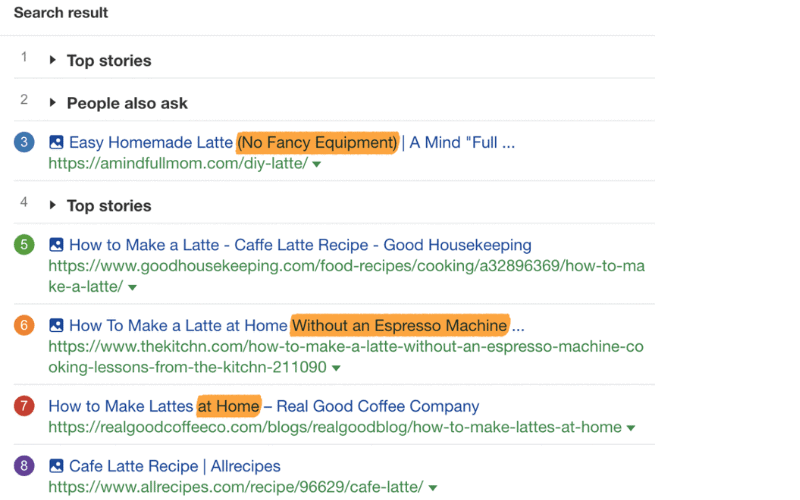
The content angle is the principal hook or selling point. In the source results, people searching for how to make a latte
appeared interested in making one at home without specialist equipment.
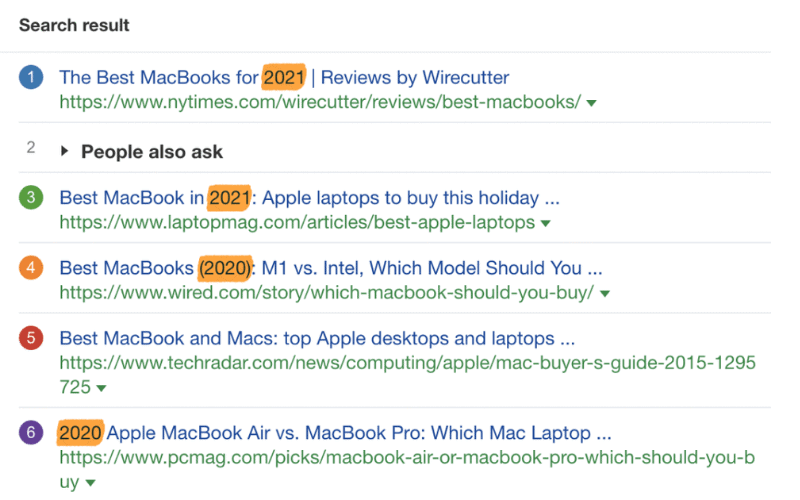
For best MacBook
, the results suggested that people wanted recently updated recommendations.
Angles are not always this obvious. The leading results for fried rice recipe
used several approaches, including best
, easy
and restaurant-style
.
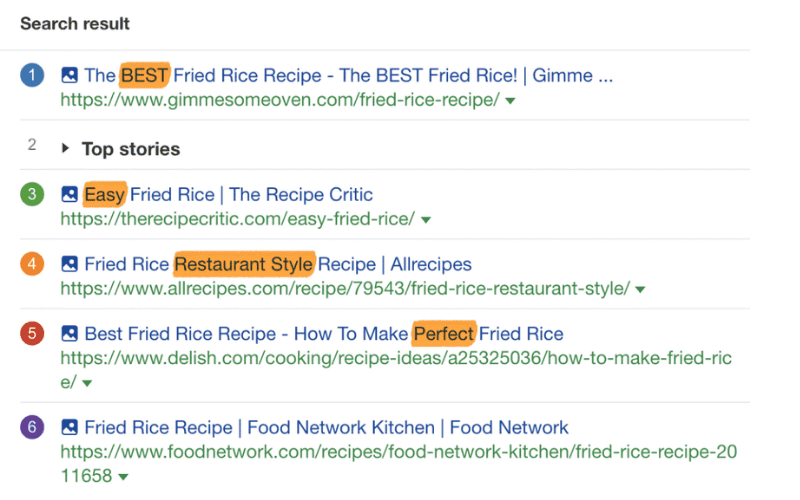
No result page can identify a perfect angle with certainty. Choose the approach you believe will be most useful and appealing to someone who wants to make fried rice.
Expert note: matching searcher expectations matters, but you do not always have to follow the crowd. If you have good reason to believe that a different type, format or angle will serve people better, it can be worth testing.
2. Make It Comprehensive
Broad alignment with intent is a good start, but it is rarely enough. To deserve a place among the leading results, the content must fulfil its promise and cover the points searchers expect to find.
Once you have identified the three Cs, you should have a rough idea of what searchers want. If the leading pages about buying Bitcoin are written for beginners, for example, a highly technical explanation of blockchain mechanics may not belong near the beginning.
The three Cs provide only a high-level view. To decide what the page should cover, examine relevant leading pages in more detail.
The word relevant
matters. If the target query is best golf club sets
and you plan to write a comparison article, ecommerce category pages and articles about individual clubs are poor models. Analyze pages that perform the same job as yours.
Here is how to do that.
Find Common Subheadings
Most pages divide a subject into subtopics through subheadings. Repeated or closely related subheadings across several pages can quickly reveal what searchers expect.
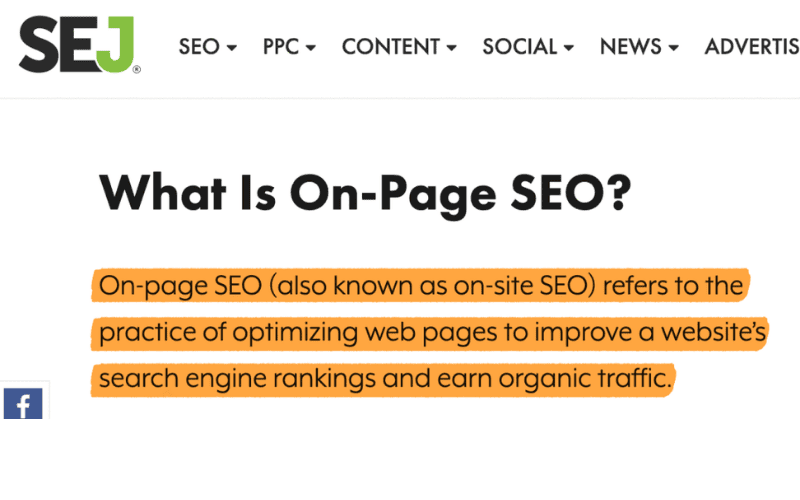
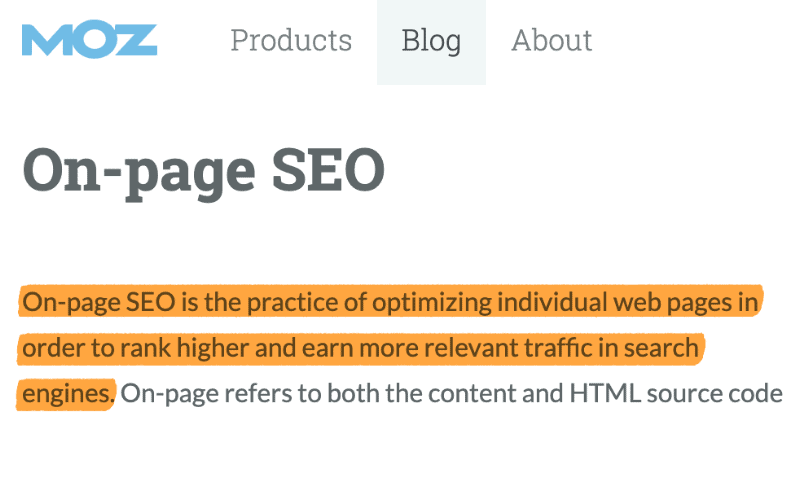
When the source reviewed other on-page SEO guides, for example, every one included a definition.
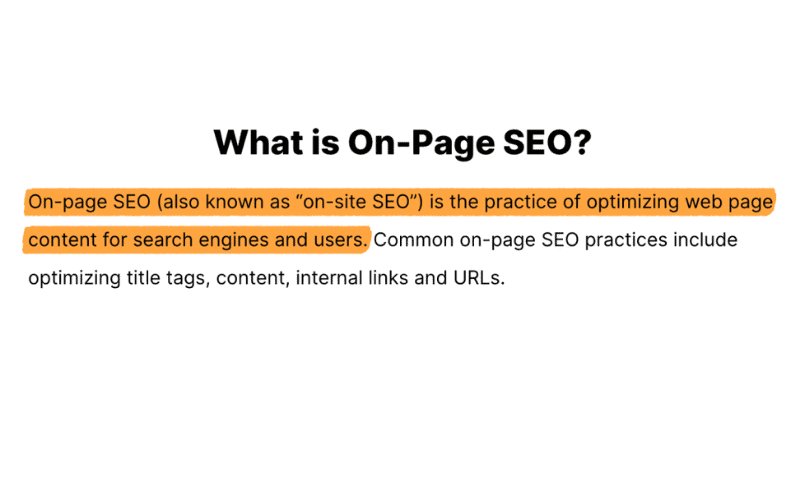
Definition used by the first-ranking page for on-page SEO
in the source example.
Definition used by the second-ranking page for on-page SEO
.
Definition used by the third-ranking page for on-page SEO
.
Because all the relevant leading pages included a definition, it was reasonable to infer that searchers wanted one. The source suggested that pages covering this need may provide greater satisfaction than pages that omit it. Treat that as an interpretation of the result pattern, not a disclosed ranking rule.
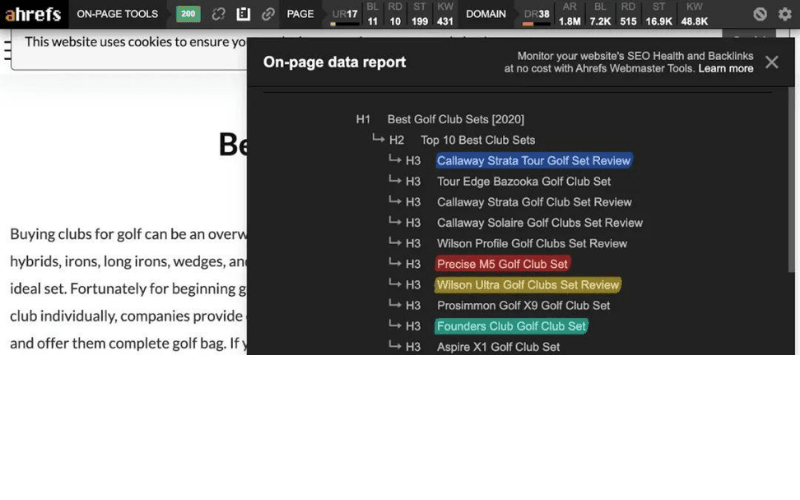
As another example, the free page report in the Ahrefs SEO Toolbar [3] showed that leading pages for best golf club sets
mentioned several of the same sets.
Use this approach carefully. If every leading page recommends a set you know to be poor, do not include it merely because competitors did.
Find Subtopics in Ranking Keywords
A study of three million search queries cited by the source [4] found that a first-ranking page also ranked in the top ten for nearly 1,000 other related keywords on average.
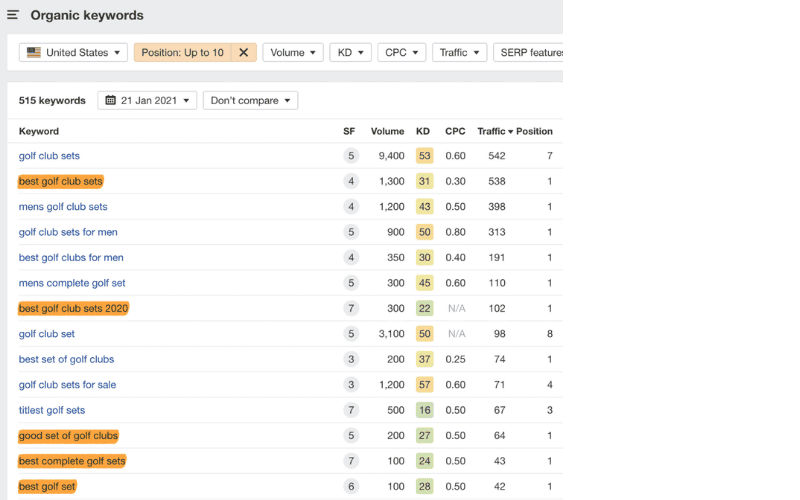
Many of those keywords were alternative ways to search for the same thing. When the leading page for best golf club sets
was examined in Ahrefs, its organic-keywords report also contained terms such as:
• best golf sets • best golf sets 2020 • good golf sets • best complete golf sets • best golf set
Other keywords represented subtopics within the broader subject.
The same page also ranked in the top ten for terms such as:
• men's golf club sets • most affordable golf clubs • best golf club brands • golf club sets with a bag • best golf clubs for amateurs
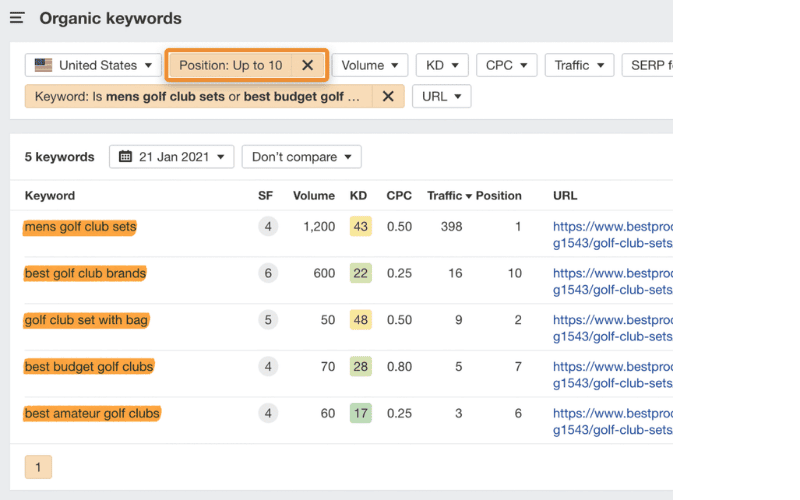
Looking for subtopics among the keywords of relevant leading pages can reveal issues worth covering in your own content.
You can also look for keyword overlap across several pages. Add a set of relevant URLs to Ahrefs' Content Gap tool [5], then adjust the intersection threshold until the results become meaningful.
1 [6]
Enter relevant leading pages in the Ahrefs Content Gap tool...
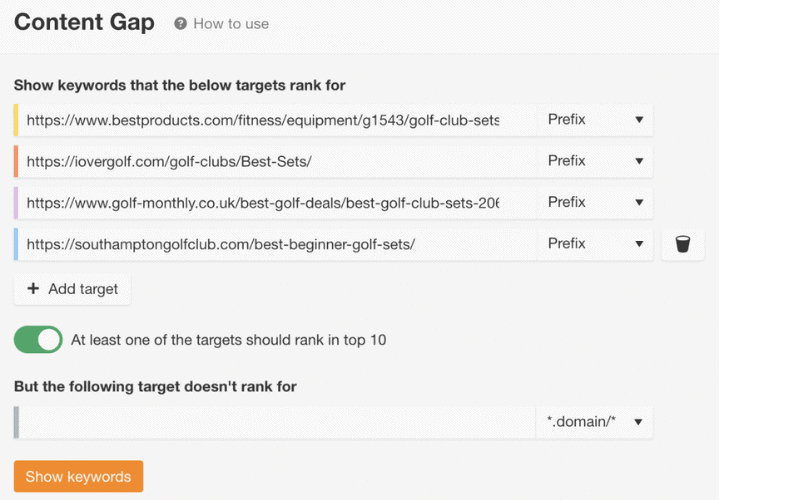
...then adjust the intersection control until the results reveal keywords that represent useful subtopics.
Review the Pages Manually
Shared subheadings and keywords are a quick way to understand potential coverage, but they do not reveal everything. Manual reading is still necessary to understand the topic properly.
When the source opened the first three pages about the best golf club sets, most recommendations were beginner sets costing less than $300. None listed the genuinely highest-end sets, which cost thousands. This suggested that the query was used mainly by beginners, so reviewing premium equipment would add little value for that audience.
Most of those leading pages also presented advantages and disadvantages for each set.
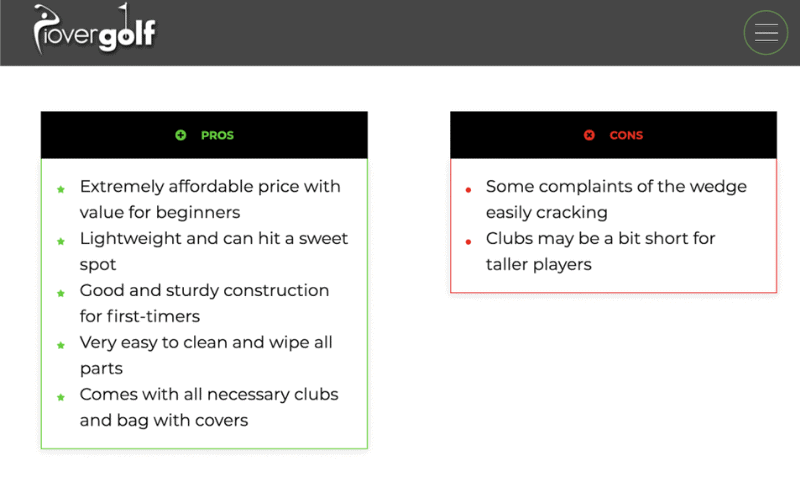
The first-ranking page for best golf club sets
listed pros and cons...
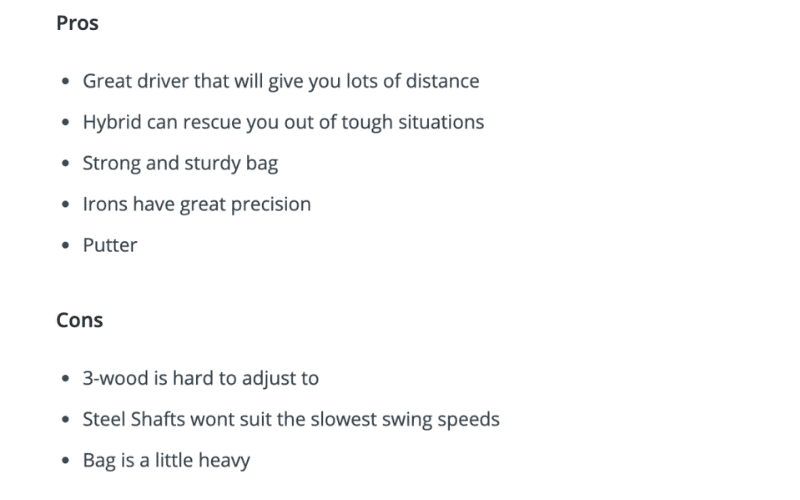
This pattern offered clues about both article structure and the attributes readers cared about. In the example, bag durability appeared to be an important selling point.
Examine SERP Features
Search-result features can also supply evidence beyond competing pages. Examine features such as featured snippets and People Also Ask boxes.
There was no featured snippet in the source results for best golf clubs
, but a People Also Ask box revealed related questions.
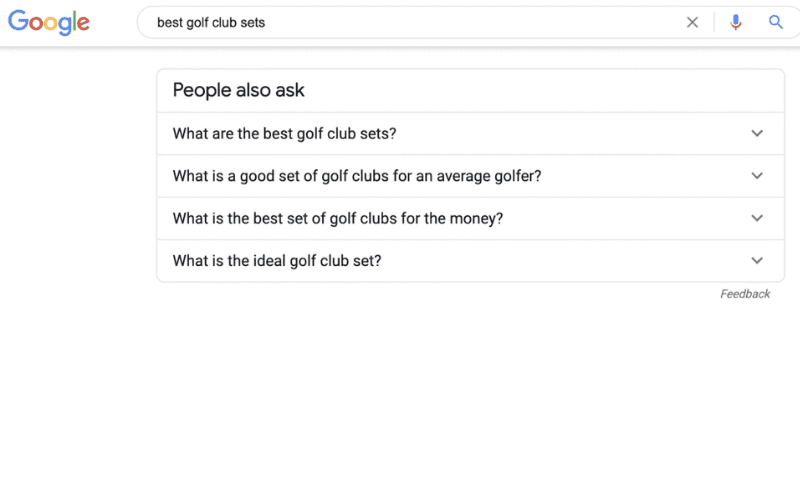
People Also Ask questions shown for best golf club sets
.
The second-to-last question suggested that searchers were price-conscious and wanted a sound set at a fair price. That supported the earlier manual reading: most were probably beginners rather than buyers seeking the most expensive clubs available.
For how to swing a golf club
, the source result page showed a YouTube video in the featured-snippet position.
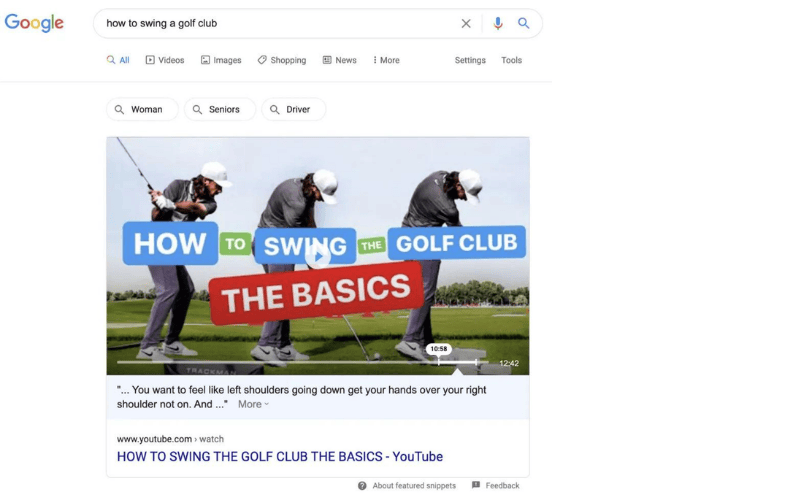
YouTube video shown in the featured snippet for how to swing a golf club
.
Even if you target the query with an article, a video in that result feature suggests that people may need visual help. Including a video or images that demonstrate the swing would therefore make sense.
3. Make It Distinctive
Giving searchers what they need is vital, but the page should also contribute something new. Otherwise it becomes another interchangeable version of the same article, with little reason for anyone to cite or share it.
The work described so far provides a strong framework and still leaves room for creativity.
For SEO tips
, the intent in the source result page was clear: people wanted a list of ideas for improving rankings and traffic.
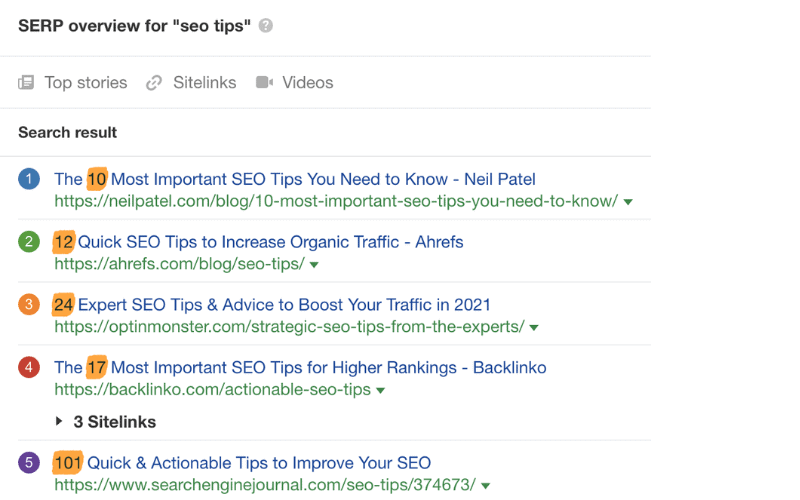
Historical US ranking for SEO tips
in Ahrefs Keywords Explorer.
The source author produced that kind of article, shown ranking second in the example.
Many tips in the list were familiar, but some were original to that page. One suggested embedding videos in relevant posts to attract visits from Google. Anyone who found that specific idea valuable and wanted to share it would need to cite or link to the page where it appeared.
Distinctiveness is harder with some other content types, but it is still possible.
A product or category page may seem difficult to differentiate, yet several elements can still be improved:
• better filters • stronger product photography • original product descriptions • useful reviews
4. Make It Clear
Even comprehensive content that matches intent will go unread if it is hard to understand. The source example matched the query all-grain brewing
, but presented a dense wall of tiny text.
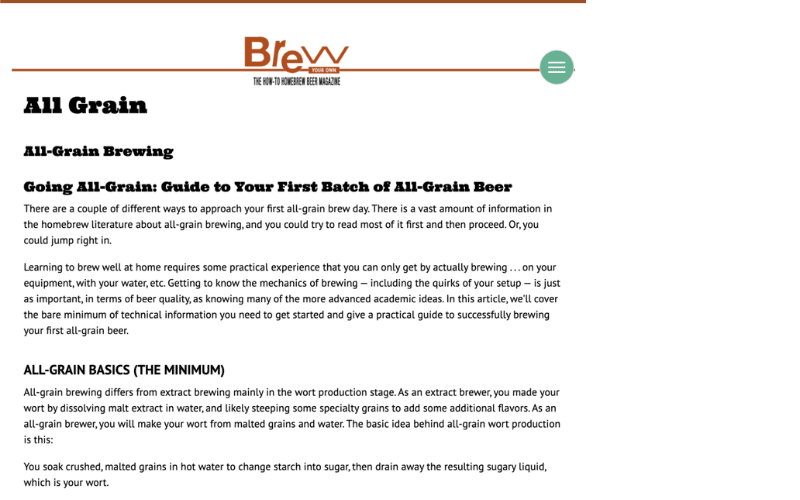
A relevant result, but still a wall of text.
Use the following simple practices to create content people can read comfortably:
• Use bullet points to support scanning. • Use descriptive H2–H6 subheadings to create a clear hierarchy. • Use images to break up the text. • Prefer straightforward words. • Keep sentences and paragraphs short enough to avoid walls of text. • Use a readable font size. • Write conversationally where that suits the subject.
The goal is to make the desired information easy to find. A page can cover every expected point and still lose readers if they cannot locate the answer and return to the results for something clearer.
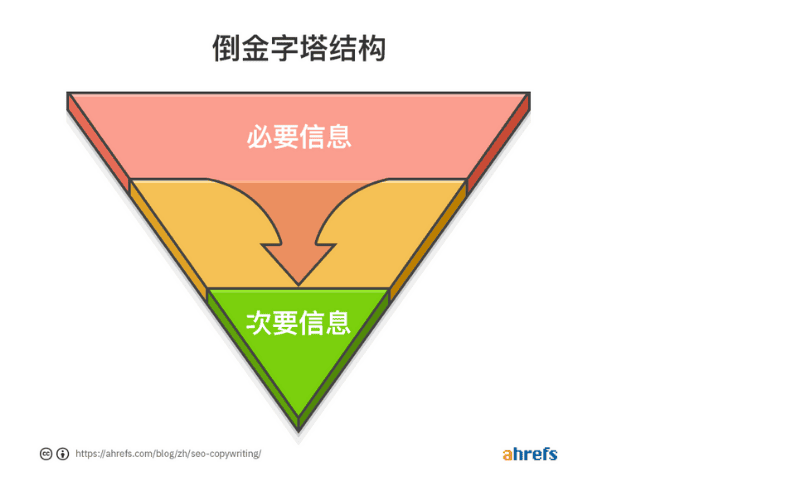
In addition, put need to know
information before nice to know
detail. This is the inverted-pyramid method.
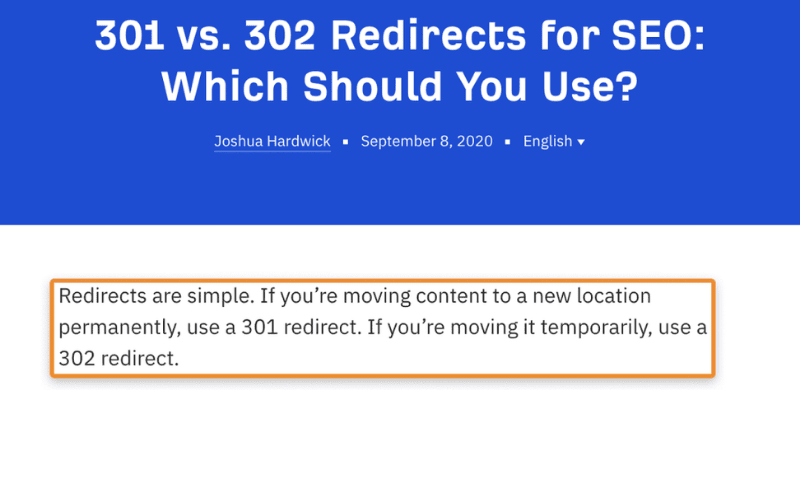
When the source author wrote a guide to 301 and 302 redirects, there was a great deal to explain. Result-page analysis suggested that most searchers first wanted the difference between the two. The guide therefore summarized that distinction in one sentence at the beginning before covering the full detail.
Further reading: Complete Guide to Search Intent [7]; How to Write SEO Content [8]; How to Become a Better SEO Writer [9]; 11 Content-Writing Tips [10]; and 12 SEO Copywriting Tips [11].
3. How to Optimize Your Content
Creating content that Google and searchers want is the difficult part. The remaining work concerns technical details such as metadata and URLs. These refinements cannot replace the content, but they can make the page's relevance clearer.
Here is a quick checklist.
1. Include the Main Topic in the Title
Page titles are commonly placed in an H1 element. That helps explain the long-standing advice to include the main topic in the title.
Google's John Mueller also discussed the importance of headings in 2020.
When we assess text on a page, a heading is a strong signal that tells us what that part of the page is about. (John Mueller, Google Search Advocate)
Using the principal keyword or topic in a title is routine for many SEO practitioners, and you will see it in many article titles.
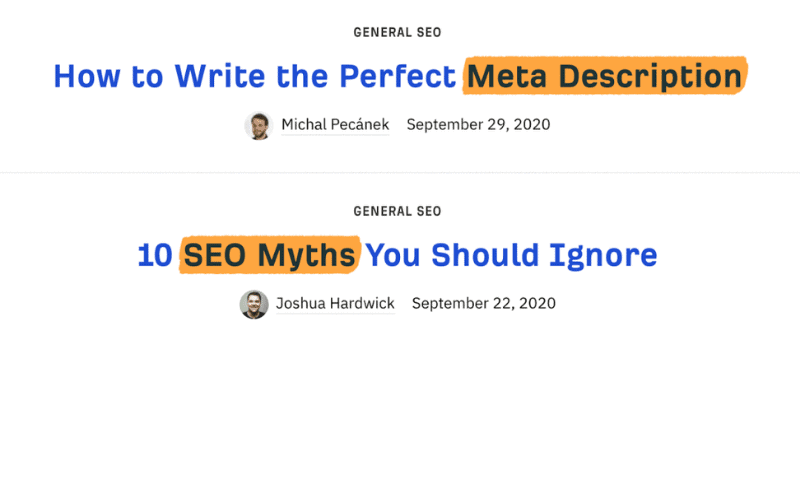
Keywords shown in title tags.
The exact keyword does not always produce a natural title, so a close variant may be better. The example cited in the source targeted SEO outsourcing
with the title How to Outsource SEO (Simple Framework)
[12].
2. Use a Short, Descriptive URL
Short, descriptive URLs help people understand a page before they click.
Compare these two URLs: https://www.medicalnewstoday.com/articles/322345 and https://www.dietdoctor.com/how-to-lose-weight
The two pages cover broadly similar subjects, but only the second URL indicates what the page is about. That can make the result easier to interpret before a visit.
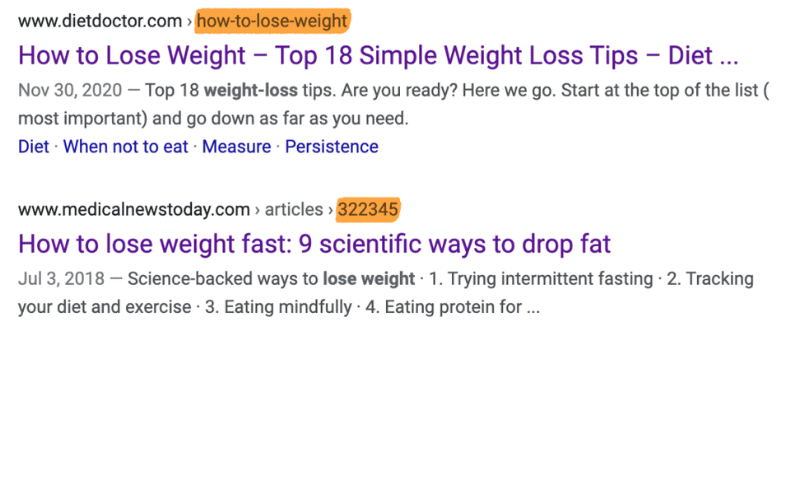
Most content-management systems let you change the URL slug, which is the part after the domain and folders. Using a concise version of the target topic is often the simplest choice, and the source author used that pattern for most blog posts.
Again, use the target phrase only when it makes sense. The source example targeted how long should a blog post be
but chose the shorter slug blog post length
.
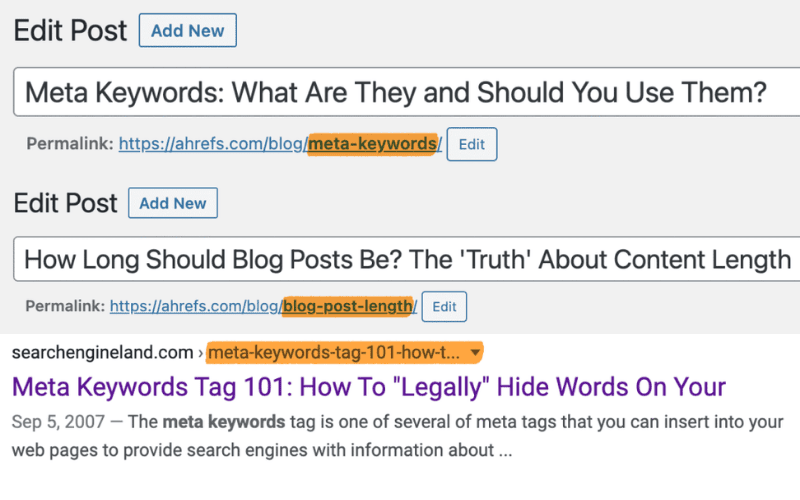
Keeping URLs concise matters because long display paths may be shortened in search results.
3. Optimize the Title Tag
A compelling title tag matters because it can appear prominently in search results.
Title tag displayed in a search result.
The simplest approach is often to make the title tag the same as the visible page or post title. That was the pattern used for most articles in the source.
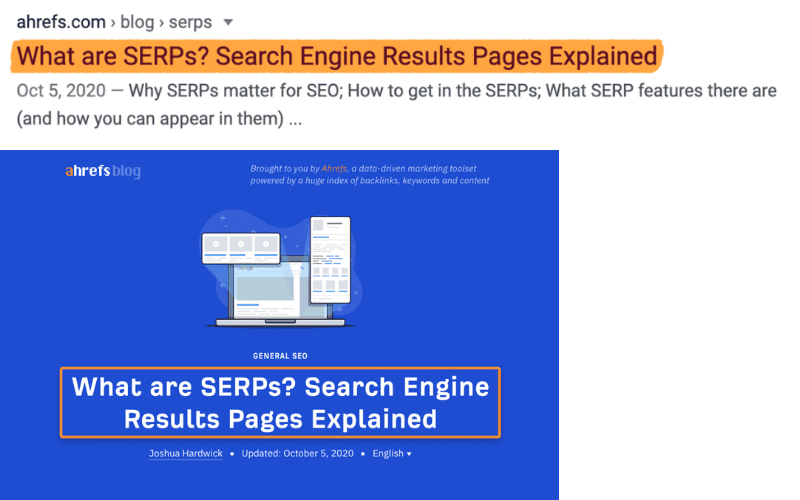
The example article used the same text for its visible title and title tag.
Sometimes a small change is useful, especially when the visible title is long. Search engines can truncate lengthy title tags in the result display.
Use editorial judgment when shortening a title. In the cited content-writing guide [13], the source author removed the ending for the title tag.
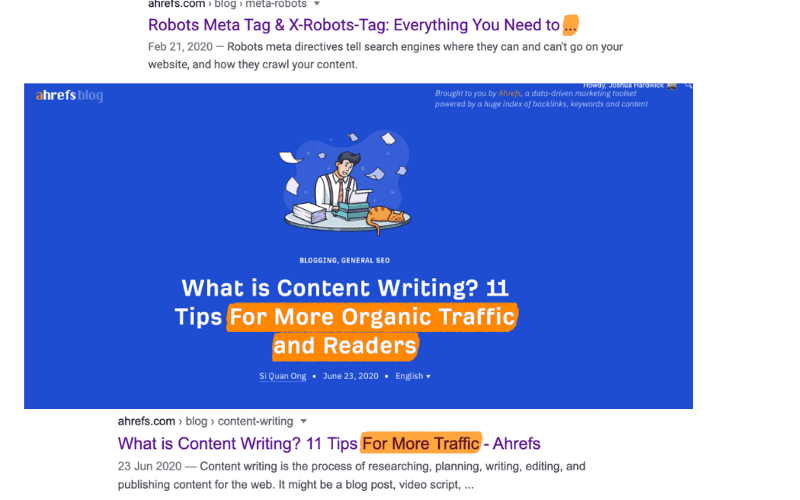
Tip: for hundreds or thousands of similar product, category or service pages, a consistent title-tag formula may be practical. The title-tag guide in the references explains the approach in more detail.
4. Write a Compelling Meta Description
Google can use a page's meta description as the descriptive snippet in a search result.
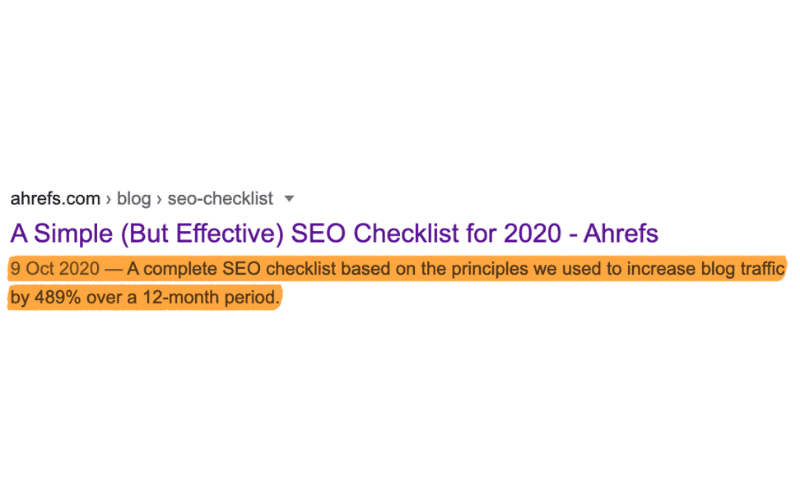
Meta description displayed in a search result.
How often did that happen in the cited study? The source reported roughly one-third of 192,000 sampled pages.
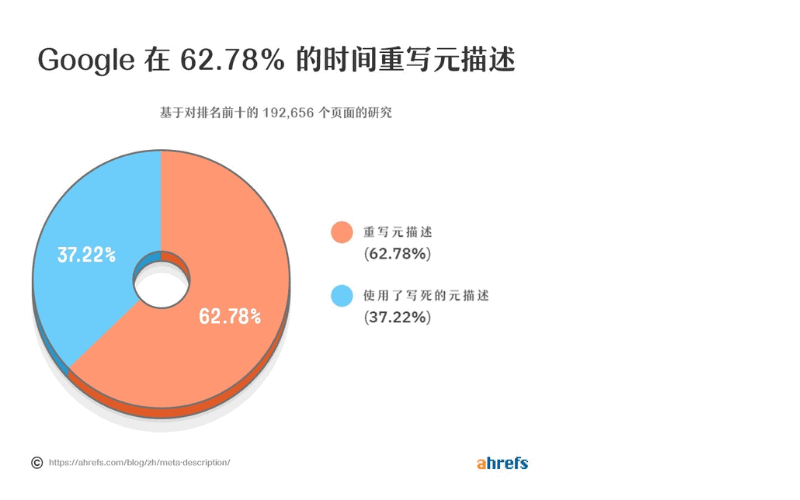
Tip: Google generated the displayed snippet dynamically at other times in that study.
Meta descriptions are not a ranking factor. They can still matter because an accurate, appealing description may help a searcher decide to visit.
Use the following ideas to draft a useful description quickly:
1. Expand on the title with a point that would not fit there. 2. Match the search intent. 3. Use active voice and address the reader directly. 4. Keep the wording concise; the source suggested about 120 characters. 5. Include the topic naturally because Google may emphasize words related to the query.
Do not devote disproportionate time to meta descriptions; they are only one small part of the page.
5. Optimize Images
Images can appear in Google Images and send visits to a site. The source author reported more than 4,000 image-search visits to the Ahrefs blog during a historical 28-day period; this is a dated example, not a forecast.
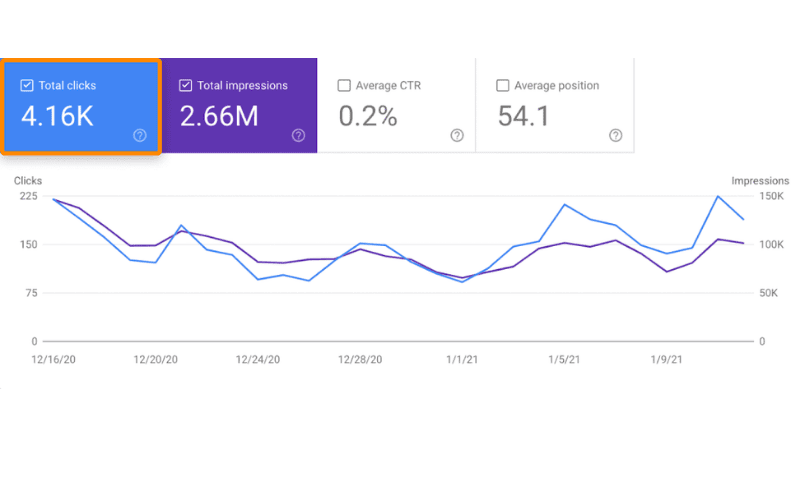
Historical Google Images visits to the Ahrefs blog over 28 days.
The following three-step checklist covers the main image considerations.
a) Name Image Files Properly
Google's image guidance says that filenames can provide limited clues about an image's subject [14]. A descriptive name such as dog.jpg is therefore more useful than IMG_859045.jpg.
Cameras, phones and screenshot tools usually create generic filenames. A screenshot might arrive as Screenshot 2021-01-12.png, for example.
Rename files before publishing when a clearer name will help:
Be descriptive: black-puppy.jpg is more specific than puppy.jpg. Be concise: avoid a filename such as my-super-cute-black-puppy-called-jeff.jpg. Do not stuff variants into the filename. Separate words with hyphens rather than underscores, in line with the cited guidance [15].
b) Use Descriptive Alt Text
Alt text, or alternative text, is an HTML attribute on an <img> element that describes the image. It is not normally visible in the page layout.
<img src="//yourdomain.com/puppy.jpg" alt="puppy">
The main purpose of alt text is accessibility. Screen readers can convey the description to people who cannot see the image, and browsers may display it when the image fails to load.
Google's John Mueller has also said that alt text can help Google Images understand and surface an image [16].
Alt text is extremely useful for Google Images if you want an image to appear there. Even with lazy loading, identify the image early and test what renders. (Paraphrased from John Mueller.)
Google's cited guidance recommends useful, informative alt text that fits the page context and uses keywords appropriately. It also warns against filling alt attributes with keywords because that creates a poor experience.
With those principles in mind, use the following rules:
- Be descriptive. Use relevant language where it belongs.
- Be concise. Keep the description short enough to remain useful.
- Be accurate. Describe what is actually visible in the image.
- Avoid keyword stuffing. Repetition harms accessibility and can look like spam.
- Do not announce the medium unnecessarily. Screen readers already identify an image, so phrases such as
image of
are usually redundant.
The puppy photograph below demonstrates the difference between weak and useful alt text.

Bad: <img src="puppy.png" alt="photo of puppy dog pooch pup">
Basic: <img src="puppy.png" alt="puppy">
Better: <img src="puppy.png" alt="black and white puppy">
Best for this particular image: <img src="puppy.png" alt="black and white puppy playing fetch">
WordPress users can add alt text through the image controls when inserting media into a post.
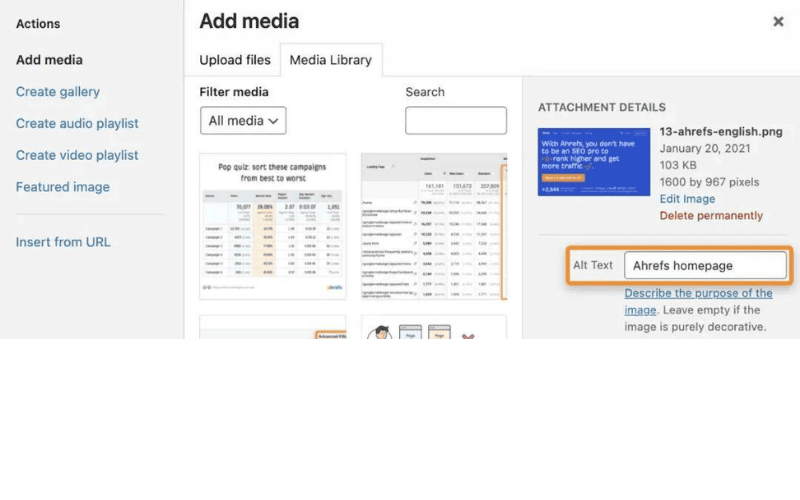
The references also include instructions for adding alt text in Squarespace [17], Wix [18] and Shopify [19].
c) Compress Images
Compressing an image reduces its file size and can improve loading time. Performance matters to users and appears in Google's documented page-experience systems; the source cites historical desktop [20] and mobile [21] speed announcements.
Many image-compression tools are available. The source recommends ShortPixel [22], which offered a web interface [23] for batches of up to 50 images and a WordPress plugin [24] that compressed uploads. Confirm current limits and pricing before relying on them.
Historical note: the source said ShortPixel's free plan allowed up to 100 images a month and then charged one cent per image. That plan detail may have changed.
6. Add Internal and External Links
Links to relevant internal and external resources help visitors navigate a site and find supporting information. Some people nevertheless claim that linking to another site is inherently harmful to SEO.
That blanket claim is a myth. The source found no evidence that a relevant outbound link harms a page merely because it points elsewhere.
John Mueller described the user benefit in these terms:
Links to other websites can provide value by helping users learn more, check sources and understand how the content relates to their questions. (Paraphrased from John Mueller, Google Search Advocate.)
The cited statement did not promise an SEO benefit from outbound links; it said they can help users. Google's explanation of how Search works [25] likewise emphasizes useful and relevant results.
This does not mean adding links indiscriminately. Link to internal and external resources when they genuinely support the reader, such as sources, product recommendations and related articles.
Further reading: Writing an Effective SEO Title Tag [26]; Creating Search-Friendly URLs [27]; Writing a Meta Description [28]; How Often Google Rewrites Meta Descriptions [29]; 12 Image SEO Tips [30]; and Optimizing Alt Text [31].
Advanced On-Page Optimization
The preceding work is enough for a well-optimized page, but further options remain. If a page already performs reasonably well, the following advanced checks may reveal additional opportunities.
1. Optimize for Featured Snippets
Featured snippets are search-result features that may appear near the top of the page and present a short answer drawn from a result.
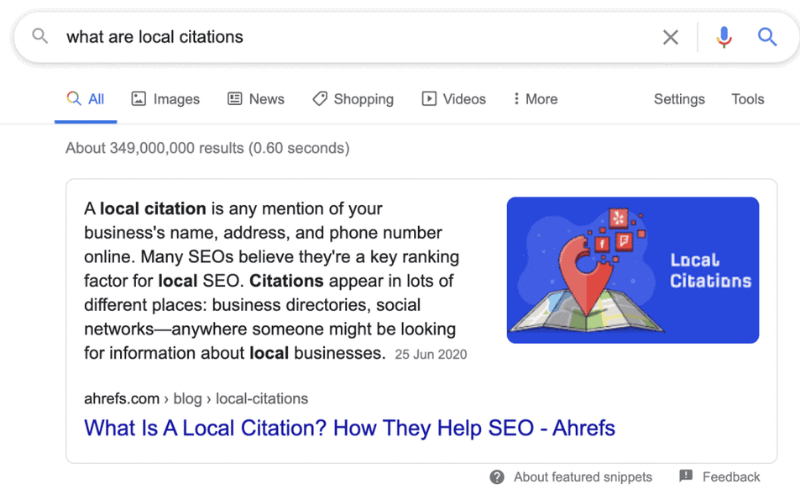
Featured snippet for what are local citations
.
Because the answer is drawn from an indexed result, a page may gain prominent placement when Google selects its passage for the snippet. Selection is not guaranteed.
The process is often harder than the checklist implies, but the source describes four basic conditions:
1. Rank on the first results page, because the source observed that snippets were commonly drawn from leading results. 2. Confirm that the query currently shows a featured snippet and study the answer format. 3. Provide a direct answer on the page. 4. Use the format the query appears to require, such as a paragraph, list or table.
Suppose we want to assess a snippet opportunity for a post about evergreen content. In the source workflow, entering the URL in Ahrefs Site Explorer and filtering the organic-keywords report showed that it already ranked in the top ten for evergreen content
.
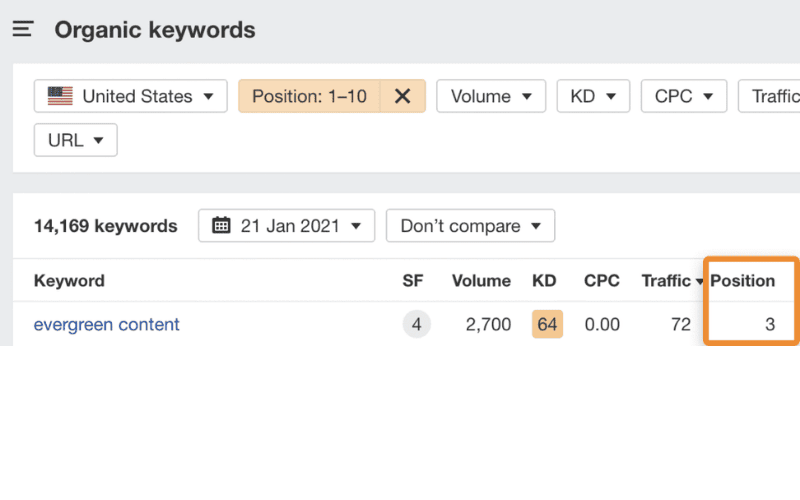
Historical US ranking for evergreen content
in Ahrefs Site Explorer.
The corresponding result page showed a short definition in the featured snippet.
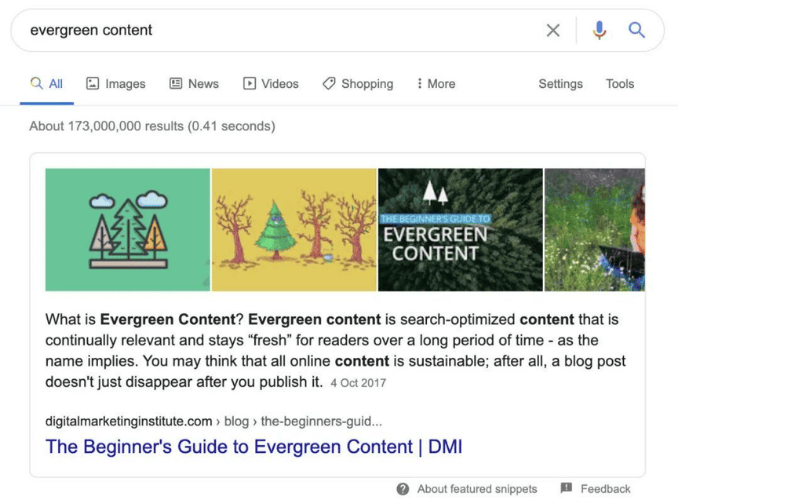
Definition of evergreen content
shown in the snippet.
To be a plausible candidate, the article would therefore need to include a clear definition.
For a query such as most visited websites
, by contrast, the selected result might require a table of sites and their monthly traffic estimates.
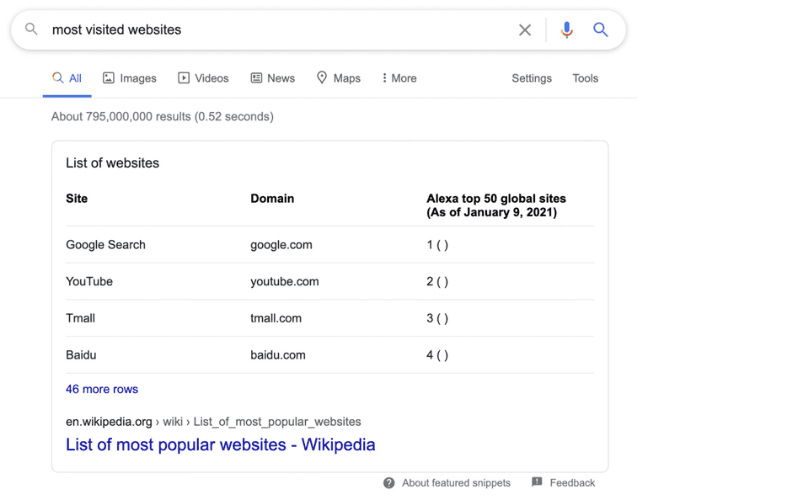
Table shown in the featured snippet for most visited websites
.
2. Add Link-Worthy Elements
Links remain an important ranking signal. Link building is off-page SEO, but a page can make itself easier to cite by including genuinely link-worthy facts, tools or ideas.
How can you identify a link-worthy element?
Study why people link to comparable pages.
The source example used a post targeting long-tail keywords
. Ahrefs Keywords Explorer showed several similar pages with many backlinks.
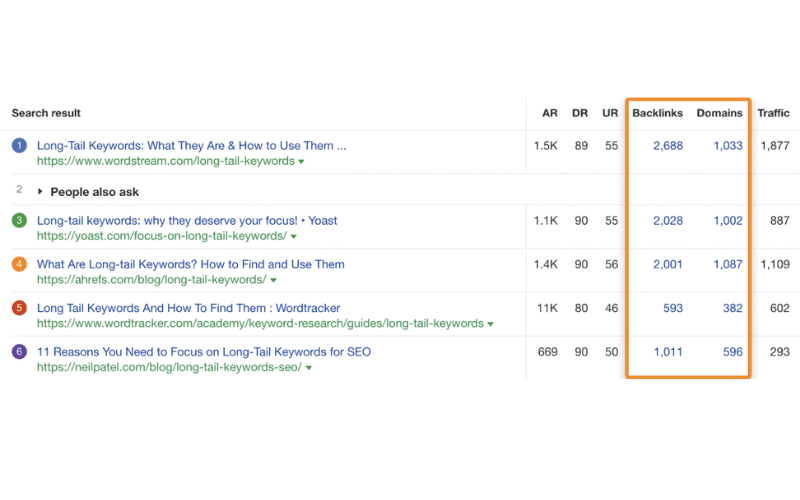
Historical US results for long-tail keywords
in Ahrefs Keywords Explorer.
Opening one of those pages in Site Explorer and reviewing its anchor-text report revealed the phrases people used when linking. Many links in this example referred to statistics.
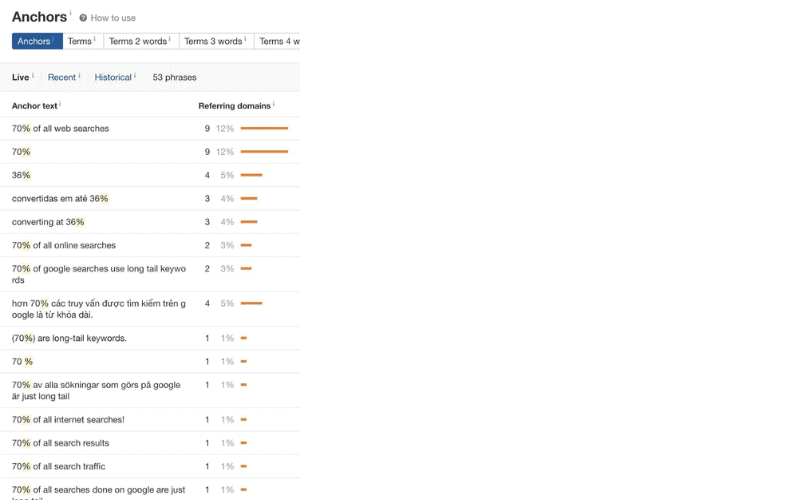
Anchor-text report in Ahrefs Site Explorer.
That evidence suggested that including supportable statistics could make the author's own article more useful to cite.
A similar review of a leading SEO copywriting
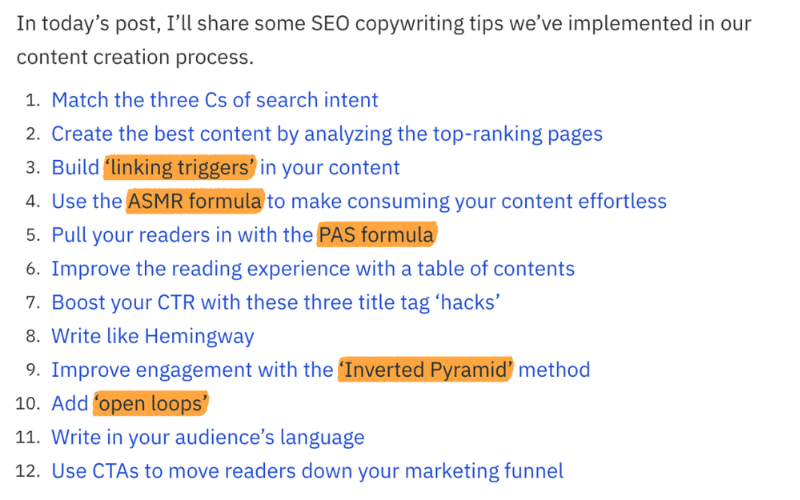
page found that many links referred to two concepts unique to that article.
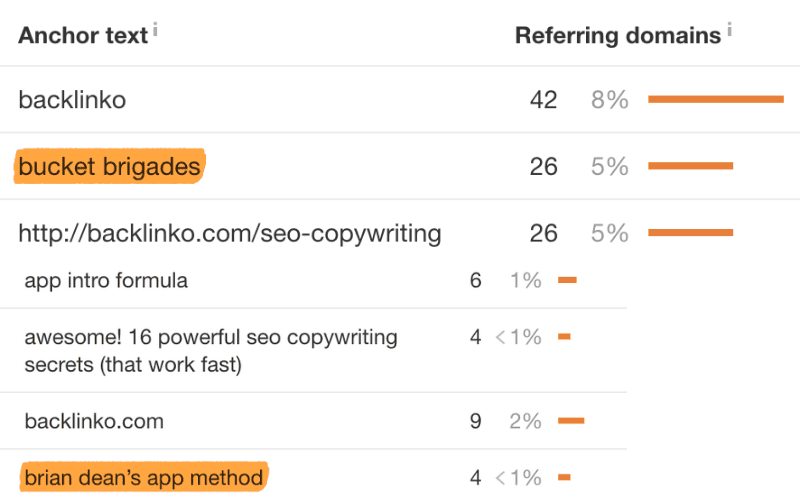
Copying those concepts would add little value. A better approach is to develop original, defensible ideas that give people a reason to cite your page, as the source author did in an SEO copywriting article.
3. Earn Supported Rich Results with Structured Data
Rich results are search listings that can display information beyond the standard title, description and URL.
In the source example, Google showed ratings, cooking time and calories for recipe pages.
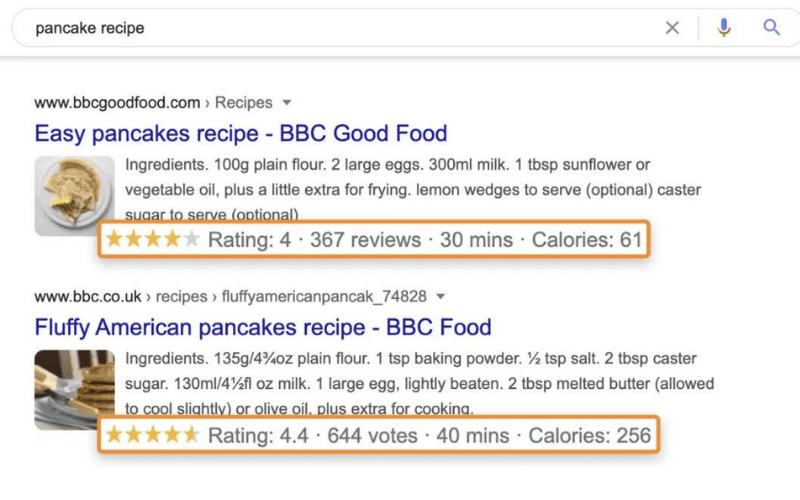
Google derived the information from structured data, often called Schema markup. These pages used a recipe-specific type [32].
Other structured-data types that historically supported enhanced result presentations included:
- How-to markup (a historical example; Google no longer shows How-to rich results)
- Product markup
- Review markup
- Software application markup
- FAQ markup (currently restricted to eligible authoritative health and government sites)
The source then showed a result using FAQ markup.
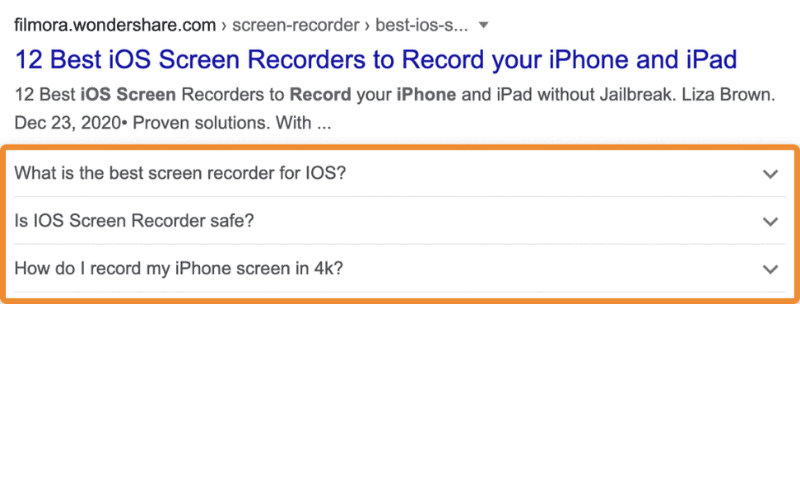
FAQ rich-result example.
Structured data is not a generic ranking factor [33]. Supported rich results may make certain listings more noticeable, but visibility and clicks are not guaranteed.
There is no general ranking boost from structured data. It can make a page easier to understand and therefore easier to show where it is relevant, but that is not a universal ranking bonus. (Paraphrased from John Mueller, Google Search Advocate.)
WordPress users can add structured data through plugins such as Yoast or Rank Math. Only supported content and valid markup can be eligible for search enhancements [34], and eligibility does not guarantee that Google will display one.
4. Improve Topical Relevance
A page can be more relevant when it covers related concepts beyond the literal query wording. A useful page about dogs, for example, may discuss breeds where that information serves the searcher's need.
If you followed the coverage guidance in chapter two, many relevant words, phrases and ideas should already appear naturally in the draft.
Complex subjects still make it easy to overlook an important detail.
One leading historical result for how to brew beer
[35] gave beginners a substantial guide but did not mention needing a siphon to transfer beer from the fermenter to bottles.
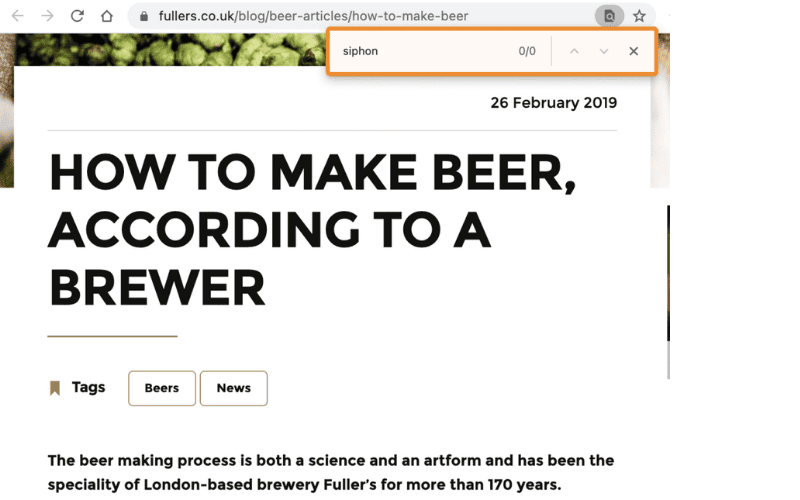
Brewing guide that omitted an important piece of equipment.
If a page does not perform as expected and the reason is unclear, review whether an important concept or task is missing.
The source suggests several ways to investigate.
The historical Also talk about
report in Ahrefs Keywords Explorer showed terms frequently mentioned by the first 100 ranking pages. Entering the target keyword offered a quick view of subjects that those pages discussed. Tool labels and calculations may have changed.
For how to brew beer
, the report contained many terms related to ingredients and equipment, including:
• hops • yeast • malted barley • malt extract • wort chiller • mash tun • auto-siphon
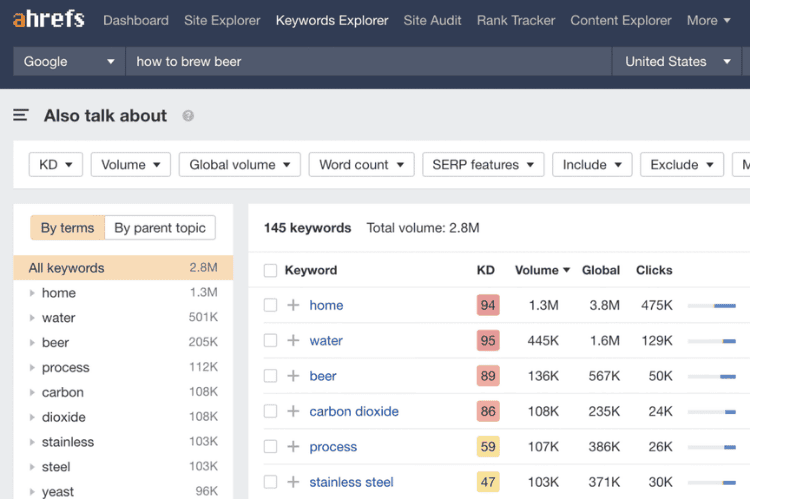
Terms discussed by historical leading pages for how to brew beer
in Ahrefs Keywords Explorer.
Aspiring brewers need to understand most of those items, so a beginner's guide may benefit from covering them. A genuine omission can justify an update.
Use judgment. A word appearing in a competitor report does not automatically belong in your content. Use the evidence to find relevant gaps, not to assemble a compulsory vocabulary list.
- Run a TF-IDF comparison as a gap-finding aid.
TF-IDF stands for term frequency–inverse document frequency. It compares how often a term appears in one text with how often it appears across a wider collection.
A TF-IDF comparison between a page and relevant leading pages can sometimes reveal concepts that competitors cover and your draft omits.
For the source author's article about negative SEO, the comparison surfaced concepts such as disavow files and unnatural links.
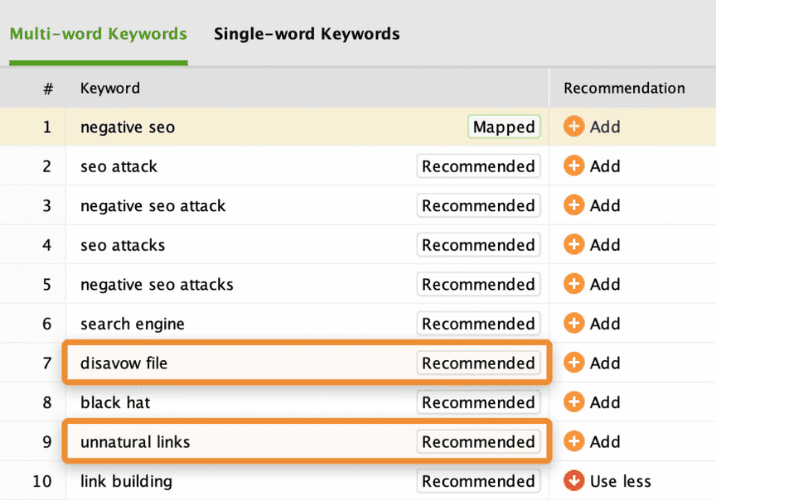
The purpose is not to scatter those terms through the copy. It is to identify relevant ideas that may have been overlooked, then decide whether they improve the page's completeness.
Many TF-IDF tools recommend a precise number of uses for selected terms. The source specifically advises against treating those counts as writing instructions.
What about
LSI keywords? John Mueller stated that there is no such SEO concept and that claims to the contrary are mistaken.
Popular tools branded around LSI keywords
are not implementations of latent semantic indexing, and their suggestion methods may be unclear. They can occasionally prompt a useful idea, but the source author found their output inconsistent.
Further reading: Optimizing for Featured Snippets; Rich Results Guide; Writing a Meta Description; Using Structured Data for SEO; and Guide to the LSI Keywords
Myth.
On-Page SEO Tools
Before closing, here are several free tools that can support the work above. Product names, free tiers and interfaces should be verified before use.
Yoast SEO
Adds titles, meta descriptions, Open Graph tags and structured data to WordPress posts and pages.
Tip: Rank Math, All in One SEO and The SEO Framework provide overlapping functions.
Ahrefs Webmaster Tools (Free)
Finds issues involving title tags, meta descriptions, alt text and Open Graph tags across a site.
Ahrefs SEO Toolbar (Free)
Helps inspect the heading and page structure of other search results.
MetaTags.io (Free)
Previews how a title tag, URL and meta description may appear in a search result.
ShortPixel (Free)
Compresses and optimizes images.
Merkle's Schema Markup Generator (Free)
Creates several structured-data types in JSON-LD, the format recommended in Google's documentation.
Rich Results Test (Free)
Tests structured data and reports whether the detected markup is eligible for supported rich-result types. Passing the test does not guarantee display.
Summary
Following the guidance above should produce a page that is more deliberate and useful. Remember that satisfying the searcher's intent is the foundation. Technical refinements matter, but they are the finishing layer rather than a substitute for the answer.
For more tutorials, explore our SEO optimization knowledge center. The source destination does not yet have a published English version, so its name remains unlinked here.
If your site needs to compete for qualified organic traffic, GlobalBrandsDigital can connect keyword research, SEO content updates, technical optimization and link building in a plan tailored to the site.
References
[1] How Search Works: https://www.google.com/intl/zh-CN/search/howsearchworks/
[2] Keyword Research Guide: https://ahrefs.com/blog/zh/keyword-research/
[3] Ahrefs SEO Toolbar: https://ahrefs.com/zh/seo-toolbar
[4] Study of Three Million Search Queries: https://ahrefs.com/blog/zh/also-rank-for-study/
[5] Content Gap Tool: https://ahrefs.com/zh/content-gap
[6] Source screenshot: https://mmbiz.qpic.cn/mmbiz_png/ALH6ogj2tdu8K2gKTwgjMDUEKAzSibxFgjApjYZSO41fj9jofzrvpLTrOR0QBGQVW1s3xAnzayFsBB1ibXSKH2Sg/0?wx_fmt=png
[7] Complete Guide to Search Intent: https://ahrefs.com/blog/zh/search-intent/
[8] How to Write SEO Content: https://ahrefs.com/blog/seo-content/
[9] How to Become a Better SEO Writer: https://ahrefs.com/blog/zh/seo-writing/
[10] 11 Content-Writing Tips: https://ahrefs.com/blog/zh/content-writing/
[11] 12 SEO Copywriting Tips: https://ahrefs.com/blog/zh/seo-copywriting/
[12] SEO Outsourcing Article: https://ahrefs.com/blog/zh/seo-outsourcing/
[13] Content-Writing Guide: https://ahrefs.com/blog/zh/content-writing/
[14] Google Image Guidance: https://developers.google.com/search/docs/advanced/guidelines/google-images
[15] Google URL-Structure Guidance: https://developers.google.com/search/docs/advanced/guidelines/url-structure?hl=en&visit_id=637467444247717072-1439885175&rd=1
[16] John Mueller on Alt Text: https://twitter.com/JohnMu/status/1036901608880254976
[17] Squarespace Alt-Text Instructions: https://support.squarespace.com/hc/en-us/articles/206542357-Adding-alt-text-to-images
[18] Wix Alt-Text Instructions: https://support.wix.com/en/article/adding-alt-text-to-your-product-images
[19] Shopify Alt-Text Instructions: https://help.shopify.com/en/manual/using-themes/change-the-layout/accessibility/adding-alt-text
[20] Historical Desktop Speed Announcement: https://webmasters.googleblog.com/2010/04/using-site-speed-in-web-search-ranking.html
[21] Historical Mobile Speed Announcement: https://webmasters.googleblog.com/2018/01/using-page-speed-in-mobile-search.html
[22] ShortPixel: https://shortpixel.com/
[23] ShortPixel Web Interface: https://shortpixel.com/online-image-compression
[24] ShortPixel WordPress Plugin: https://wordpress.org/plugins/shortpixel-image-optimiser/
[25] Google's Guide to How Search Works: https://developers.google.com/search/docs/basics/how-search-works
[26] Writing an Effective SEO Title Tag: https://ahrefs.com/blog/title-tag-seo/
[27] Creating Search-Friendly URLs: https://ahrefs.com/blog/zh/seo-friendly-urls/
[28] Writing a Meta Description: https://ahrefs.com/blog/zh/meta-description/
[29] How Often Google Rewrites Meta Descriptions: https://ahrefs.com/blog/zh/meta-description-study/
[30] 12 Image SEO Tips: https://ahrefs.com/blog/image-seo/
[31] Optimizing Alt Text: https://ahrefs.com/blog/alt-text/
[32] Recipe Structured Data: https://developers.google.com/search/docs/data-types/recipe
[33] John Mueller on Structured Data and Ranking: https://twitter.com/JohnMu/status/980902538865205248
[34] Google Search Gallery: https://developers.google.com/search/docs/guides/search-gallery
[35] Historical Brewing Guide: https://www.northernbrewer.com/blogs/new-to-brewing-start-here/how-to-brew-beer-homebrewing-101