
On this pageTable of contents+
- Traffic Analysis: Similarweb
- Exporting and Opening Search Results: SEOquake and Open Multiple URLs
- Authority Reference: MozBar
- Keyword Insights: Keywords Everywhere
- Fast Keyword Screening: Ubersuggest
- Finding Contact Details: Hunter, RocketReach and Snov.io
- Expanding a Publisher List: SimilarSites
- Shopify Store Analysis: Commerce Inspector
- Understanding a Site's Technology Stack: Wappalyzer
- Analysing Competitor Affiliate Strategies: Publisher Discovery
- Inspecting Shopify Operations: Koala Inspector
- Supporting Amazon Operations: SellerSprite, Jungle Scout and Keepa

In digital marketing and affiliate outreach, teams work more efficiently when they can gather information, assess prospective partners and analyse competitor sites quickly. This guide collects browser extensions and services used in the source workflow for traffic analysis, keyword research, contact discovery, ecommerce monitoring and Amazon operations. The tools serve different stages of the work: Similarweb and MozBar provide directional site and authority signals; SEOquake and Open Multiple URLs speed up result screening; Keywords Everywhere and Ubersuggest surface keyword estimates; Hunter, RocketReach and Snov.io support contact research; and the ecommerce tools reveal selected store, technology, affiliate or marketplace signals. The source team's process did not treat any extension as conclusive. It combined estimates, exported result sets, manual page review and business context before deciding whether a site, keyword, publisher or product deserved further attention. That distinction matters because an extension can make research faster without making its estimates first-party facts. Features, prices, free quotas and interfaces can change, so verify each tool before adopting it. Also confirm that the way you gather data and contact people follows platform rules, privacy law and anti-spam law in every market where you operate.
Traffic Analysis: Similarweb
Similarweb was the source team's most frequently used traffic-analysis extension. It displayed estimates such as monthly visits, global, country and category rankings, bounce rate, average visit duration and the distribution of organic, direct, social and paid traffic.
At the time of the source review, the free version provided enough information for routine initial screening. Current limits may differ.
The team used it mainly in two situations:
- Assessing media, blogs and forums
When evaluating a prospective partner, the team used Similarweb to form an initial view of the site's traffic. It reviewed estimated monthly visits, bounce rate and channel mix, including whether the site depended on organic or paid traffic. During the team's ShareASale work, it also observed that some affiliate-review processes considered similar data when estimating reach and partnership potential.
- Analysing competitor sites
For competitor research, Similarweb helped the team estimate whether a site's core traffic came from SEO and content or from paid acquisition. The source also used its keyword and backlink views as directional inputs for traffic planning.

Exporting and Opening Search Results: SEOquake and Open Multiple URLs
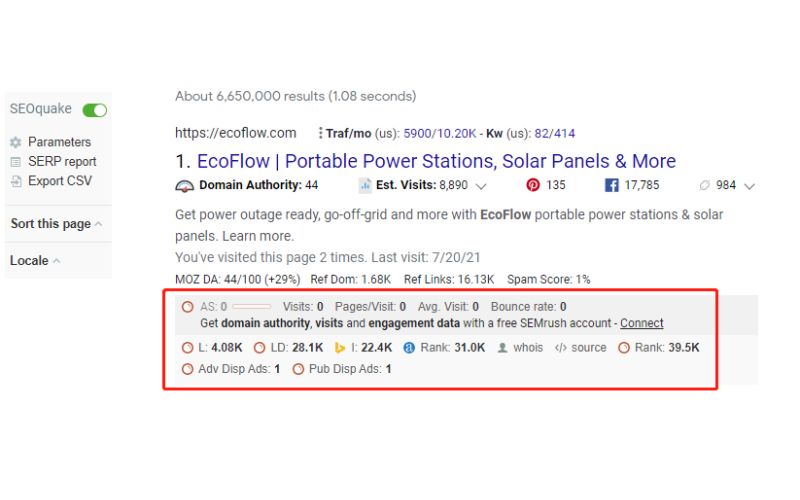
SEOquake was another frequently used extension for finding blogs, forums, publishers and creators. In the source-era interface, it added a toolbar and metrics beneath search results, including rankings, Whois information and third-party Semrush and Ahrefs measures.
The feature the team used most was Export. It converted Google results into a spreadsheet and removed the need to copy every link manually.
The team paired it with Open Multiple URLs, a lightweight extension that opened a batch of exported links. This was useful for quickly previewing sites during screening or content review.
Combined with Google operators such as inurl:, site: and intitle:, the two tools helped the team build and filter a list of prospective partners more efficiently.
Authority Reference: MozBar
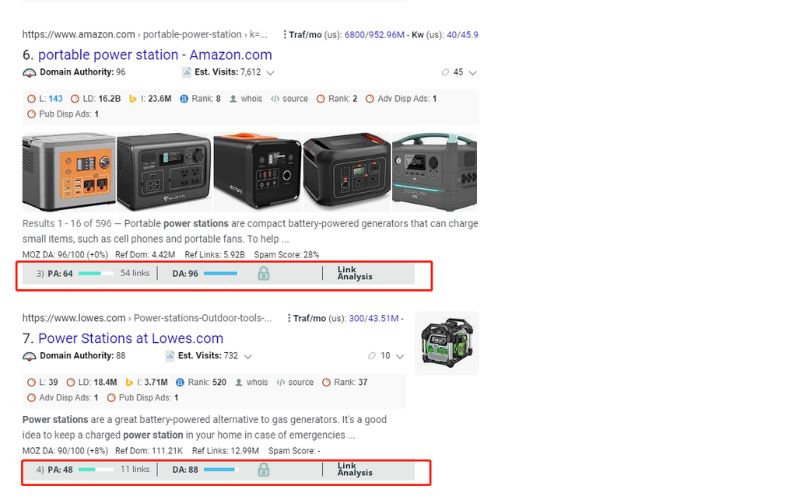
MozBar was used during keyword research and website assessment. In the source workflow, it displayed several third-party SEO metrics beneath Google results:
- DA, or Domain Authority: Moz's proprietary 1–100 estimate of a domain's relative ranking strength. It is not a Google metric.
- PA, or Page Authority: Moz's proprietary 1–100 estimate for an individual page.
- Link data: referring domains and link types used to assess a site or page.
The source applied these metrics in two ways:
- Assessing partner-site quality
Before working with a publisher, blog or forum, the team compared DA, PA and links with Similarweb's traffic estimates. No single score established quality; the combination provided a broader initial screen.
- Estimating keyword competition
For a target query, the team reviewed DA, PA and links across the first 10 or 20 results. If the leading pages were mostly smaller blogs with modest third-party scores and the result set contained no dominant marketplaces such as Amazon or eBay, the team treated the query as potentially more accessible and then reviewed the pages manually.
Keyword Insights: Keywords Everywhere
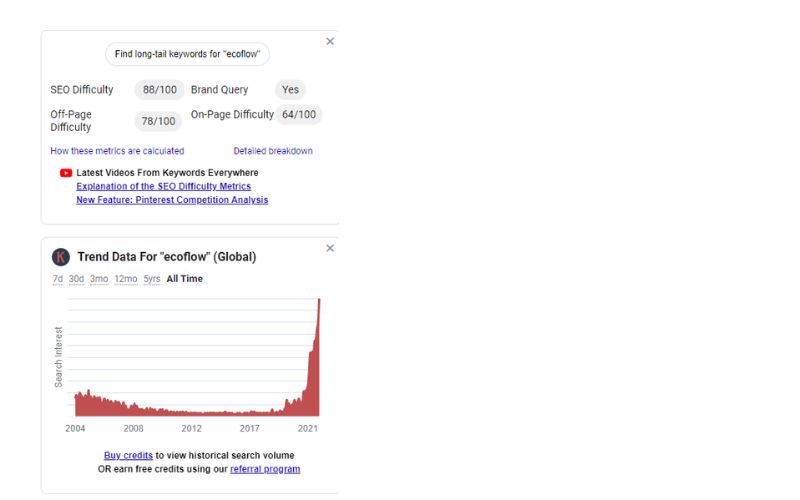
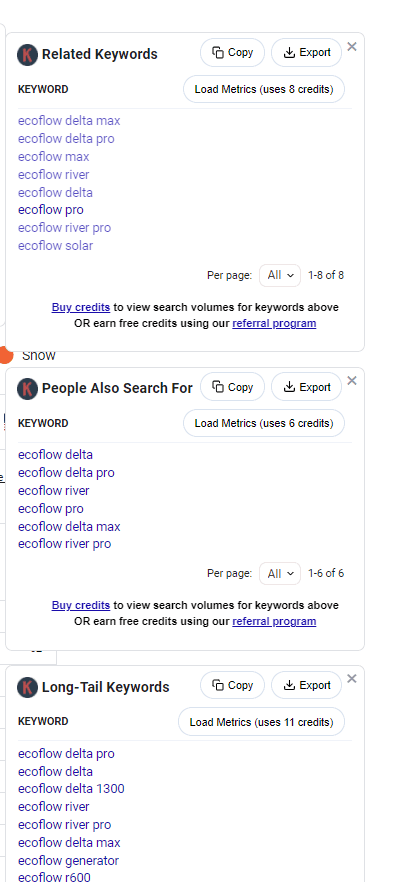
Keywords Everywhere placed several research dimensions directly in Google results:
- Search volume;
- Keyword difficulty;
- Trend over time;
- Related and long-tail suggestions;
- Related searches and "People also search for" suggestions.
The source team used these estimates for content planning, paid-keyword selection and SEO prioritisation. During topic and landing-page work, it compared demand and competition to refine its view of user needs.
The source-era extension also offered bulk export, allowing results to be organised, filtered and compared in a spreadsheet. Current credits and plan limits should be checked.
For both content and paid-search teams, the extension supplied quick directional data. The figures remain third-party estimates rather than guaranteed demand or difficulty.
Fast Keyword Screening: Ubersuggest
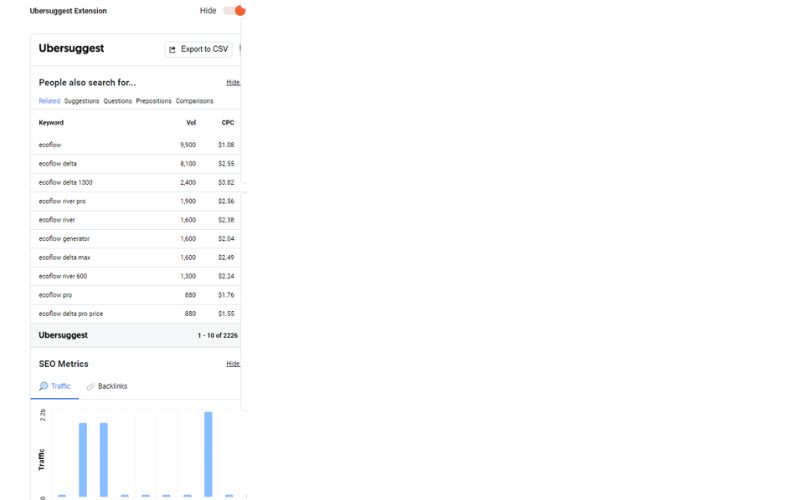
The Ubersuggest extension displayed search volume, cost per click and SEO difficulty in the result page. This reduced the need to switch repeatedly between tools such as Semrush, Ahrefs and Similarweb.
The immediate view was useful for collecting ideas and conducting an initial assessment before deeper validation.
For quick keyword screening, the extension served as a lightweight supplement to a fuller research workflow.
Finding Contact Details: Hunter, RocketReach and Snov.io
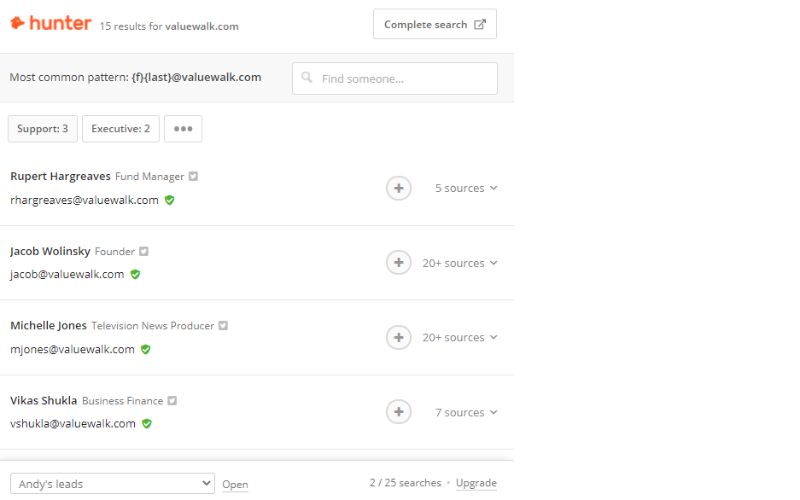
Finding a usable business email is often the first step in outreach to a blog, forum or publisher. The source team used the Hunter extension, formerly Email Hunter, to find publicly available addresses associated with a site and perform basic verification.
These services can speed up screening of publishers, specialist blogs and creators for partnership or affiliate outreach. Teams should use public business data responsibly and follow applicable privacy and anti-spam rules.
The source also used RocketReach and Snov.io. RocketReach supported searches by role, company and industry, which could help identify editors, content leads and affiliate managers.
For teams that regularly develop publisher and forum relationships, contact-discovery tools can reduce manual research. The source found RocketReach and Hunter particularly useful in affiliate-channel work, including ShareASale programmes.
Expanding a Publisher List: SimilarSites
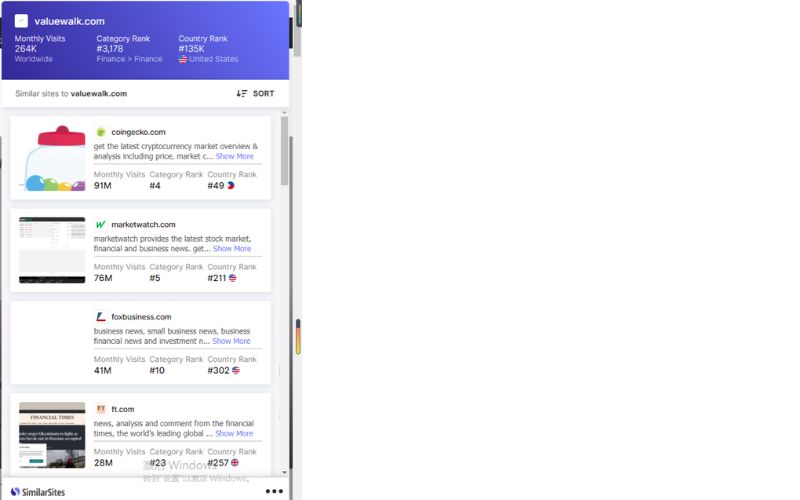
SimilarSites recommended sites with a comparable topic, content structure or audience. The source says its interface could show up to 25 suggestions for the site being viewed; current limits may differ.
This recommendation model helped the team expand a pool of related blogs, publishers, creators and affiliate channels.
After finding one strong blog or content platform, the team used SimilarSites to discover others with similar audiences and editorial styles.
For systematic partnership and off-site traffic research, it served as a lightweight discovery tool whose suggestions still required manual review.
Shopify Store Analysis: Commerce Inspector
Commerce Inspector was designed for Shopify store research and was one of the source team's regular tools.
The source used it to inspect details such as:
- The store theme;
- Directional traffic estimates;
- Best-selling products;
- Recently added products.
Theme detection was the feature the team used most. A competitor's theme can help explain its front-end structure and user experience, but it cannot prove why the site converts.
For teams studying competitors or improving their own brand store, Commerce Inspector offered a quick view of selected layout and catalogue signals.

Understanding a Site's Technology Stack: Wappalyzer
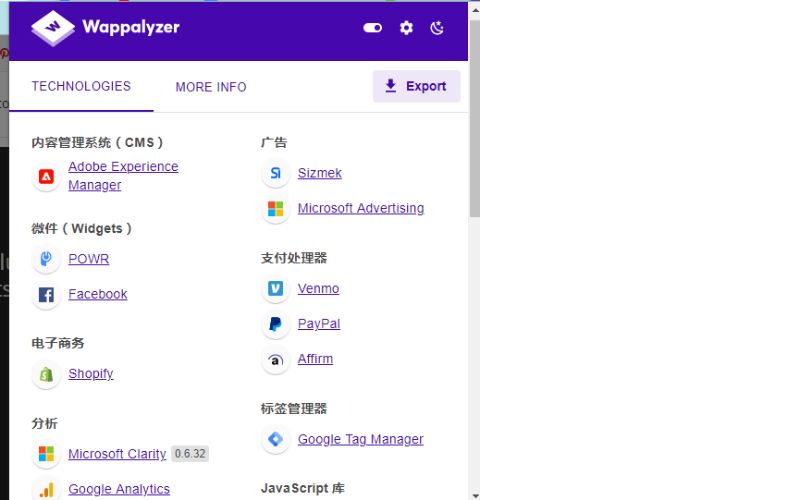
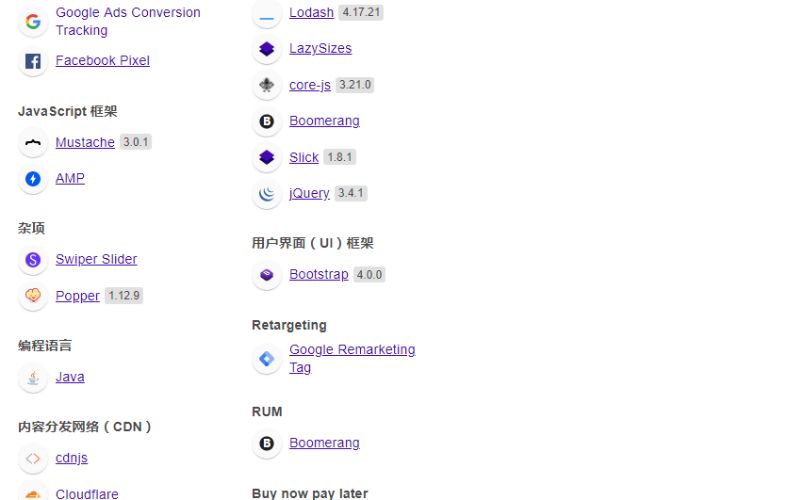
Wappalyzer identified technologies used by a website across categories such as:
- Platforms and content-management systems, including Shopify, WordPress and Magento;
- Tracking pixels and analytics, such as Meta Pixel and Google Analytics;
- Payment processors, including Stripe and PayPal;
- Content delivery networks, such as Cloudflare and Akamai;
- Marketing, CRM, customer-service and other third-party tools.
These signals can suggest how a site is built, measured and run. For example, remarketing tags, payment methods and a CDN can inform a competitor review, but teams should verify what the detector reports before acting.
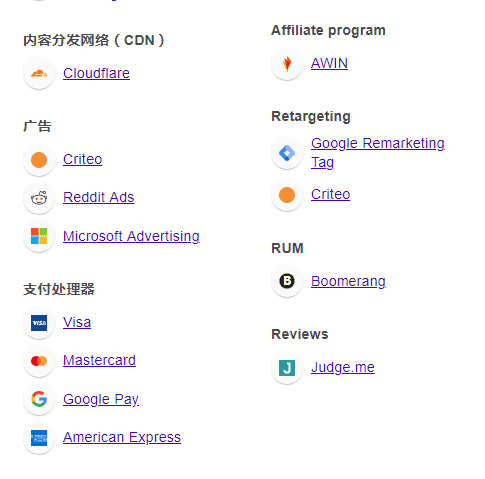
The source also used Wappalyzer on product pages to identify affiliate and advertising technologies, including:
- AWIN, an affiliate network with a substantial European presence;
- Criteo, a programmatic advertising platform commonly associated with retargeting;
- Reddit Ads, a channel some brands use to reach specific communities.
These clues helped the team form hypotheses about a site's affiliate activity and advertising mix and identify channels competitors might not be using.
Wappalyzer's breadth and immediacy made it a useful starting point for technology, competitor and media research, not a substitute for direct verification.
Analysing Competitor Affiliate Strategies: Publisher Discovery
In addition to extensions that detect an affiliate platform, the source recommended PublisherDiscovery.com for affiliate-channel analysis. It was used to explore networks, publisher types and the distribution of a brand's affiliate relationships.
The source-era free version provided a broad view of networks and partnership models. Paid access exposed publisher lists, sites and contact details. Current plans and data coverage should be verified.
At the time of writing, the team was operating programmes on ShareASale and AvantLink. It considered cost-per-sale affiliate models more controllable than rising paid-media costs for brands building long-term partnerships, but recognised that results depend on programme economics and partner quality.
Its affiliate-operations workflow had three steps:
- Platform setup: optimise landing pages and tracking so that performance can be measured end to end;
- Publisher recruitment: use network invitations and responsible off-platform outreach to suitable partners;
- Publisher activation and retention: maintain communication, supply useful resources and align incentives with sustainable performance.
The team planned to share more detailed affiliate-operations examples in later articles.
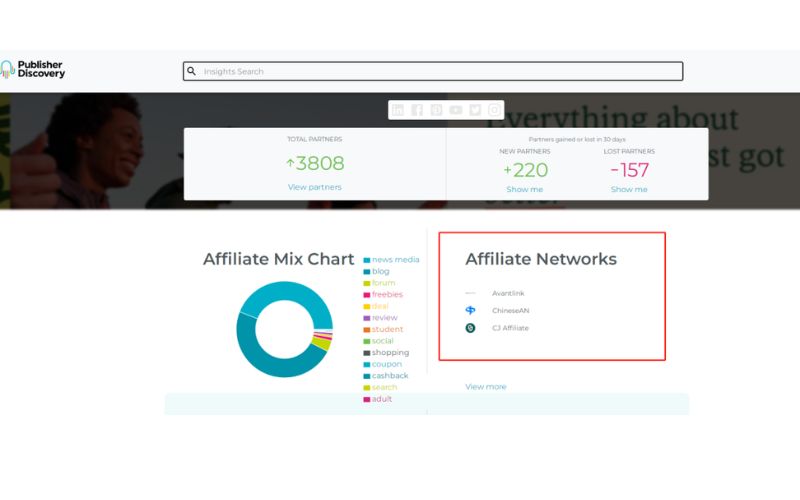
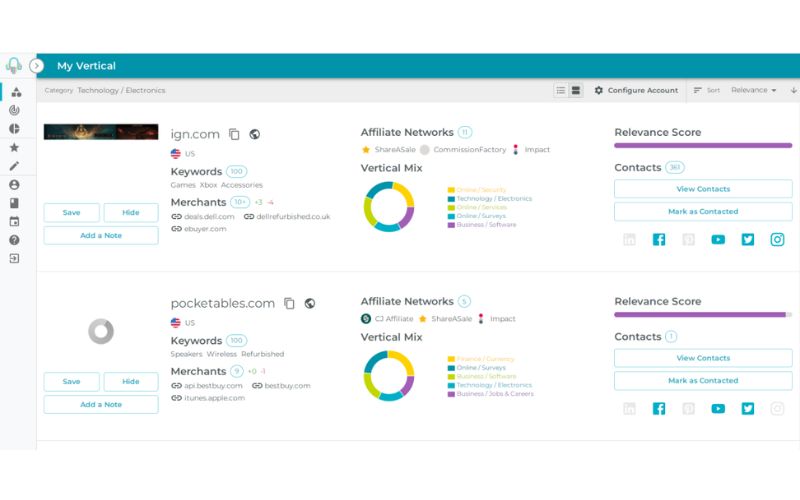
It also recommended monitoring the affiliate networks and publisher types used by competitors. This can reveal channel gaps and help a team decide which networks fit its stage and resources.
Some brands favour editorial publishers, whereas others depend more on coupon and comparison partners. Understanding the mix can inform a choice among networks such as ShareASale, AvantLink, Impact and CJ.
Inspecting Shopify Operations: Koala Inspector
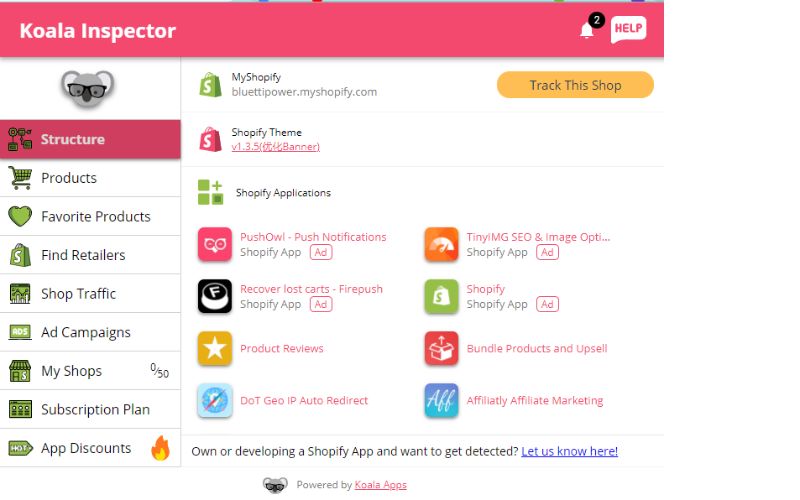
Koala Inspector supplemented general website analysis with Shopify-specific operational signals. The source used it to review competitor product and advertising strategies, including:
- Whether the store appeared to run advertising;
- Whether it had an offline or retail presence;
- Directional traffic estimates;
- Recently added products;
- Best-selling products;
- Estimated SKU count.
The source team had previously found SKU counts difficult to estimate. Koala Inspector provided a simpler directional figure, although the article explicitly notes that it was not guaranteed to be exact.
The extension also helped the team estimate product-range depth, launch rhythm and ad activity when selecting a market or comparison brand.
Supporting Amazon Operations: SellerSprite, Jungle Scout and Keepa
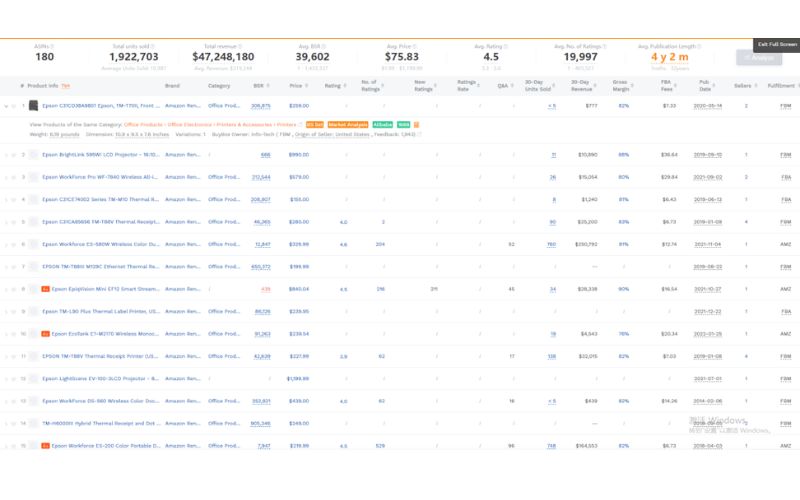
The source team used several extensions for Amazon product and market research. SellerSprite was its most frequently used tool and covered:
- Market selection and analysis;
- Product research and competitor comparison;
- Keyword discovery and trend analysis;
- Reverse-ASIN research and category-rank tracking.
Jungle Scout, Keepa and Helium 10 offered different strengths, including price history, review monitoring and listing optimisation. In the source team's workflow, SellerSprite offered the most balanced combination of data, usability and Chinese-language support, so it became the primary tool.
For teams researching products, keywords and competitors on Amazon, these tools can reduce manual work and support better-documented decisions. Their estimates still need validation against first-party business data.
The tools in this source guide supported digital marketing, off-site promotion, independent-site analysis and Amazon operations. Their value came from combining faster information gathering with human review rather than accepting any one metric at face value.
The team intended to continue sharing practical tools and operating experience for each intended use case and more detailed operating workflows.