
On this pageTable of contents+
- What Is a Reverse Image Search Engine?
- How Reverse Image Search Works
- Reverse Image Search vs Image Search
- How to Use Reverse Image Search for SEO
- 1. Use Original, High-Quality Images
- 2. Monitor How Other Sites Use Your Images
- 3. Improve Alt Text and Descriptions
- 4. Increase Brand Visibility and Earn Links
- 5. Study Competitors' Visual Strategies
- 6. Improve User Experience
- 7. Review Image Performance Regularly
- Recommended Reverse Image Search Tools
- 1. Google Images
- 3. Bing Visual Search
- 4. Baidu Image Search
- 5. TinEye
- 6. Pinterest Visual Search
- More Reverse Image Search Tools
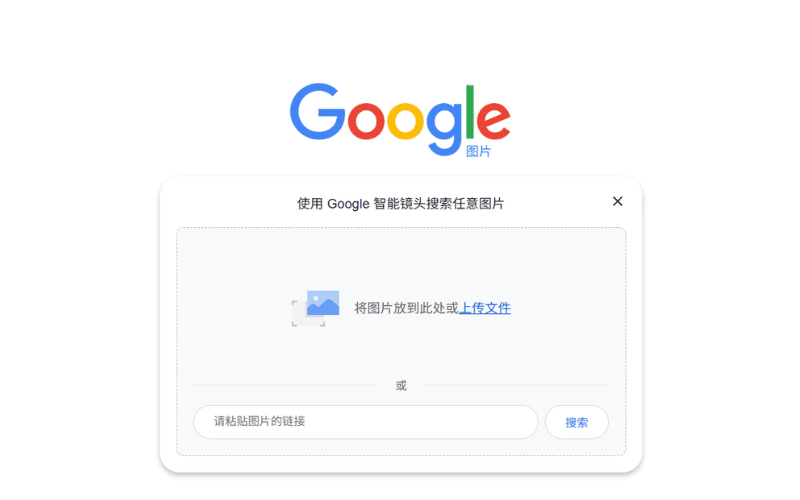
- How to Run a Reverse Image Search With Google Lens

If you work on SEO, reverse image search may be one of the useful tools you have overlooked. It can help you check where your images appear, investigate possible copyright misuse and uncover practical optimisation opportunities.
This guide explains how reverse image search works, how it can support SEO and how the 17 services listed in the Chinese source differ. Product availability, interfaces, coverage and privacy terms change, so verify a service before uploading sensitive or personal images. The final two source-era listings were not reachable with valid HTTPS during our September 2026 check and are retained for completeness, not as current recommendations.
What Is a Reverse Image Search Engine?
A reverse image search engine uses an image as the query. In a conventional image search, you type a description and look for pictures. In a reverse search, you upload an image or provide its URL, and the service looks for related information, matching copies or visually similar images.
For example, you may find a landscape photograph online without knowing where it was taken, or you may suspect that someone has reused an image without permission. A reverse search can help you investigate the original source and find other pages on which the image appears.
How Reverse Image Search Works
The underlying technology can be complex, but the basic process is straightforward.
- Extract visual features: the engine analyses the uploaded image and identifies signals such as colour, shape, patterns and texture, rather than relying only on a filename or tag.
- Compare images: it compares those signals with images or image representations in its index and looks for close matches.
- Return results: it presents matching or related images and pages. Results may identify a possible source, show other uses of the image or offer visually similar alternatives.
In simple terms, reverse image search uses an image's appearance to investigate its footprint across the web.
Reverse Image Search vs Image Search
The two tools may look similar, but their inputs and purposes differ. A standard image search usually starts with words, whereas a reverse image search starts with an image.
- Image search: you enter a query and the engine returns images associated with the words. A search for “cats”, for example, uses page context, filenames, alt text and other signals to find relevant images.
- Reverse image search: you upload an image and the engine analyses its visual content to find identical, modified or similar images. It relies more heavily on visual features such as colour, shape and texture.
Put another way, a standard image search asks the engine to find what you describe. A reverse search asks it to tell you more about the image you already have.
How to Use Reverse Image Search for SEO
Reverse image search can support copyright monitoring and source research, but it can also inform image SEO. The following methods are the practical uses described in the source.
1. Use Original, High-Quality Images
- Original images: reverse search can show whether a supposedly distinctive asset is already widely used. Originality alone does not guarantee rankings, but unique, useful imagery can strengthen the page and reduce accidental duplication.
- High-quality images: clear, relevant images are more useful to visitors and more likely to earn attention or shares. Review common imagery in your market, then improve the usefulness, clarity and distinctiveness of your own visual assets without sacrificing load speed.
2. Monitor How Other Sites Use Your Images
- Investigate unauthorised reuse: search for copies of your images and document the pages on which they appear. If a use is unauthorised, contact the publisher or obtain legal advice appropriate to the jurisdiction; do not assume that every match is infringement.
- Protect copyright: consistent monitoring can help an organisation enforce its rights and maintain reliable records of where original assets are used.
3. Improve Alt Text and Descriptions
- Improve discoverability: compare the contexts in which an image appears, but write alt text for accessibility and accurate description first. Do not copy keywords from search results or stuff them into the attribute.
- Improve relevance: use the surrounding page and the image's actual subject to write concise, descriptive alt text and filenames. Accurate context helps search engines understand the image and helps people who use screen readers.
4. Increase Brand Visibility and Earn Links
- Find attribution opportunities: reverse search can reveal publishers that use your original images. Where the use is legitimate, you can politely request clear attribution and, when editorially appropriate, a link to the original source. A link is not automatically owed and should never be coerced.
- Monitor branded assets: track logos, product photography and campaign images to understand how they spread. If a publisher has a valid reason to cite the original source, a useful attribution link can support referral traffic and brand visibility.
5. Study Competitors' Visual Strategies
- Understand competitors: review the types of images that appear around competing pages and the contexts in which they are reused. Treat this as qualitative research, not proof that an image caused a page to rank.
- Improve the image-and-content combination: identify visual formats that help users understand the subject, then create original assets suited to your audience and content rather than copying a competitor's work.
6. Improve User Experience
- Increase usefulness and engagement: examine how other sites position explanatory images, diagrams and product photographs. Use the findings to test layouts that make your own content easier to understand and navigate.
- Improve content structure: connect each image with the section it supports, provide an informative caption when useful and test the experience with real users. Better relevance and presentation can improve engagement, although reverse search itself does not measure dwell time or rankings.
7. Review Image Performance Regularly
- Track distribution: periodically check which original images are being referenced or shared, and combine those observations with Search Console, analytics and referral data before deciding what to update.
- Optimise format and size: use performance tools, not reverse-search results, to choose formats and compression. Responsive images, suitable dimensions and efficient files can improve loading and user experience.
Recommended Reverse Image Search Tools
Reverse image tools vary in index coverage, matching method, use case and privacy policy. The Chinese source lists the following 17 options. This section preserves that inventory while distinguishing current checks from source-era descriptions.
1. Google Images
- What it offers: a widely used image-discovery service with broad web coverage.
- Best for: investigating image sources, visually similar images and possible reuse.
- Why consider it: broad coverage makes it a practical starting point, although no engine sees the entire web.
- URL: https://images.google.com
Learn more: What Can Google Learn From an Image?
2. Google Lens
- What it offers: visual recognition for objects, text, plants, animals and other subjects.
- Best for: object identification, shopping research, text extraction and translation.
- Why consider it: it combines visual matching with contextual information and recognition features.
- URL: https://lens.google, or use the Google Lens option in a supported desktop browser.
3. Bing Visual Search
- What it offers: Microsoft's visual-search service, including related images, products and places.
- Best for: product identification, shopping research and related visual information.
- Why consider it: it can supplement similar-image results with commerce-oriented context.
- URL: https://www.bing.com/visualsearch
4. Baidu Image Search
- What it offers: Baidu's image-search service, with particular relevance to Chinese-language web content.
- Best for: tracing sources and matches across Chinese websites.
- Why consider it: its regional index can complement global search engines when the likely source is in China.
- URL: https://image.baidu.com
5. TinEye
- What it offers: reverse matching focused on locating copies and transformations of an image.
- Best for: source tracing, reuse monitoring and protection of original work.
- Why consider it: specialised matching and result filters make it useful for provenance checks.
- URL: https://tineye.com
6. Pinterest Visual Search
- What it offers: visual discovery within Pinterest, particularly across design, fashion and creative topics.
- Best for: inspiration research, design references and visual trend exploration.
- Why consider it: it is useful when the relevant visual ecosystem is already represented on Pinterest.
- URL: https://www.pinterest.com
More Reverse Image Search Tools
The source also includes the following specialist and meta-search services. Check current product status, jurisdiction, privacy terms and upload retention before using any service, especially one that processes faces or identity data.
7. Yandex Images
- What it offers: image search from Yandex with visual-matching capabilities.
- Best for: investigating sources in Eastern Europe and across multilingual pages.
- Why consider it: a different index can return matches that other engines miss.
- URL: https://yandex.com/images
8. DNS Checker
- What it offers: a site known for DNS utilities that also presents a reverse-image-search interface.
- Best for: users who want domain utilities and links to image-search functions in one place.
- Why consider it: it can act as a convenient utility hub; verify which engine handles an uploaded image.
- URL: https://dnschecker.org
9. Labnol
- What it offers: a simple web utility that can route an image query to more than one search service.
- Best for: quick source checks in everyday research.
- Why consider it: a lightweight interface can reduce the steps needed to compare services.
- URL: https://www.labnol.org
10. PimEyes
- What it offers: face-search technology that looks for visually similar faces online.
- Best for: lawful, consent-aware investigations of a person's own images.
- Why consider it: face search is highly sensitive. Review local biometric and privacy law, the service's terms and consent requirements before use.
- URL: https://pimeyes.com
11. Lenso.ai
- What it offers: AI-assisted visual matching and image analysis.
- Best for: users who need more specialised matching categories.
- Why consider it: it may provide an additional index and matching approach; validate results rather than treating them as identity proof.
- URL: https://lenso.ai
12. Copyseeker
- What it offers: a service positioned around finding copies and monitoring image reuse.
- Best for: copyright research and protection of original visual assets.
- Why consider it: its focus aligns with creator workflows, but every result still requires manual verification.
- URL: https://copyseeker.com
13. SocialCatfish.com
- What it offers: identity and image-research services marketed for online-safety investigations.
- Best for: cautious investigation of suspected impersonation or scams where the user has a lawful basis.
- Why consider it: it may add identity-oriented sources, but results are not proof and can affect real people. Follow privacy law and avoid harassment or misidentification.
- URL: https://socialcatfish.com
14. ImgOps
- What it offers: a gateway to several image tools and reverse-search engines.
- Best for: comparing results across multiple services.
- Why consider it: the multi-engine workflow can save time when one index is insufficient.
- URL: https://imgops.com
15. SwindlerBuster
- What it offers: image and profile research marketed for detecting possible romance or online scams.
- Best for: safety checks performed lawfully and with careful verification.
- Why consider it: the specialist framing may be useful, but no image match alone establishes fraud or identity.
- URL: https://swindlerbuster.com
16. FindFace ID
- Source-era description: a face-recognition service intended to find similar faces.
- Source-era use case: face matching, social-media monitoring and public-figure research.
- Current caution: the listed domain did not present a valid trusted HTTPS certificate during our September 2026 check. Do not upload an image unless availability, ownership, security, consent and legal use have been independently verified.
- Source-listed URL: https://findface.pro
17. TrackMe
- Source-era description: a service said to track how images spread, particularly on social platforms.
- Source-era use case: social monitoring, brand monitoring and distribution analysis.
- Current caution: the listed domain did not present a valid trusted HTTPS certificate during our September 2026 check. Retain it only as part of the source inventory, not as a current tool recommendation.
- Source-listed URL: https://trackme.com
How to Run a Reverse Image Search With Google Lens
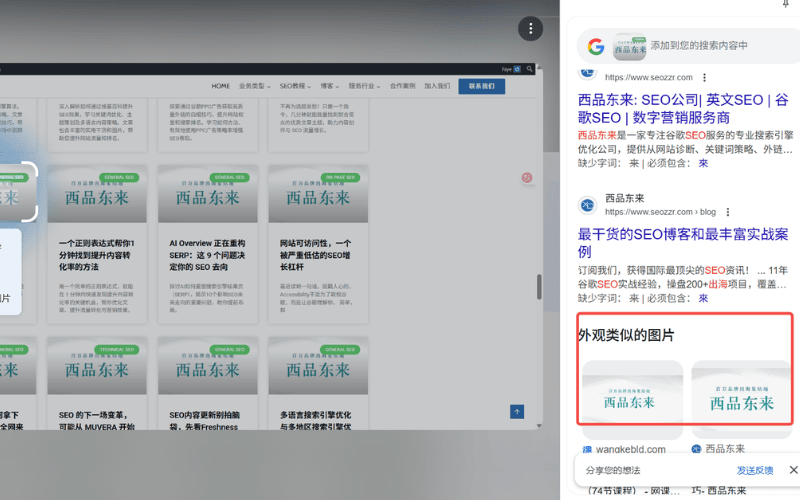
Choose a search tool: select a service that fits the task, such as Google Images, TinEye or Bing Visual Search, and review its upload and privacy terms.
Upload an image or paste an image URL: find the upload control or camera icon. The available options vary by service.
- Upload an image: choose a local image file and submit it only if you have the right to do so.
- Paste an image URL: if the image is already online, provide its direct URL when the service supports this method.
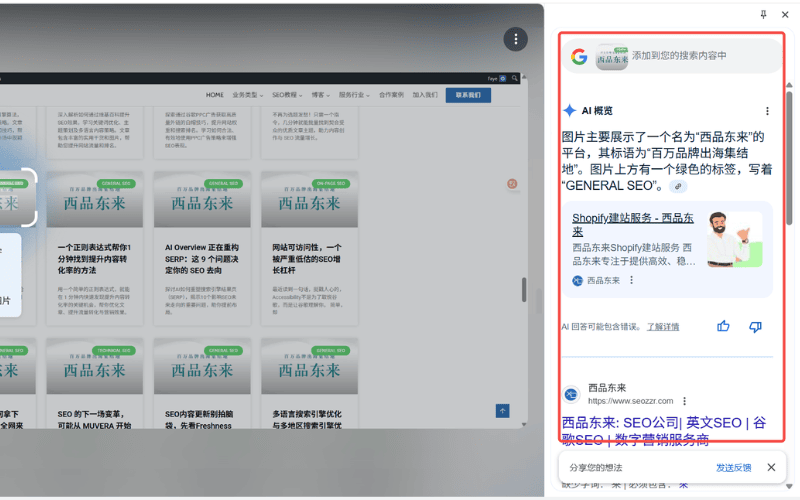
Review the results:
- After processing the query, the service may show visually similar images, possible source pages, instances of reuse and pages that contain the image.
- Some services, including Google Lens and Pinterest's visual search, may also show related products, places or visual elements. Follow a result to examine the underlying page and context.
Filter and assess the results
- Check likely matches and source pages, and confirm dates, ownership and context before drawing a conclusion.
- If an image appears without authorisation, preserve evidence and use an appropriate rights-enforcement process rather than assuming that an automated match settles the issue.
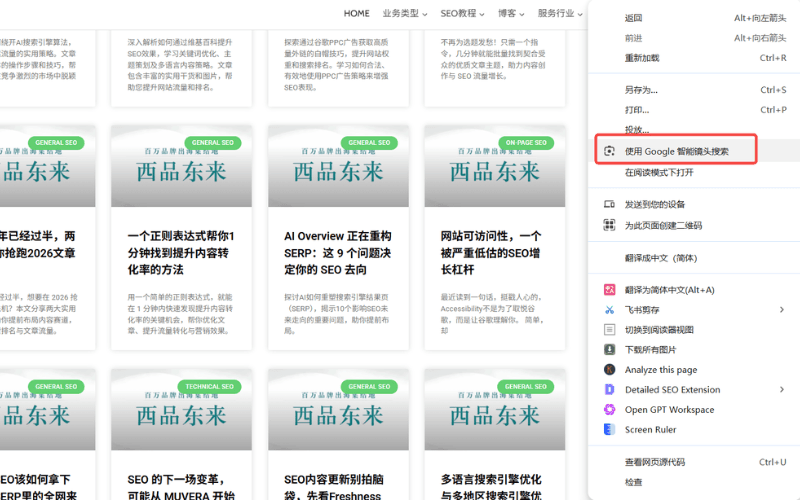
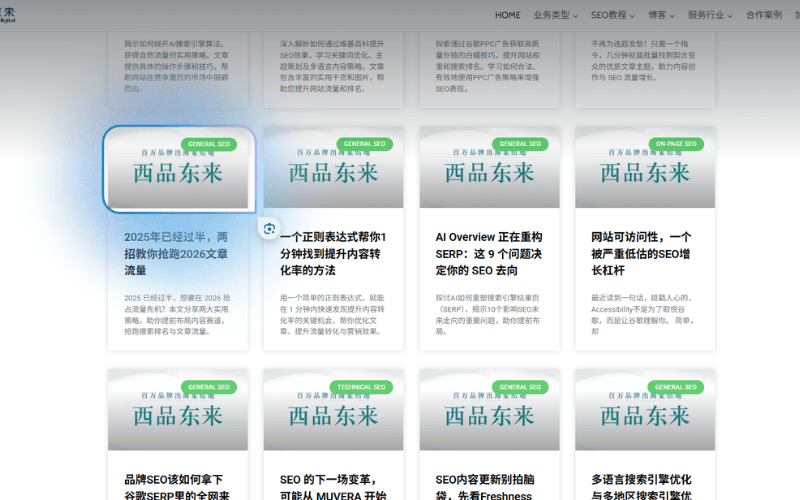
On desktop, a supported browser may offer Google Lens from the context menu. Select the area of the image you want to investigate, then review the results in the side panel.
Used carefully, reverse image search can improve source research, attribution monitoring and visual-content planning. Combine it with accessibility, analytics and page-performance data to choose the right tool and make practical improvements.
For a more systematic approach to organic visibility, XPDL provides website SEO services covering site structure, content and search performance. Recommendations are tailored to the site's goals and evidence rather than to a single image-search result.
We aim to be a practical SEO partner that helps teams solve problems and improve qualified traffic and brand visibility. Contact us if you would like to discuss a specific site or workflow.