
On this pageTable of contents+
- First, Clarify Why Google Crawls a Page but Does Not Value It
- What Did We Do? These Three Steps Form the Improvement Path We Tested
- Step 1: Stop Hiding Glossary Pages in a Corner
- Step 2: Rewrite the Glossary Page's Content Structure
- Step 3: Do Not Write Titles and Descriptions Like Boilerplate Contracts
- Common Title Mistakes:
- Common Meta Description Mistakes:
- Implementation Advice: Test a Small Batch Before Scaling
- A Few Final Thoughts

Glossary pages create a dilemma: should you add them or not? The usual reason not to is that the content is too short and too thin. This article explains whether glossary pages are worth adding and how to build them.
If you manage a website's SEO, you may often see this status when you open Search Console:
'Crawled – currently not indexed'
This may be a short-term delay, or it may mean that content quality, duplication or site-level signals are preventing the page from being indexed for now.
If a page remains in this state for a long time, or if a group of previously indexed pages suddenly moves into it, the issue deserves a closer look.
Among the most frustrating pages in this category are the subject of today's article: glossary pages.
You may have organized useful knowledge carefully, only for Google to show no interest. What can you do?
We recently carried out a systematic round of glossary-page improvements. The process was practical rather than mysterious. This article explains it in detail:
- Why are the pages seen but ignored?
- What exactly did we change?
- What were the results?
- Which methods can you apply directly?
Let us get straight to it.
First, Clarify Why Google Crawls a Page but Does Not Value It
Here is a blunt but realistic point: when a page is crawled but not indexed, the problem may not be technical. It may be the page's quality and structure, especially when every check returns HTTP 200 and both the page and its links work.
Google has an enormous volume of content to process every day. Glossary pages with simple definitions, mechanical structures and keyword stuffing are already everywhere.
So when it finds a page that:
- Uses a templated formula with only the surface details changed;
- Applies the same structure everywhere without real-world use cases;
- Adds no new information;
- And gives no evidence that the author genuinely understands the term;
It can reasonably conclude that the same material already exists across the web.
The page then remains outside the index until it is improved.
What Did We Do? These Three Steps Form the Improvement Path We Tested
The glossary-page problem is difficult in some respects, but manageable once broken down.
We divided the work into three steps:
- Have more important pages recommend the glossary page.
- Rewrite its content structure completely.
- Update its title and meta description so that it looks genuinely worth reading.
The second step matters most, but the first and third should not be skipped.
Step 1: Stop Hiding Glossary Pages in a Corner
Many glossary pages are only:
- Listed in an HTML sitemap;
- Mentioned in passing in an article;
- Or placed in a related-terms section at the bottom of a page.
Links exist, but they are weak. Google can see the page without receiving a strong signal that it matters.
We therefore made these changes:
- Added contextual links from related articles that already receive organic traffic;
- Added natural references from topic pages, category pages and FAQs so the term became part of the wider content system;
- Avoided presenting the page in isolation and instead introduced it through relevant context.
This step is not about using links to force indexation. It tells Google that the page is not peripheral; it has a meaningful role in the content system.
We also found that internal links alone produced only a limited improvement in indexing. They lay the foundation but do not create the turnaround by themselves. Do not assume that more internal links are enough.
Step 2: Rewrite the Glossary Page's Content Structure
This is the central part of the improvement.
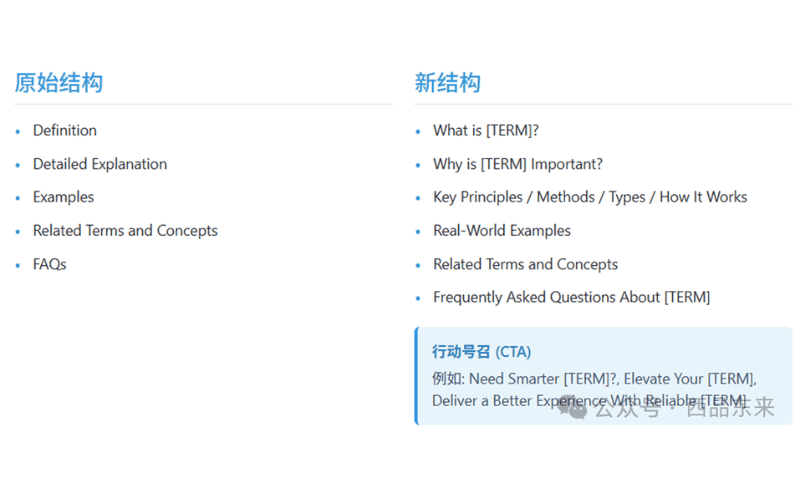
The original glossary pages usually looked like this:
• One sentence defining the term; • one paragraph explaining it; • one or two examples; • a list of related terms; • and then the page ended.
To Google, that can look like a dictionary page generated in a single pass by AI.
We changed the approach and structured each page around the questions users actually ask:
1. What is [term]? → Explain it in plain language rather than textbook prose.
2. Why does it matter? → Give the term a reason to exist and tell readers why knowing it is useful.
3. How does it work? → Explain its types, mechanism and core principles.
4. Where is it used? → Give two concrete industry scenarios, such as a DTC brand, logistics company or SaaS dashboard.
5. Which concepts commonly appear with it? → Recommend related concepts, further reading and associated terms.
6. What questions do users often ask? → Answer three to five real questions, such as 'Is excess inventory a fulfilment failure?'
7. Do I need to take action? → Where appropriate, add a prompt such as 'If you are dealing with complex fulfilment issues, you may need a smarter solution.'
This structure is easier for people to read and aligns more closely with search intent. It also gives search engines clearer semantics and structure, making the page more suitable for featured snippets, AI Overviews and voice-search responses.
Step 3: Do Not Write Titles and Descriptions Like Boilerplate Contracts
Most people know this in principle, but it is easy to slip back into a template.
Common Title Mistakes:
❌ Order Fulfillment – [Brand Name]
✅ What Is Order Fulfillment? – DTC Supply Chain Glossary – [Brand Name]
Common Meta Description Mistakes:
❌ This page explains the definition and related content of order fulfillment.
✅ Understand what order fulfillment is, how the process works, and why it matters for DTC brands looking to streamline their supply chain.
These small changes may not produce an obvious visual difference, but they still matter:
They are not the deciding factor in indexation, but they are among the easiest supporting signals to improve.
Implementation Advice: Test a Small Batch Before Scaling
Do not start by changing every glossary page on the site. Instead:
Choose 10 to 20 pages for the first test.
Apply all three changes together: links, structure and metadata.
Monitor their indexing status in Search Console for one to two weeks.
If the success rate improves clearly, expand the work in waves.
In our first test group, every glossary page returned to the index, and several began receiving a small amount of long-tail traffic.
A Few Final Thoughts
Glossary pages are often undervalued internally. A knowledge team produces a batch, and the publishing team is expected simply to upload it.
But viewed differently, each page can be:
- A landing point for long-tail keywords;
- An extension of topical authority;
- One potential source for AI-generated summaries.
You only need to invest the effort once and make the page worth indexing.
After that, it can keep working, attracting traffic and supporting the foundation of the wider content system.