On this pageTable of contents+

We recently tried something rather interesting.
We used a single Google Sheet to test, in bulk, whether ChatGPT would mention a given brand name.
Why did we do this?
Because SEO has a long-standing problem that some people may still not have fully considered: an SEO ranking is not the same as business growth.
Since search engines first appeared, rankings have been treated as the primary measure of SEO performance. The usual assumption is that higher keyword positions bring traffic, and traffic then brings orders.
That logic is not wrong, but ranking is a means rather than the objective.
For brands and businesses, the goal is to grow the business. SEO was never meant to produce an attractive ranking report. The real questions are whether users can see you and whether they choose you.
User search behavior is now becoming very different from what it was in the past.
When a query becomes this specific, how can you tell whether your brand will appear in the answer?
"I'm planning a weekend trip to Kyoto with my parents who are both in their 70s and have limited mobility, but my wife loves modern art installations, and our 12-year-old son is obsessed with samurais and ninja history. If we only have time to visit one place that can balance accessibility and interests for everyone, where should we go?"
AI search experiences such as ChatGPT and Gemini are gradually making a simple ranking position less central to the search process.
That is why we created the ChatGPT Brand Visibility Template.
It gives companies a quick way to estimate their brand's overall visibility in search scenarios involving large language models.
How to Use the Template: An Eight-Step Workflow
Template link: https://docs.google.com/spreadsheets/d/1yOpRzlvok-fU3r4IrtGjuaVrYQ-cQ0JsAswAomZu_0A/edit?usp=sharing
Calling the OpenAI API directly requires separate paid access, which not everyone has. This version therefore uses the GPT for Sheets add-on to retrieve ChatGPT answers so that more people can use it. We also have another template that calls the OpenAI API directly. If you need that version, leave us a comment or send us a private message and we will provide it free of charge.
1. Make a copy of the template spreadsheet.
2. Install the GPT for Sheets add-on: https://workspace.google.com/marketplace/app/gpt_for_sheets_and_docs/677318054654
3. Enable GPT by going to Extensions > GPT for Sheets™ and Docs™ > Enable GPT.
4. In the "Brand terms" tab, enter your brand name and its variants. You can enter more than one term, but do not leave the field blank.
5. Research and collect questions. There are many ways to do this; the most common sources include:
- People Also Ask (PAA): use the Ahrefs browser extension to copy questions in bulk.
- People Also Search For: extract the text with a text-extraction tool.
- Keywords associated with image labels: use the bookmarklet we provide. If this method is new to you, read "The Hidden Clues in Google Image Search That Every SEO Should Examine."
- ChatGPT Auto Suggest: this easily overlooked source supplies questions directly from AI and may reflect questions that AI users frequently ask. The template includes a practical bookmarklet that copies ChatGPT Auto Suggest text to the clipboard in one click. It may not work for everyone, in which case a text-extraction tool is an alternative.
- Forums and discussions: Reddit is the first place to look; no lengthy explanation is needed.
Social media also yields many long-tail questions in its comment threads.
6. In the "Enter questions" tab, paste each question into its matching row.
7. The spreadsheet will generate the answers automatically.
8. Review the results to see whether the brand was mentioned and to estimate its overall visibility.
The third column shows whether your brand was mentioned in the answer to each question.
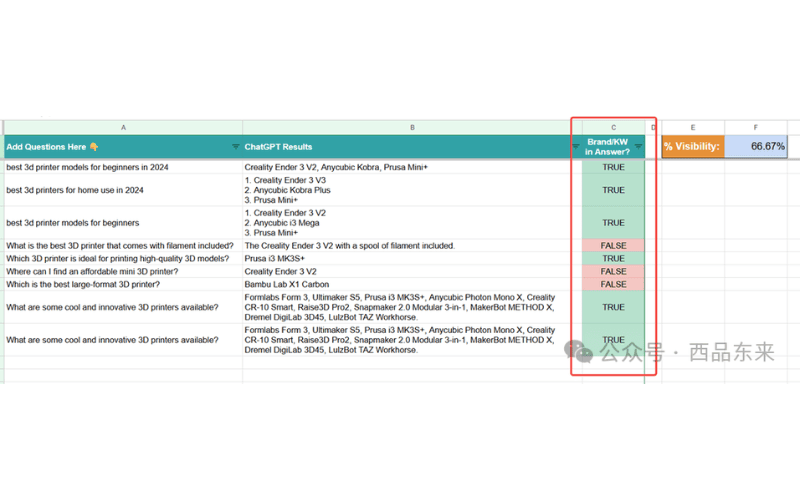
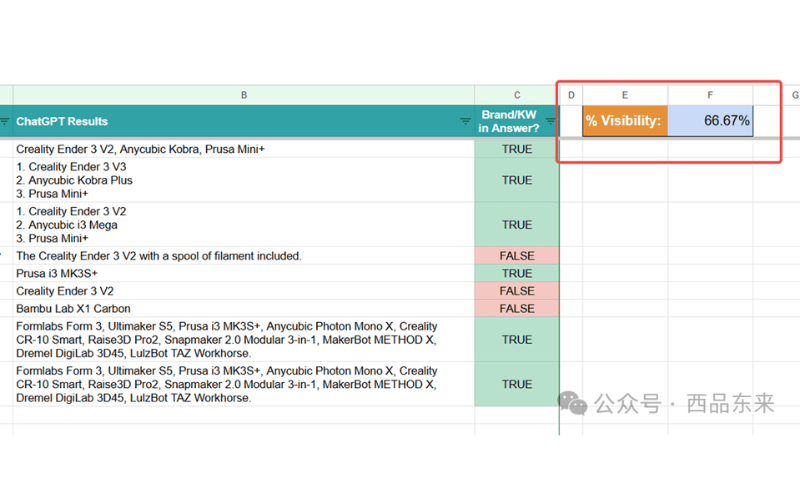
The "% Visibility" figure in the upper-right corner reports how often the brand appears across the full set, giving you a rough overall estimate.
Conclusion: Treat the Template as a Data Proxy
The template generates answers through the OpenAI API. Its results are not identical to real-time answers in the ChatGPT web interface, and it does not cover platforms such as Bard or Gemini. Even so, it remains one of the more efficient proxy methods currently available for estimating brand visibility across the large-language-model ecosystem.